

SeatGeek is a premier ticketing platform that provides users with a smart and secure way to buy and resell tickets for a wide range of live events. With an intuitive interface, SeatGeek allows you to browse thousands of sporting events including NFL, NBA, NHL, MLB, MLS games, concerts, festivals, and Broadway shows. The app ensures peace of mind with its 100% buyer guarantee, while also offering the flexibility for resellers to list tickets above or below face value.
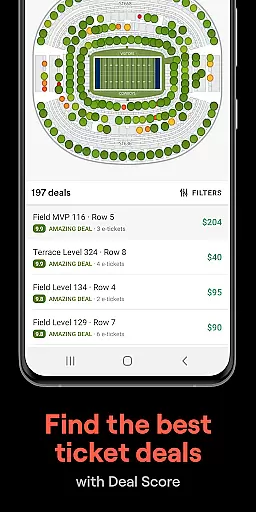
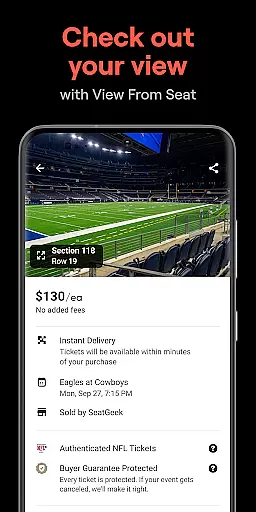
One of the standout features of SeatGeek is its interactive seating charts. These charts are enhanced with panoramic photographs from every section, giving users a clear understanding of their potential view before making a purchase. Additionally, the Deal Score feature helps users identify the best deals available, ensuring they get the most value for their money. Whether you're attending a baseball game or a music festival, SeatGeek's mobile tickets make entry seamless by simply showing your e-ticket in the app.
SeatGeek offers a variety of innovative features designed to enhance the ticket-buying experience. One of the key highlights is the interactive seating charts, which provide users with detailed views of venues through panoramic photographs. This allows buyers to see exactly what their view will be like from any seat in the house. Another significant feature is the Deal Score, which color-codes each deal based on its value, helping users avoid overpriced tickets and find the best options available.
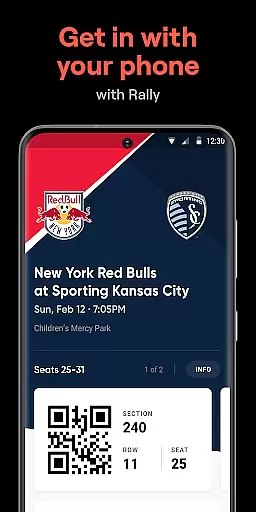
In addition to these, SeatGeek supports mobile tickets, eliminating the need for printing. Users can simply display their e-tickets within the app to gain access to venues. For those who have extra tickets, the app allows easy transfer to friends' phones either for free or for a fee. Furthermore, if you can't attend an event, SeatGeek makes it simple to sell your tickets directly from the app, even recommending optimal pricing to facilitate quick sales. Lastly, the Discover Nearby Events feature lets users easily browse upcoming events by team, artist, venue, genre, or sport, ensuring you never miss out on exciting live entertainment near you.
SeatGeek offers a seamless experience for creating and customizing event tasks, ensuring users can tailor each detail to their preference. The app's interactive seating charts allow users to explore the best deals with panoramic views from every section, providing an accurate preview of the event experience.
Beyond just selecting seats, SeatGeek's Deal Score feature adds another layer of customization by helping users evaluate the value of their ticket purchases. This color-coded system empowers users to make informed decisions based on the quality of deals available.
Additionally, the app simplifies sharing plans with friends through its ticket sending functionality. Users can effortlessly send extra tickets to friends' phones, enhancing the collaborative nature of attending events together.
The ability to customize doesn't stop at purchasing; SeatGeek also allows users to sell tickets easily if plans change. With one tap, users can list their tickets on the marketplace, where the app even suggests optimal pricing strategies to facilitate quick sales.
With SeatGeek, users have access to sophisticated reminder settings that ensure they never miss an upcoming event. The Discover Nearby Events feature continuously updates users about local happenings, allowing them to stay informed about concerts, sports, and theater shows in their vicinity.
Once users purchase tickets, SeatGeeku2019s mobile ticketing system provides timely reminders and easy access to e-tickets directly within the app. This eliminates the need for physical tickets and ensures users are prepared for entry into venues without hassle.
Furthermore, the Daily Tap feature engages users daily with opportunities to win free tickets, serving as a regular reminder of the exciting events happening around them. This gamified element keeps users actively participating in the platform while staying aware of nearby entertainment options.
Overall, SeatGeek's comprehensive reminder settings extend beyond basic notifications, integrating seamlessly with its diverse functionalities to keep users connected and engaged with live events.
User-friendly interface
Interactive seating charts
Deal Score for best prices
Mobile ticket convenience
Secure resale options
Limited international support
Occasional service fees
Complex pricing algorithms
Restricted payment methods
Ticket availability issues

An App for Bhutanese
 4.0
4.0
The Official App
4.2
Create Birthday Cards in Birthday Invitation Maker and Birthday Card Creator App
3.00
It is an Event Planning Application.
4.2
Fantasy of Lights Event App
5.00
Wedding planner app with wedding venues, wedding checklist, countdown & budget.
4.60
Soft Proxy for Your Online World
4.3
ETH Mining provides secure way to mine Ethereum & earn ETH in Cloud mining app
3.50
TV Garden - World Live TV : Play & cast your videos seamlessly!
3.20
TodayTix is the easiest way to get tickets to the best shows in your city.
4.90
Text message invitations for birthday party, wedding, graduation, baby shower +
4.60
Connect with an ecosystem of 5M+ eventgoers and organizers.
4.50
PheedLoop Go! is the mobile event app for events powered by PheedLoop.
4.40
Get live football here
4.30
Rocket Monkey - Space rocket launch schedule for launch sites around the world
4.20
Introducing the official Magic: The Gathering app for mobile.
4.20
Local events, contests, and giveaways for local dads
3.70
RAISE-365 makes fundraising easy and fun!
3.20
Browse events, find transportation, keep up with the latest news from your team
4.3


User Reviews