
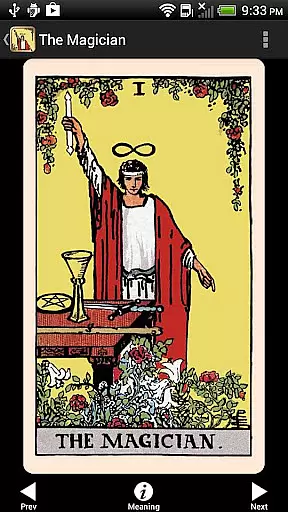
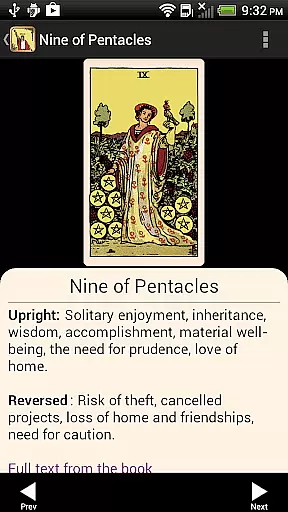
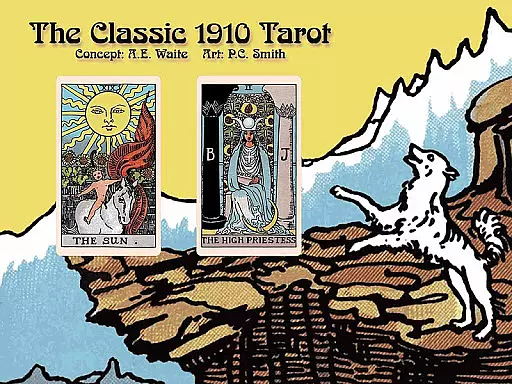
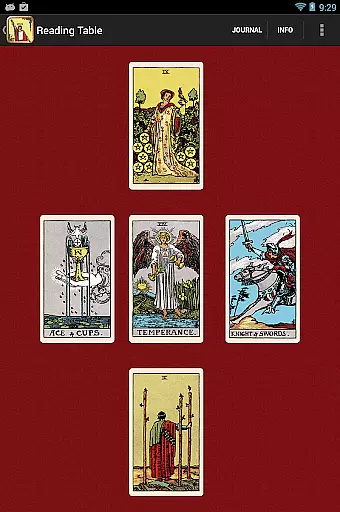
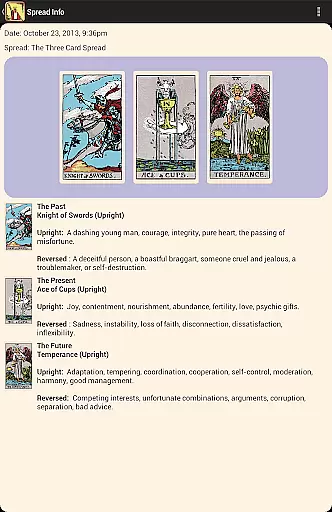
Tarot! is an immersive digital recreation of the iconic 1910 Tarot deck conceived by A. E. Waite and illustrated by Pamela Colman Smith. This app offers users a pristine restoration of the classic deck, allowing them to explore every vibrant detail as if it were newly printed. Designed for both beginners and seasoned practitioners, the app provides an intuitive interface that makes learning Tarot accessible and engaging.
One of the standout features is the inclusion of three complete books within the app, including A. E. Waite's original guidebook, The Pictorial Key to the Tarot, alongside modern interpretations. With 21 built-in card layouts, adjustable settings, and a sophisticated journaling system, users can customize their Tarot experience extensively. Whether you're conducting readings for yourself or sharing insights with others via email, this app ensures a seamless blend of tradition and technology.
The app's value lies in its ability to bring the timeless wisdom of Tarot into the digital age. By offering high-resolution images, zoomable details, and customizable readings, it caters to both casual enthusiasts and serious practitioners. Its elegant design and rich functionality make it an ideal tool for anyone seeking guidance, introspection, or simply a deeper connection with the mystic arts.
Tarot! stands out with its meticulously restored 1910 Tarot deck, presented in stunning high-resolution imagery. Users can zoom into each card to uncover intricate details, experiencing the artistry like never before. The app also includes three unabridged books, offering comprehensive guidance on Tarot interpretation from both historical and modern perspectives.
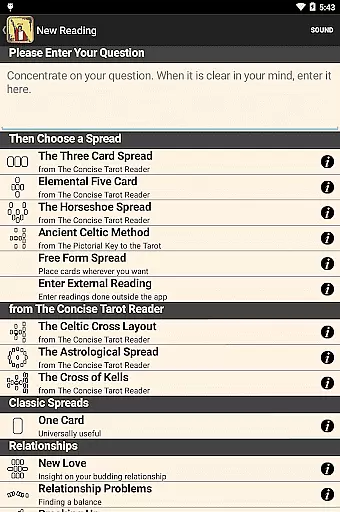
Functionality-wise, the app supports all Android devices and offers 21 pre-designed card layouts along with a free-form option for personalized spreads. Advanced features include a sophisticated journal for recording readings, adjustable settings such as reversed cards or Major Arcana-only options, and voice prompts that enhance the reading experience. Users can even customize card meanings and reading cloths to suit their preferences.
What truly sets Tarot! apart is its balance of tradition and innovation. Animated shuffling, email sharing capabilities, and customizable settings ensure that users have a dynamic yet authentic Tarot experience. Whether you're a beginner drawn to its intuitive interface or an expert appreciating its depth, this app delivers exceptional value through its thoughtful design and extensive feature set.
In the realm of digital Tarot exploration, content diversity and regular updates form the backbone of user engagement. The Tarot! app offers an extensive collection of resources that cater to both beginners and seasoned practitioners. With three unabridged books included, users can immerse themselves in modern and classic interpretations of the Tarot.
The app features sumptuous full-screen, high-resolution images of the classic 1910 Tarot cards, allowing users to explore every minute detail as if they were holding the deck in their hands. This visual feast is complemented by 21 built-in card layouts and a free-form layout option, ensuring that readings remain dynamic and personalized.
Moreover, the inclusion of adjustable settings, voice prompts, and the ability to customize card meanings and reading cloths adds layers of interactivity and personalization. These features not only enhance the user experience but also encourage prolonged engagement with the app.
By offering such a rich tapestry of content, the Tarot! app ensures that users have access to fresh perspectives and interpretations each time they engage with the Tarot, making every session a unique journey into self-discovery and divination.
User engagement duration and retention are critical metrics for any entertainment app, and the Tarot! app excels in keeping its audience captivated. With an intuitive and elegant interface designed for ease of use, both newcomers and experts can navigate the app effortlessly, ensuring longer sessions and repeat usage.
The app's sophisticated journal feature allows users to document their readings and reflections, creating a personal archive that encourages continuous interaction. This sense of ownership and progression fosters a deeper connection with the app, prompting users to return frequently.
Additionally, the animated shuffle and cut feature, along with the option to share readings via email, injects an element of fun and social connectivity into the Tarot experience. Users can now engage with friends and fellow enthusiasts, further enhancing retention through community interaction.
With these thoughtful features, the Tarot! app not only captures the user's interest initially but also sustains it over time, turning casual explorers into dedicated practitioners who eagerly anticipate their next session.
Stunning high-res images
Intuitive user interface
Comprehensive learning resources
Customizable reading options
Supports all Android devices
No iOS version available
Complex for absolute beginners
Limited interactive guidance
Occasional performance lags
Premium price point

Watch whatever you want, whenever you want, wherever you want.
 3.30
3.30
Create, chat & bond with AI souls who truly listen.
4.50
Binge-worthy short dramas on DramaRush—engaging stories that fit your day.
3.90
Unofficial Game Companion App” “Guides • Builds • Tips • Progression
4.1
Disney Stickers: Zootopia 2
4.0
Your choice of 350+ networks plus movies and full TV series on-demand.
3.70
Start EVP/Spirit Box tonight: real EMF, offline, recording. One-time purchase.
4.10
Earn big rewards like PayPal & Amazon gift cards by playing games you love!
4.30
Earn Real Rewards Playing Fun Mobile Games & Easy Cash Out - PayPal & Gift Cards
4.40
Stream Live TV, News & Documentaries. Watch Full Seasons with PBS Passport.
4.80
Direct access to the most complete Guitar Tab Archive in Spanish: LaCuerda.net
4.60
Tarot & Oracle Card Readings
4.50
Chat with AI characters! Anime, games, roleplay & more.
4.50
Rain and lightning effects for your Philips Hue lights
4.30
Himnario LLDM - Fast and Easy to read , updated Hymnal 2019 Edition Official
4.20
A companion app for the game Elite Dangerous
4.10
Watch New Episodes & Live TV
3.80
Necrophone is spirit box ghost hunting app made for spirit communication.
3.70
Christmas Globe: Transform your Wear OS device into a festive timekeeper!
4.5


User Reviews