







Walmart is a comprehensive shopping application that allows users to purchase a wide range of products, from fresh groceries to the latest tech gadgets. The app offers multiple fulfillment options including convenient curbside pickup, fast delivery straight to your door, and reliable shipping services. With features like Home VR for virtual furniture placement, personalized shopping suggestions, and real-time order tracking, Walmart makes online shopping more efficient and user-friendly.
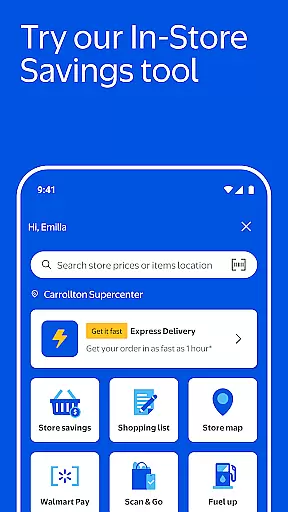
The app also includes practical tools such as barcode scanning for price checks and easy list creation, store maps for quicker in-store navigation, and Walmart Pay for seamless checkout experiences. Additionally, Walmart+ members can enjoy exclusive benefits like Scan & Go for contact-free in-store shopping and member prices on fuel at thousands of locations nationwide. These features collectively enhance the overall shopping experience, saving users both time and money.
One of the standout features of the Walmart app is its variety of shopping and fulfillment methods. Users can choose between Pickup, where orders are loaded into their car curbside, Delivery, which can be expedited to as fast as one hour for urgent needs, and Shipping, offering fast two-day delivery with free shipping on eligible orders over $35. This flexibility caters to different user preferences and urgency levels.
Beyond shopping, the app provides several innovative tools designed to save time and enhance convenience. Features like Home VR allow users to visualize furniture in their space before purchasing, while personalized shopping suggestions help quickly fill carts with frequently bought items. Real-time order tracking keeps users informed about their deliveries, and Walmart Pay simplifies the checkout process by recommending optimal payment splits across various methods.
Additional functionalities include an item barcode scanner for building shopping lists, store maps for efficient in-store navigation, and pharmacy services for managing prescriptions. Walmart+ members also benefit from exclusive features such as Scan & Go for contact-free in-store purchases and discounts on fuel, making everyday shopping more economical and efficient.
Walmart offers an extensive range of products, ensuring that customers can find everything on their shopping list within a single platform. The app categorizes items into well-organized sections, including fresh groceries, household essentials, and the latest tech gadgets, making it simple for users to navigate through different categories.
The application's search functionality is robust, allowing shoppers to quickly locate specific items or browse through various departments with ease. With clear labels and intuitive filters, users can refine their searches by price, brand, customer ratings, and more, enhancing the overall shopping experience.
By providing such a diverse product selection and streamlined categorization, Walmart empowers its customers to efficiently manage their shopping needs. Whether it's everyday essentials or special purchases, the app ensures that all items are easily accessible, saving time and effort for the user.
This comprehensive approach not only meets but exceeds shopper expectations by delivering convenience and variety at their fingertips. As a result, users can enjoy a seamless shopping journey, from discovery to purchase, all within the Walmart app.
Price transparency is a cornerstone of Walmart's shopping experience, ensuring customers have access to competitive pricing across all product categories. The app displays clear and upfront pricing information, empowering users to make informed purchasing decisions without hidden costs or surprises at checkout.
In addition to visible price tags, Walmart provides dynamic pricing features such as real-time price comparisons and alerts for discounts on frequently purchased items. This allows shoppers to take advantage of the best deals available, whether they're buying groceries or electronics.
Furthermore, the app highlights eligible orders over $35 that qualify for free shipping, adding another layer of cost savings for online shoppers. By maintaining competitive prices and offering various money-saving opportunities, Walmart reinforces its commitment to helping customers save money while enjoying a hassle-free shopping experience.
Overall, this dedication to pricing transparency not only builds trust with consumers but also enhances their ability to budget effectively and shop confidently within the app environment.
User-friendly interface
Wide product selection
Convenient fulfillment options
Exclusive Walmart+ benefits
Innovative shopping tools
Delivery fees apply
Limited express delivery
Membership required for some perks
Occasional app glitches
Varied customer service

Shop, plan, order, and save
 4.70
4.70
Trendy Athleisure Wear. Affordable Skirts, Leggings, Functional & All Sizes!
4.60
Shopping easy, fresh, and affordable just got easier.
4.50
Scan receipts, earn gift cards & fetch rewards with the Receipt Pal scanner app.
4.00
An easy Secret Santa & gift exchange planner - Simplify your gift shopping!
4.80
Unlock the latest from Nike & Jordan. Shop sneakers & apparel for all athletes.
4.70
Furniture, Décor & Design Tips
4.80
The Costco Mobile App is the easiest way to save time and money on the go.
4.70
Shop anywhere, manage payments, get cashback, discover Klarna Card & more.
4.80
Shop stores, delivery & pickup
4.80
ALDI is your home for low prices on high-quality groceries and products.
4.70
With the IKEA app, you can explore, shop for furniture, and check out—simply.
4.70
BJ’s mobile app provides smart & easy ways to get the most from your Membership.
4.70 4.60
4.60
World’s simplest mobile payment solution for machines.
4.50
Buy & sell local items. Find amazing deals. Join the largest mobile marketplace!
4.40
Shop clothes, shoes, bedding, home & more. Save with exclusive deals & rewards!
4.20
Grooming, Training & Shopping
3.80
The PetSmart App is a great resource for every step of your pet parent journey!
3.40


User Reviews