
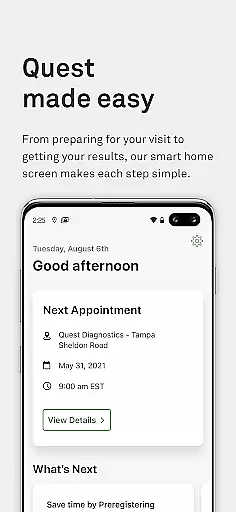
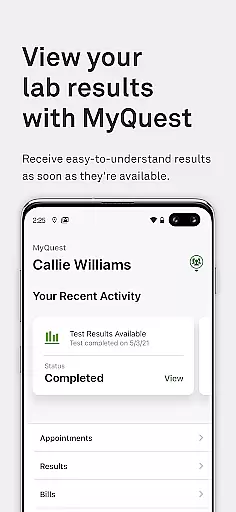
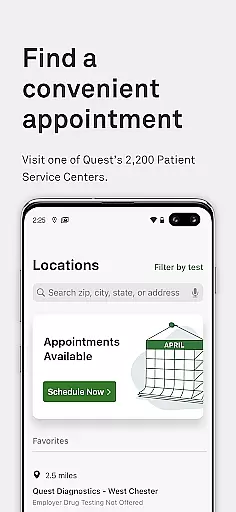
MyQuest for Patients is a comprehensive medical application designed to help users take control of their health by providing easy access to lab results and healthcare management tools. With this app, you can view your lab results securely, find nearby Quest Diagnostics locations, and schedule appointments effortlessly.
The app also offers advanced features like MyCircle, which allows you to manage the health of your loved ones, and QuestDirect for purchasing tests independently. Integration with Apple Health ensures that your vital health information is always up-to-date and accessible in one place, empowering you to stay informed about critical health metrics such as blood type, cholesterol, and blood sugar levels.
MyQuest stands out with its robust set of features tailored for efficient health management. Users can securely and quickly access their lab results, ensuring privacy and convenience. The location finder helps you identify nearby Quest Diagnostics centers, making it easier to plan visits without hassle.
Scheduling and managing appointments are streamlined within the app, offering a user-friendly interface for all your healthcare planning needs. Additionally, the MyCircle feature enables you to oversee the health of family members, while QuestDirect allows for independent test purchases. By integrating with Apple Health, MyQuest ensures that your health data is centralized, providing a holistic view of your wellness journey.
In the realm of digital health management, the credibility of medical content is paramount. MyQuest for Patients ensures that all lab results and health information provided through its platform are verified by certified professionals. This guarantees that users receive accurate and reliable data regarding their health status.
The app partners with Quest Diagnostics, a renowned name in clinical diagnostics, to offer lab results that patients can trust. With direct access to your test outcomes, you're empowered to make informed decisions about your healthcare. The expert validation process assures that every piece of shared medical information adheres to stringent quality standards.
Furthermore, the integration with Apple Health signifies an additional layer of endorsement for the authenticity of health metrics tracked within MyQuest. Users can confidently incorporate their lab findings into broader personal health records without concern over inaccuracies or misinterpretations.
MyQuest for Patients not only provides access to lab results but also enhances teleconsultation experiences by enabling seamless sharing of your health information with healthcare providers. This feature bridges the gap between physical and virtual care settings, ensuring continuity and comprehensiveness in patient-doctor interactions.
By allowing users to manage appointments and share vital health data electronically, MyQuest streamlines the teleconsultation process. Healthcare professionals can deliver more personalized advice based on comprehensive insights into patient histories, leading to improved diagnostic accuracy and treatment planning during virtual consultations.
Moreover, tools like MyCircle extend these capabilities further by letting individuals take charge of their family's wellbeing remotely. Coordinating care among loved ones becomes effortless as authorized members gain secure access to each otheru2019s essential medical updatesu2014a testament to how technology facilitates maintaining close-knit support systems even from afar.
User-friendly interface
Secure result access
Comprehensive health tools
Convenient appointment scheduling
Apple Health integration
Limited to Quest services
Occasional sync issues
Premium feature costs
Location-dependent services
Requires internet

MySafeRide simplifies booking and managing rides for health plan members.
 3.50
3.50
Donating blood and platelets is easier than ever with The American Red Cross.
4.80
Molina Members: My Molina. Manage your health anytime, anywhere!
4.30
Pelvic Floor Muscle Exercises
4.80
Control your hearing aids discreetly with the touch of a finger
4.30
Enjoy 200%+ volume booster with bass booster, equalizer and headphone supported.
4.60
Voice pitch monitor for speech therapy, LSVT, Parkinson's, singing & trans
4.30
X-Vein: Advanced vein detection for medical practice
3.10
The doctor will see you now
4.70
Remote, medical-grade heart care at your fingertips
4.70
This app is simply 1 book (also large app) and 17 other apps combined into 1
4.70
Health Care at Your Fingertips
4.60
Take on apraxia and aphasia with a powerful video-driven speech therapy app.
4.60
Radiographic Positioning Guide for Medical Imaging Professionals and Students
4.50
Manage your health care in one easy place
4.40
Patient Health Portal
4.20
Crush your paramedic exam with NREMT-style tests, ECGs, and top-tier prep!
3.90
Update medical records, view upcoming appointments, message your provider & more
3.80
Conveniently receive lab results, schedule lab appointment and pay your bills
3.70


User Reviews