
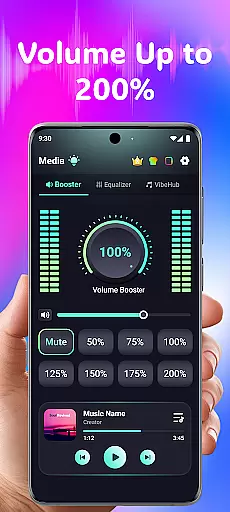
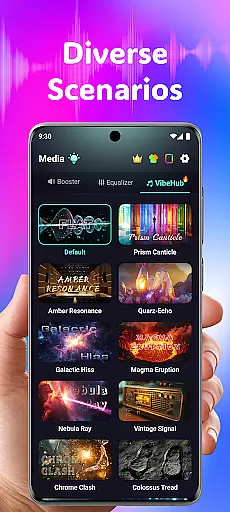
Volume Booster Bass Booster EQ is a versatile audio enhancement application designed to elevate your sound experience across various scenarios. The app's core functionality lies in its ability to amplify media volume up to 200%, making it an ideal solution for outdoor parties, movie watching, and gaming sessions where audio clarity is crucial. With features like the Advanced Equalizer and Real-Time Noise Reduction, users can customize their sound output while enjoying crystal-clear audio quality.
Beyond basic volume control, the app offers specialized tools such as Independent Left & Right Ear Control and AI-powered noise filtering. These features cater to users with specific hearing needs or those who require precise audio adjustments. Whether you're looking to boost your entertainment experience or address personal hearing challenges, this app provides a comprehensive suite of tools to deliver an immersive and tailored audio experience on both mobile and Bluetooth devices.
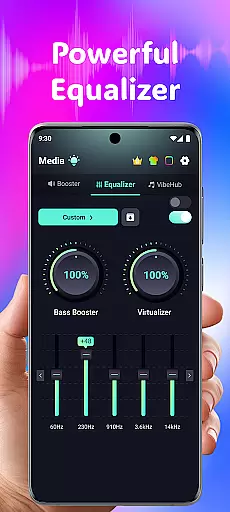
Volume Booster Bass Booster EQ stands out with its robust feature set tailored for audiophiles and casual listeners alike. The app includes a powerful 5-band equalizer that allows detailed customization of sound frequencies, ranging from deep bass tones to crisp high-pitched sounds. This level of control ensures optimal audio performance whether you're listening to music, watching videos, or gaming. Additionally, the inclusion of a 3D Surround Sound Effect enhances spatial audio perception, making it perfect for immersive entertainment experiences.
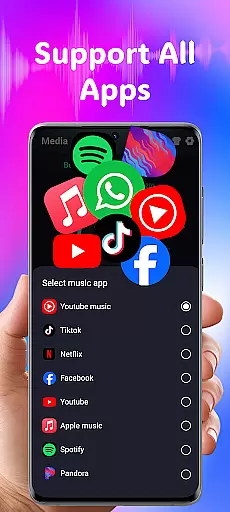
Another key highlight is the app's Wide App Compatibility, which seamlessly integrates with popular streaming platforms, social networks, and audio services. This ensures uninterrupted audio enhancement across different applications. The User-Friendly Design further simplifies navigation through intuitive controls and large buttons, making it accessible even for non-technical users. Combined with features like Live Sound Recorder & Playback and Independent Ear Control, these capabilities position Volume Booster Bass Booster EQ as a complete audio solution for diverse user needs.
In the realm of medical applications, content credibility is paramount. Volume Booster Bass Booster EQ ensures that all audio enhancement features are grounded in sound engineering principles. The app's advanced equalizer and hearing support functions are designed based on verified acoustic science, providing users with reliable tools for their audio needs.
The app includes an Advanced Hearing Mode, which offers independent left and right ear control, as well as frequency amplification across six distinct ranges. These features have been carefully calibrated to support users with asymmetrical hearing abilities, ensuring that each individual can tailor their listening experience according to their specific requirements.
Furthermore, real-time noise reduction powered by AI filtering demonstrates the app's commitment to delivering clear and accurate sound reproduction. By eliminating unwanted background noise, users can focus on the audio content that matters most, whether it be for entertainment or communication purposes.
Volume Booster Bass Booster EQ stands out not only for its technical sophistication but also for its responsible approach to user safety. With disclaimers regarding safe volume levels and potential risks associated with prolonged use at high volumes, the app prioritizes user well-being alongside performance.
While Volume Booster Bass Booster EQ is not a teleconsultation platform, it enhances the quality of remote communication through superior audio processing. Clear sound transmission is crucial during virtual consultations, and this app ensures that every word is heard with precision, thanks to its advanced equalizer settings and noise reduction capabilities.
The app's compatibility with various devices, including headphones, Bluetooth speakers, and built-in phone speakers, means that healthcare professionals and patients can maintain high-quality audio connections regardless of their setup. This versatility supports uninterrupted teleconsultations where clarity is key.
Moreover, the inclusion of a Live Sound Recorder & Playback feature allows users to capture important moments from consultations. This functionality enables both parties to revisit discussions, ensuring no critical information is missed and facilitating better follow-up and understanding.
Although primarily an audio enhancement tool, Volume Booster Bass Booster EQ indirectly contributes to improved teleconsultation experiences by providing robust audio management options that cater to diverse user environments and needs.
Powerful volume boost
Advanced equalizer
User-friendly interface
Wide device compatibility
Real-time noise reduction
Potential speaker damage
No physical controls
Limited free features
High battery usage
Complex for beginners

A fantastic 3d reference that includes over 300 structures and a quiz function.
 3.00
3.00
The MDLIVE app makes connecting with a doctor fast, easy, and convenient.
4.60
The official DSM-5-TR® app
4.50
Control your hearing aids discreetly with the touch of a finger
4.30
Remote, medical-grade heart care at your fingertips
4.70
Internal medicine literature at your fingertips.
4.50
Your pocket guide to following The Monash University Low FODMAP diet.
4.20
Manage your health care in one easy place
4.40
MyChart for Android
4.50
Medication reminder, Medicine list, Trackers for BP, glucose, weight, water, etc
4.70
Beat alcohol and drug addiction with a revolutionary treatment program in an app
4.50
Secure video visits with your VA care team from anywhere
4.50
The Omada app enhances your program experience and helps you stay engaged.
4.50
Download OctaApp for easy access to your plasma donation info
4.40
We’ve made it easy for Oscar members to get care on the go.
4.30
Over 1,200 review questions and 5 exams—pass the NREMT with EMT Review Plus!
4.10
700 questions, 2 full exams, Predictive Scoring—your key to NREMT success!
3.90
Update medical records, view upcoming appointments, message your provider & more
3.80
Conveniently receive lab results, schedule lab appointment and pay your bills
3.70


User Reviews