
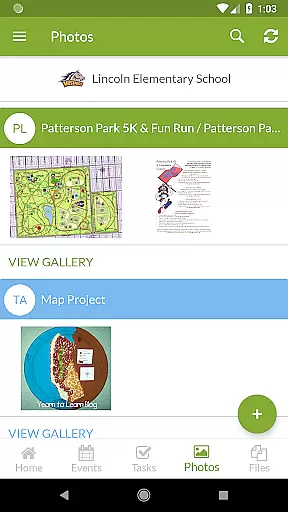
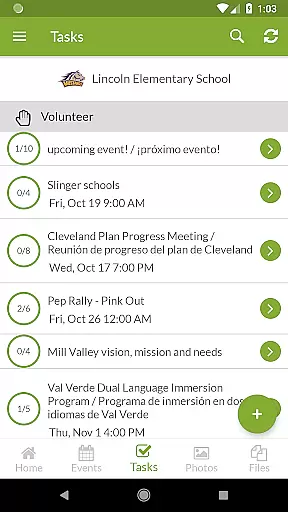
ParentSquare is an all-in-one communication platform designed specifically for educational institutions to foster stronger connections between schools and families. The app serves as a centralized hub where parents can access school news, receive real-time alerts, and engage in direct messaging with teachers. With support for automatic translation into 190+ languages, it ensures inclusivity across diverse communities.
One of the standout features of ParentSquare is its ability to streamline both routine and critical communications. Parents can stay updated on classroom activities, respond to attendance notifications, and even handle school-related payments—all from their mobile device. This makes it an invaluable tool for modern schools aiming to improve transparency and parental involvement.
The app's user-friendly interface and robust security measures make it ideal for busy families and educators alike. By consolidating various communication channels into one platform, ParentSquare saves time and reduces the risk of missing important updates, ultimately helping create a more supportive environment for student success.
ParentSquare offers a comprehensive suite of features tailored to meet the needs of both families and school staff. At its core, the app provides real-time messaging capabilities that allow teachers and administrators to send announcements, alerts, and reminders directly to parents' devices. These messages are automatically translated into over 190 languages, ensuring accessibility for non-native speakers.
Beyond basic communication tools, ParentSquare includes advanced functionalities such as attendance tracking, cafeteria balance notifications, and volunteer sign-ups. Parents can also participate in group discussions, view classroom photos, and manage school fees through integrated payment systems (where available). This variety of features ensures that every interaction between schools and families is efficient and meaningful.
Security is another key highlight of ParentSquare. The platform employs industry-leading practices to protect sensitive information shared by users. Additionally, its intuitive design makes navigation seamless for individuals of all tech skill levels, further enhancing the overall user experience while maintaining focus on what truly matters—student achievement.
In the realm of education, the precision and reliability of content are paramount. ParentSquare ensures that all information disseminated through its platform is accurate and authoritative. This commitment to excellence means that families and educators can trust the integrity of the messages they receive, whether it's about school policies, classroom activities, or important alerts.
ParentSquare employs best-in-class safety and security practices, underscoring its dedication to content accuracy. The platform automatically translates messages into over 190 languages, ensuring that language barriers do not impede access to crucial information. By prioritizing clear communication, ParentSquare fosters an inclusive environment where every family feels connected and informed.
The app consolidates all school updates, alerts, and messages into one place, streamlining the flow of information. This consolidation not only saves time for both families and staff but also minimizes the risk of misinformation. With ParentSquare, users can focus on what truly mattersu2014helping students succeedu2014knowing that the information they rely on is both accurate and credible.
Personalized learning paths represent a transformative approach to education, tailoring the educational experience to meet individual needs. ParentSquare supports this by enabling direct communication between teachers and parents, allowing for customized updates and tailored messages regarding each childu2019s progress. This personalized interaction helps in crafting a unique learning journey for each student, enhancing their educational outcomes.
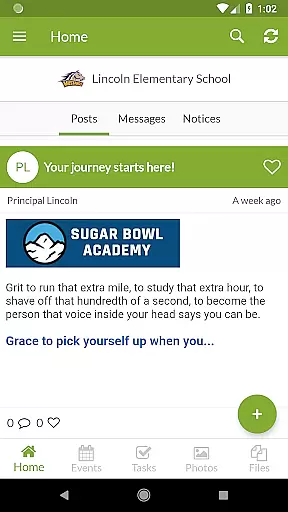
Through ParentSquare, parents can engage with their child's school community more effectively. They have the ability to see classroom updates, photos, and even respond to absences or tardies. These features empower parents to actively participate in their child's education, making it easier to support personalized learning objectives at home.
Furthermore, ParentSquare facilitates group conversations and allows parents to sign up for volunteering opportunities and conferences. Such engagement enriches the educational ecosystem, promoting a collaborative atmosphere where personalized learning thrives. By integrating these dynamic tools, ParentSquare ensures that every child receives the attention and support necessary for their unique academic journey.
User-friendly interface
Multi-language support
Secure communication
Comprehensive updates
Time-saving tools
Limited customization
Premium feature costs
Occasional bugs
Dependent on school adoption
Learning curve for new users

Turn scrolling hours into improving your knowledge, communication, intelligence
 4.50
4.50
Bebefinn and Baby Shark educational, animated videos & games for kids
3.40
2026 DVSA Driving Theory Test revision with Hazard Perception + Highway Code
4.60
Hebrew Vocab
4.90
A must-have app for mastering Japanese verb/adjective conjugations.
3.60
A collection of favorite stories from Daniel Tiger's Neighborhood
2.00
MONOPOLY JUNIOR brings Hasbro's classic the board game to life.
3.00
Hasbro’s classic CANDY LAND game is now a gorgeous interactive storybook app.
2.30
Learn Japanese in an immersive educational game set in Japan!
4.90
The best way to study for your amateur radio license exam.
4.90
Universe simulator: Find & explore planets system, outer space, astronomy events
4.60
Study for your 608 certification.
4.50
The FE Clock is a way to track sun & moon around the circle of the earth.
4.30
Listen, request and record pronunciations in more than 450 languages. Everywhere
3.90
Our most popular app series returns, better than ever!
3.90
FAR/AIM, FAR for Flight Crew and FAR for Aviation Maintenance Technicians
3.80
THE MOST COMPREHENSIVE JUMPMASTER STUDY RESOURCE AVAILABLE.
3.40
Master the NRP with 700+ questions, rationales, and updated NREMT scenarios.
3.00
A 2024 digital study guide for the Expert Infantryman and Expert Soldier's Badge
4.0


User Reviews