
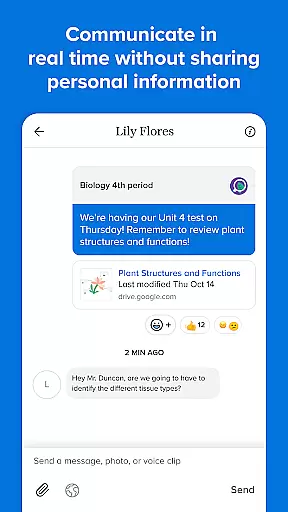
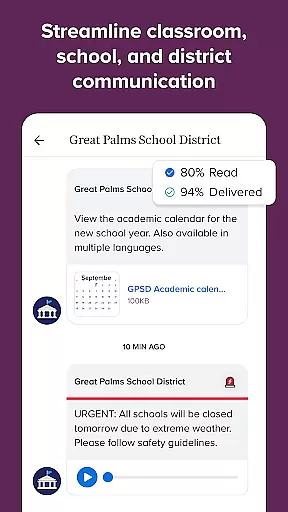
Remind is an essential communication tool designed for the education sector, helping students, educators, and parents stay connected in real time. The platform enables seamless interaction across any device, ensuring that important school-related information is always accessible. With features like private contact protection and multi-language translation support, Remind bridges communication gaps effectively.
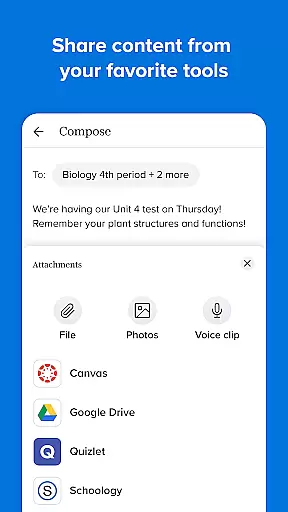
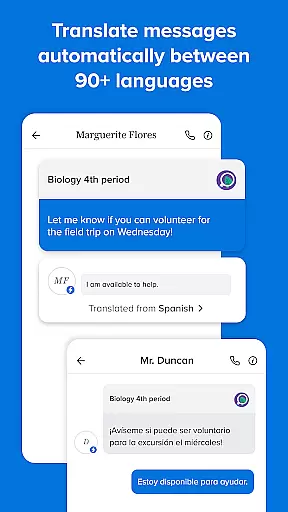
One of the standout capabilities of Remind is its ability to translate messages into over 90 languages, making it a versatile solution for diverse educational environments. Additionally, users can share files, photos, and links from popular websites, enhancing collaboration among teachers, students, and families. Whether you're at home or in the classroom, Remind ensures that staying engaged with your school community has never been easier.
Remind offers a comprehensive set of features tailored to meet the needs of modern educational communities. Its real-time messaging functionality allows instant communication between teachers, students, and parents, regardless of the device being used. This flexibility ensures that no one is left out of important discussions or updates.
In addition to its core messaging system, Remind provides advanced privacy controls, allowing users to keep their personal contact details confidential while still participating in group conversations. The platform also supports multimedia sharing, enabling users to send documents, images, and web content effortlessly. These robust features make Remind a reliable choice for managing school communications efficiently.
In the realm of education, the precision and reliability of content are paramount. Remind ensures that all shared materials, whether they are messages, files, or photos, maintain a high standard of accuracy. This commitment supports the platform's goal of fostering successful learning environments for students.
Remind facilitates communication by providing translation in over 90 languages, ensuring that language barriers do not impede access to accurate information. This feature amplifies the authority of the content delivered through the platform, making it accessible to a diverse audience within the school community.
The ability to share resources from trusted educational sites further enhances the credibility of the content exchanged on Remind. Teachers and students can disseminate knowledge from verified sources, thus upholding the integrity of academic discussions and collaborations.
Personalization in learning is crucial for catering to individual student needs, and Remind excels in creating tailored educational experiences. By enabling the sharing of various types of content, Remind allows educators to design personalized learning paths that can adapt to each student's unique learning style.
Through real-time communication, teachers can promptly address questions and provide feedback, which is essential for guiding students along their distinct educational journeys. The platform's capacity to keep personal contact information private while allowing interaction fosters a safe environment for personalized engagement.
Moreover, Remindu2019s translation feature breaks language barriers, thereby crafting personalized learning paths that transcend linguistic limitations. Students from varied linguistic backgrounds can receive the same level of personalized attention as others, ensuring equitable educational opportunities for all.
User-friendly interface
Real-time messaging
Multi-language support
Private contact protection
Multimedia sharing options
Limited offline functionality
Occasional notification delays
Dependent on internet access
No voice call feature
Premium features require subscription

FAR/AIM, FAR for Flight Crew and FAR for Aviation Maintenance Technicians
 3.80
3.80
An animated storybook app to help ease your child through toilet training.
3.70
Explore myths and gods across cultures with in-depth insights and stories.
5.00
Dinosaurs coloring book game. Drawing and painting dinos.
4.50
THE MOST COMPREHENSIVE JUMPMASTER STUDY RESOURCE AVAILABLE.
3.40
A must-have app for mastering Japanese verb/adjective conjugations.
3.60
The Fighter Verses Bible memory system helps you memorize God's Word.
4.50
Enrich the experience of your visit to the Pantheon with our audiotour.
1.60
Make your own game and world. Draw and animate characters
3.70
Stack the States makes learning about the 50 states fun!
4.70
A fast and fun way to learn guitar - works with any guitar.
4.60
SkyView®, an augmented reality space app, brings stargazing to everyone!
4.40
Ignite curiosity, spark learning: All babybus videos &games
4.30
Learn math, step-by-step
4.30
The "Go To" app for Airmen studying for promotion to SSgt and TSgt
4.30
Learn to make peaceful contact with extraterrestrial civilizations
4.10
Break Language Barriers with AI—Learn Language Anytime, Anywhere!
4.00
An aviator’s preparation, study and test tool for FAA Knowledge Exams.
3.90
AR planetarium app that brings the solar system to you via XREAL Glasses.
4.2


User Reviews