
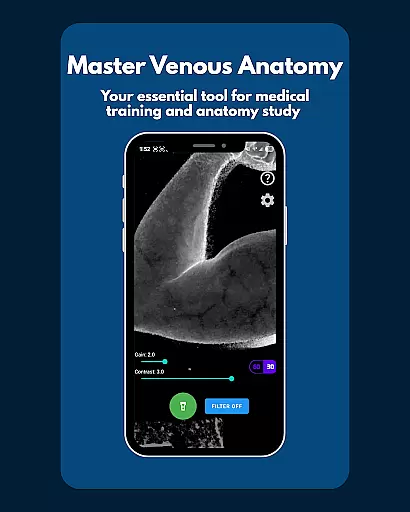
VeinFinder is an innovative educational tool designed to assist medical students and educators in mastering venous anatomy. Using advanced GPU-accelerated image processing, the app enhances vein visibility directly through your device's camera, eliminating the need for additional hardware. This makes it an invaluable resource for exam preparation and practical training.
The app offers precise control over gain and contrast settings, ensuring optimal vein visualization across various skin tones and lighting conditions. With its integrated flashlight feature, VeinFinder maintains consistent performance even in low-light environments. Whether you're studying anatomy, practicing venipuncture techniques, or teaching a class, this app bridges the gap between theoretical knowledge and hands-on application.
While VeinFinder is optimized for Samsung devices, it delivers reliable performance on most Android models. The app strictly adheres to privacy standards, performing all image processing locally without transmitting any data. It serves as an excellent visual aid for classroom instruction and self-study, helping users deepen their understanding of venous structures.
VeinFinder stands out with its unique combination of advanced technology and user-friendly features tailored for medical education. The app's core functionality lies in its ability to process images in real-time using GPU acceleration, providing instant enhancement of venous structures visible through the device's camera. This eliminates the need for specialized equipment while delivering clear and detailed visuals.
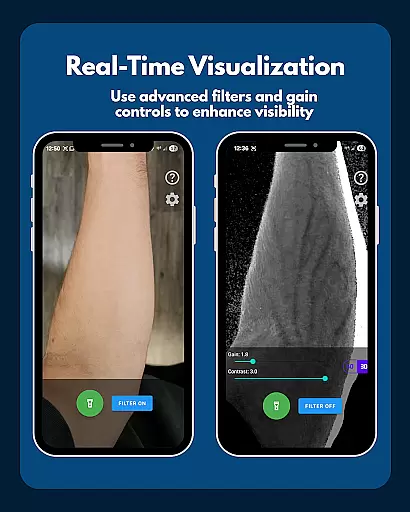
One of the app's key strengths is its precision control system, allowing users to fine-tune gain and contrast settings. This ensures accurate vein visualization across diverse skin tones and environmental conditions. The integrated flashlight control further enhances usability by maintaining optimal visibility in various lighting scenarios. Additionally, the instant comparison feature enables users to toggle between enhanced and raw views, facilitating better understanding of anatomical structures.
VeinFinder prioritizes user privacy and data security by processing all images locally on the device. The app is specifically designed for educational purposes, making it ideal for students preparing for exams and educators seeking effective teaching aids. While performance may vary based on device specifications and environmental factors, ongoing updates continue to improve the app's capabilities, ensuring a valuable learning experience for medical professionals in training.
VeinFinder stands out in the realm of educational tools by providing highly accurate and authoritative content for students and educators focused on anatomy. The app leverages advanced GPU-accelerated image processing to enhance the visibility of veins, ensuring that users receive precise representations of venous structures directly through their device's camera.
This level of accuracy is crucial for those studying anatomy and physiology, as it bridges the gap between theoretical knowledge and practical understanding. VeinFinder's precision control feature allows users to fine-tune gain and contrast settings, optimizing vein visibility across diverse skin tones and lighting conditions. This ensures that the visual information provided remains consistent and reliable, regardless of external variables.
The app's commitment to quality extends to its privacy and safety measures. All image processing occurs locally on the device, meaning no data is collected or transmitted. This guarantees that the anatomical visuals remain private and secure, fostering a trustworthy learning environment. With these features, VeinFinder empowers learners to study with confidence, knowing they are engaging with credible and expertly rendered content.
While VeinFinder excels in delivering accurate anatomical visuals, it also offers personalized learning paths tailored to individual needs. For students preparing for exams or educators seeking dynamic teaching aids, the app provides customizable tools that adapt to various learning styles and objectives. Users can toggle the vein-enhancing filter on and off, instantly comparing enhanced views with raw camera feeds to deepen their understanding at their own pace.
The app's precision controls enable learners to adjust settings like gain and contrast, allowing them to optimize their study experience based on specific requirements such as skin tone or lighting conditions. Additionally, integrated flashlight control ensures usability in low-light environments, further personalizing the learning journey by accommodating different study settings.
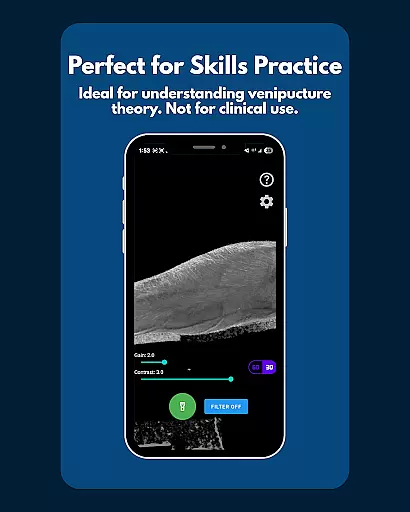
VenueFinderu2019s focus on educational use only reinforces its value as a tool designed specifically for learning rather than clinical application. By emphasizing exploration over diagnosis, it encourages users to engage creatively with anatomy concepts while maintaining clarity about its intended purpose. These features collectively create an adaptive, user-centric platform that supports diverse educational goals within the field of anatomy.
Enhances vein visibility
Real-time image processing
User-friendly interface
Privacy-focused design
Versatile educational tool
Performance varies
Not for clinical use
Device optimization
Limited refund window
Dependent on lighting

An aviator’s preparation, study and test tool for FAA Knowledge Exams.
 3.90
3.90
Learn Words Daily in Just Minutes - Boost Your Language Skills Fast!
4.60
Latest TLC Practice Questions! Multiple languages available!
4.50
Practice Casino Roulette Payouts for Table Game Dealers and Croupiers
4.40
Deal Craps (Practice Craps Payouts)
3.80
Engage in learning science and math with the award-winning PhET simulations!
4.70
Your best partner for learning Japanese words. Based on a best-selling textbook.
2.80
The FE Clock is a way to track sun & moon around the circle of the earth.
4.30
A realistic sky map to observe stars, planets, satellites and constellations!
4.80
Memorize anything efficiently with AnkiDroid! Many pre-built decks available.
4.80
2026 DVSA Driving Theory Test revision with Hazard Perception + Highway Code
4.60
An interactive enhancement of the Sesame Street classic.
4.50
Learn math, step-by-step
4.30
An aviator’s preparation, study and test tool for FAA Knowledge Exams.
4.30
An aviator’s preparation, study and test tool for FAA Knowledge Exams.
4.10
A must-have app for mastering Japanese verb/adjective conjugations.
3.60
MONOPOLY JUNIOR brings Hasbro's classic the board game to life.
3.00
AR planetarium app that brings the solar system to you via XREAL Glasses.
4.2
Test prep for Indiana students
4.1


User Reviews