
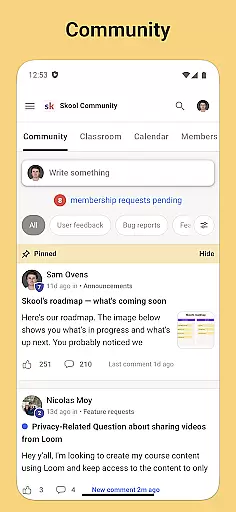
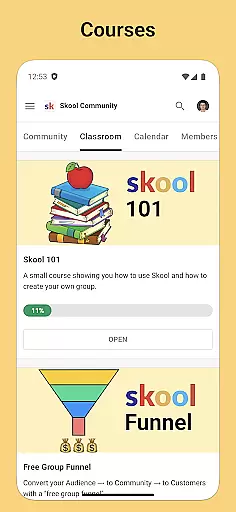
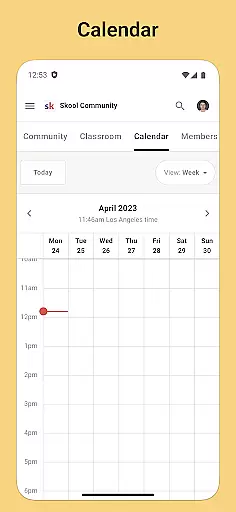
Skool is a dynamic social platform designed to keep users engaged with their online communities through an intuitive mobile experience. The app offers comprehensive features that include community discussions, interactive courses, and event tracking, all enhanced by real-time push notifications. With Skool, users can actively participate in group discussions via posts and comments, access educational content through video and text-based lessons, and stay updated on community events using the integrated calendar feature.
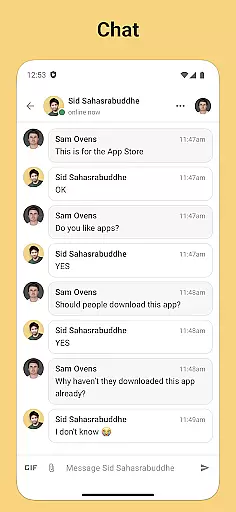
The app's chat functionality allows direct messaging within communities, fostering closer connections among members. Whether you're looking to contribute to discussions, expand your knowledge base, or simply stay informed about upcoming events, Skool provides the tools necessary to remain connected anytime, anywhere. Its seamless integration of social and educational elements makes it particularly valuable for users seeking an interactive community experience.
Skool stands out with its diverse range of features tailored to enhance community interaction and learning. One of its core functionalities is the Community section, where users can engage in group discussions through posts and threaded comments. This creates an environment conducive to meaningful conversations and collaborative knowledge sharing. Additionally, the Courses feature offers a rich library of educational content, including both video and text-based lessons, enabling users to learn at their own pace while staying within the app ecosystem.
Another notable feature is the Calendar tool, which provides users with a clear overview of upcoming community events. This ensures no important gathering or deadline is missed. Furthermore, Skool incorporates a Chat module that facilitates private communication between members, allowing for more personal interactions. Each of these features is designed not only to improve user engagement but also to create a well-rounded experience that combines social networking with continuous education, setting Skool apart from traditional social apps.
In the realm of social applications, the ability to customize and verify user profiles is paramount. Skool offers a comprehensive suite of tools that allow users to personalize their profiles while ensuring authenticity. This dual approach not only enhances user engagement but also fosters a trustworthy community environment.
Skool enables users to tailor their profiles with various personal details, interests, and preferences. This level of customization allows for a more engaging and relevant experience as users can express themselves more fully within their communities. The app provides options to add profile pictures, bios, and links to other social media accounts, creating a holistic view of each member.
To maintain the integrity of its platform, Skool incorporates authenticity verification processes. These procedures help in establishing credible interactions by confirming the identity of users through verified badges or similar indicators. By prioritizing verified profiles, Skool ensures that its users can trust the information shared within the community.
The combination of customization and verification features significantly enhances user interaction quality on Skool. Members can connect with confidence, knowing they are engaging with genuine profiles. This strategic focus on profile management ultimately leads to stronger, more reliable community connections.
Discovering new connections is a vital aspect of any social platform, and Skool excels in facilitating meaningful interactions among its users. Through innovative algorithms and community-focused features, Skool makes it easier for individuals to find like-minded members and expand their networks organically.
Skool's connection discovery mechanisms leverage user data such as interests, activity history, and community participation to recommend potential connections. By analyzing these factors, the app suggests relevant users who share common goals or hobbies, thereby enhancing the likelihood of forming valuable relationships.
Beyond automated suggestions, Skool also empowers users to actively seek out new connections through search functionalities and community events. The calendar feature highlights upcoming events where users can meet others in their communities, fostering real-world interactions alongside digital connections.
This multifaceted approach to connection discovery enriches the overall user experience on Skool. By combining intelligent recommendations with active exploration tools, the app creates numerous opportunities for users to build lasting relationships within their communities. Such features ensure that every member can expand their network meaningfully and efficiently.
User-friendly interface
Real-time notifications
Integrated calendar
Rich educational content
Active community engagement
Limited customization options
Occasional notification delays
Restricted third-party integrations
Higher data usage
Learning curve for new users

Looking for a date or a friend? Swipe to match and meet open-minded singles.
 4.20
4.20
Meet Strangers Online, Live Video Chat & Make Random Video Calls on Joi!
4.30
Video call, live video chat & talk to strangers. Meet people on Omega!
3.60
Discover an open-minded dating experience when you download today
4.10
Live pics from your friends - Only the photos you want to see
4.60
Chill and Chat with Tagged Live Video with millions of peeps
4.10
Widget Together, Share Whatever! Keep Pets & Share Sleep, Poop, Moods on Screens
4.70
Connection Beyond Content
4.50
Watch 24/7 great live stream, or go live to boost your social followers!
4.50
Raise cute Pengus with friends
4.70
Social calendar for friends to make plans, group chat, share events & schedules
4.60
Dating & make friend to chat, meet, flirt, and make real connections!
4.60
Reddit is where you’ll find your people and feel at home in every conversation.
4.60
A gathering place for 300 million people's life interests and hobbies
4.30
Build Your Team With One App
4.30
Dating for singles. Meet lonely people nearby online. Find your match here!
4.20
Unlimited messages, WiFi Calling, Texting app. Text now with Second Phone Number
4.10
Connect and share ideas
4.10
Create & share photos, stories, & reels with friends you love
3.90


User Reviews