
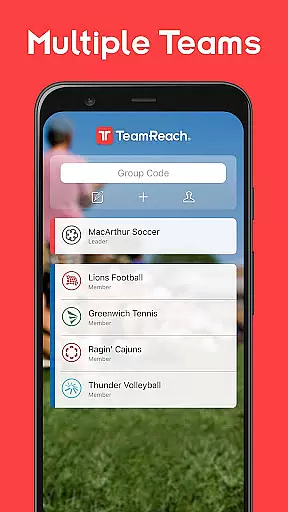
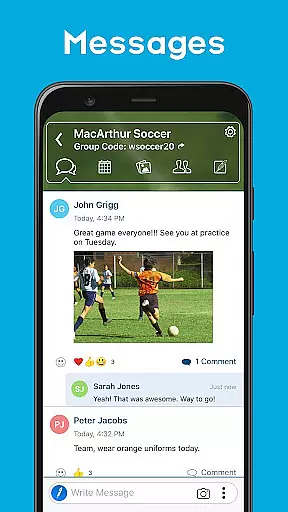
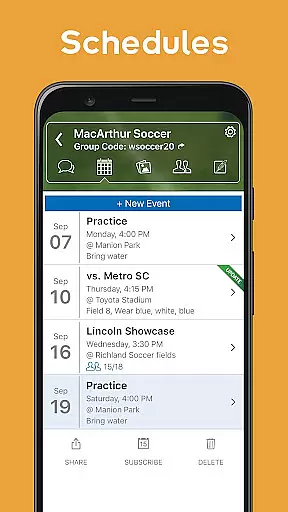
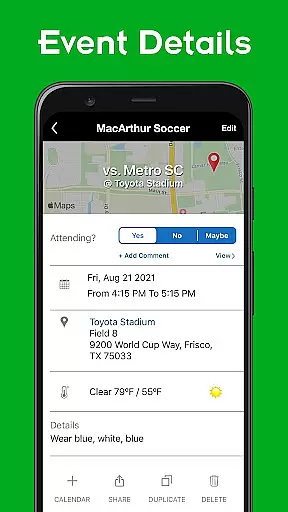
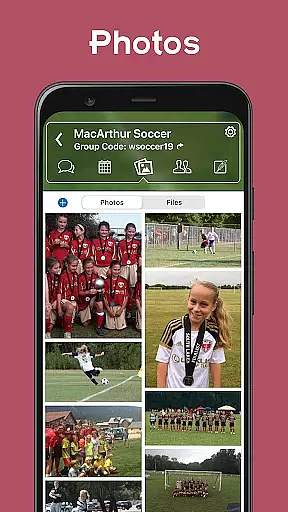
TeamReach is a comprehensive communication and management solution tailored for sports teams, clubs, and various groups. The app centralizes all essential functions such as messaging, scheduling, instant updates, availability checks, event details, polls, and photo sharing. This ensures that coaches, players, and parents can communicate efficiently without exchanging personal contact information, thus enhancing privacy and safety.
Beyond its core communication features, TeamReach offers practical tools like map integrations, calendar syncing, and reminders which help teams stay organized and informed. Whether it's a last-minute schedule change or coordinating team availability for an event, the app streamlines these processes. Its versatility extends beyond sports, making it suitable for any group activity including scouting organizations, faith groups, and educational institutions.
The true value of TeamReach lies in its ability to save time and simplify life for everyone involved. By eliminating the need for scattered phone calls, emails, and physical handouts, it creates a single hub for all interactions. This free, intuitive platform empowers managers and coaches to create and manage teams effortlessly while enabling members to join easily via group codes.
TeamReach stands out with its robust feature set designed to enhance team communication and coordination. One of its key functionalities is centralized messaging, which serves as the primary channel for all communications, reducing confusion and ensuring everyone stays on the same page. Additionally, the scheduling feature provides clear information about game times, practice sessions, and events, complete with reminders, maps, and weather forecasts.
Another notable aspect is the ability to send instant updates regarding last-minute changes, whether it's related to timing, location, or cancellations. This immediacy helps keep the entire team aligned. The app also facilitates availability requests, allowing organizers to quickly determine participant attendance for specific events. Moreover, features like polls enable quick decision-making on various topics such as practice times or equipment choices.
TeamReach further enriches user experience through integrated photo sharing, map locations within messages, and multi-team support. Users can add events directly to their device calendars and share them effortlessly with friends and family. These capabilities collectively ensure that TeamReach not only meets but exceeds the needs of dynamic group interactions, making it an indispensable tool for modern team management.
Gameplay realism in sports applications like TeamReach is crucial for delivering an authentic experience. The app achieves this by providing real-time updates, schedule changes, and event details that mirror the dynamic nature of sports activities.
TeamReach ensures that all communications, including messages about last-minute changes or availability requests, are delivered instantly. This immediacy replicates the fast-paced environment of sports, where timing and quick decision-making are essential.
The app's design focuses on accuracy by offering features such as maps, forecasts, and driving directions. These tools help users make informed decisions based on precise data, enhancing their overall engagement with the team or group.
By integrating these realistic elements, TeamReach not only keeps users informed but also heightens their sense of involvement and presence within the team, making every interaction meaningful and impactful.
An intuitive control scheme is vital for ensuring that users can easily navigate and utilize an application. TeamReach excels in this area by providing a user-friendly interface that simplifies complex tasks such as managing schedules, sending instant updates, and organizing events.
The app's straightforward design allows users to perform essential functions like creating messages, checking availability, and viewing event details without a steep learning curve. This ease of use encourages more frequent and effective communication among team members.
Features such as poll creation and photo sharing are seamlessly integrated, enabling users to access these functionalities with minimal effort. This enhances the overall user experience by reducing the time and energy required to stay connected with the team.
Ultimately, TeamReach's intuitive control scheme empowers users to focus more on their team activities and less on figuring out how to use the app, thereby fostering a more cohesive and engaged community.
User-friendly interface
Comprehensive feature set
Enhanced privacy controls
Free to use
Versatile application
Limited advanced analytics
No video conferencing
Basic design aesthetics
Occasional bugs
Dependent on internet connectivity

Basketball dunking fun !
 4.50
4.50
Feel the thrill of American football: guide a team to triumph through touchdowns
4.40
Advanced Shotgun Shooting Simulator: Skeet, Trap, Sporting and Bird Hunting
4.20
Pixel Cup Soccer is a retro-style arcade game, just the fun part of soccer!
4.00
Realistic PvP Multiplayer Dart game blending sports games and simulation fun!
4.50
Play football like it's 1987! Classic retro arcade action and franchise mode.
4.60
NFL & NBA Real Money Team & Player Picks
4.60
Gym Calendar & check-in for Buckeye Pole Vault Academy athletes, parents & admin
4.5
Experience the thrill of NFL with the ultimate app for Football enthusiasts!
3.80
Ride, flip, and perform crazy stunts in an open BMX freestyle playground!
4.80
8 Pool Master is an interesting billiard game
4.70
Real-time 1v1 basketball game! Dunk, shoot & win like MVP basketball superstars!
4.70
The ultimate Golf game! Compete in 6 player real-time multiplayer golf battles!
4.70
Kick into action! Score goals & climb 100+ levels to become a soccer super star!
4.70
Modern arcade style pool game with single player, Relaxed game of 8 ball.
4.60
Build a soccer club from scratch and see if you can conquer the World!
4.50
Master the arrow art in archer duels
4.50
Old-School Football
4.40
Play the 3 classic Duck Life games like you've never seen them before!
4.10


User Reviews