
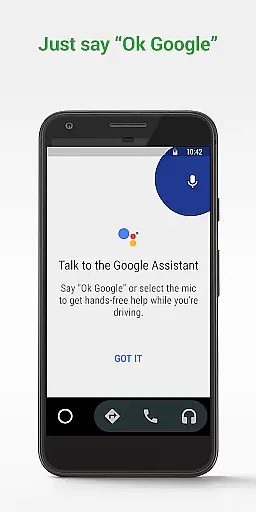

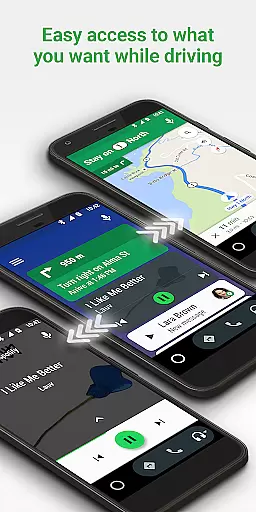
Android Auto is a driving companion app designed to keep users focused and connected while on the road. It offers a simplified interface with large buttons and powerful voice actions, making it easier to use essential apps from your phone while driving. The app integrates Google Assistant for hands-free operation, providing real-time navigation, messaging, and media controls.
Key features include real-time GPS navigation with traffic alerts, voice-activated commands for calls and messages, and access to popular media apps. Android Auto is compatible with over 400 car models and requires a phone running Android 6.0 or higher. Whether you're commuting to work or going on a road trip, this app ensures you stay connected safely.
The true value of Android Auto lies in its ability to minimize distractions while driving. By using voice commands and simplified touch controls, drivers can maintain focus on the road while still accessing important information and communication tools. This makes it an essential app for modern drivers who need to balance connectivity with safety.
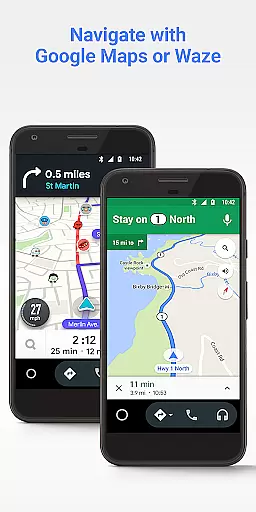
Android Auto stands out with its comprehensive feature set tailored specifically for drivers. The app's core functionality revolves around its integration with Google Assistant, enabling hands-free operation through voice commands. Users can navigate to destinations using Google Maps or Waze with real-time traffic updates, all while keeping their eyes on the road.
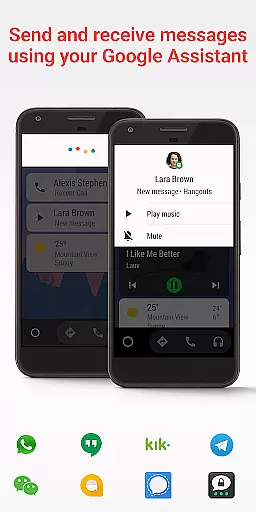
One of the app's key innovations is its unified messaging system that works across multiple platforms including SMS, WhatsApp, and Hangouts. The app also manages incoming calls with simple tap controls and provides customizable do not disturb settings for driving. Additionally, Android Auto supports a wide range of media applications like Spotify, Pandora, and Google Play Music, giving users access to their favorite entertainment without compromising safety.
What sets Android Auto apart from other driving apps is its growing compatibility with car manufacturers and its expanding list of supported apps. The interface is specifically designed for minimal driver distraction, featuring large touch targets and clear visual indicators. These features combine to create a safer, more convenient driving experience while maintaining full access to essential smartphone functions.
Detailed vehicle information is crucial for drivers who want to stay informed about their car's status and performance. Android Auto provides essential details that help users understand their vehicle's metrics while keeping their focus on the road.
Through seamless integration with compatible cars, Android Auto displays important vehicle data such as speed, fuel level, tire pressure, and engine temperature directly on the caru2019s infotainment screen. This allows drivers to quickly glance at vital stats without being distracted from driving.
By leveraging this feature, users can maintain optimal vehicle health and address potential issues before they become serious problems. The real-time updates ensure that drivers are always aware of their vehicle's condition, enhancing both safety and convenience.
This functionality not only improves the driving experience but also contributes to better vehicle maintenance and longevity. With Android Auto, drivers have access to comprehensive vehicle information that supports smarter, safer driving decisions.
Price transparency in automotive services ensures that drivers are fully aware of costs associated with using various features within their vehicles. Android Auto promotes clarity by providing users with upfront information regarding any expenses tied to its functionalities.
While Android Auto itself is free to use, certain connected apps may offer premium services or subscriptions. Users can easily view these pricing details through the app interface, ensuring there are no hidden fees or surprises when accessing advanced features.
Additionally, Android Auto integrates with navigation apps like Google Maps and Waze, offering real-time traffic alerts and alternative routes that could save money on fuel costs. By optimizing travel paths, drivers can reduce unnecessary expenditures related to traffic congestion or detours.
Overall, Android Auto enhances price transparency by clearly communicating costs and helping drivers make economical choices. This empowers users to manage their automotive expenses effectively while enjoying a connected driving experience.
User-friendly interface
Voice command support
Wide app compatibility
Real-time navigation
Hands-free operation
Android only
Car compatibility
Limited customization
Data connection required
USB connection needed

Launcher for use in the car
 4.40
4.40
Better fuel to help keep you on the road
3.20
Buy and sell your boat
4.70
Simplify your drive
3.90
Instant diesel savings. No credit checks or fees. Nationwide growing network.
4.40
Available in select states.
4.00
O'Reilly Pro will streamline your parts lookup and ordering process!
3.20
Find Your Local Store or Shop Online for the Car, Truck, or SUV Parts You Need
4.70
Shop, finance, or sell today.
4.80
Take Control of Your Car
4.80
1M+ high-quality auto parts at your fingertips. Fitment guaranteed.
4.70
Find Fast EV Chargers | Charge Your Vehicle at 1,100+ Fast Car Charging Stations
4.60
On the CarShield app, you can view contracts, make payments, & request roadside.
4.40
Digital Car Key/Launcher, Screen Mirror, Android Dashboard, Remote Wireless Link
4.40
Autotrader is your online solution for buying and selling new and used cars.
4.40
OBD2 car scanner and diagnostics: read Check Engine, DTC, economy....
4.30
Mobile Phone Parking - So easy to park
3.70
Attention! This is the theme for the Car Launcher app
4.0
Ferrari inspired analog & digital watch face with quick access and premium style
4.0


User Reviews