
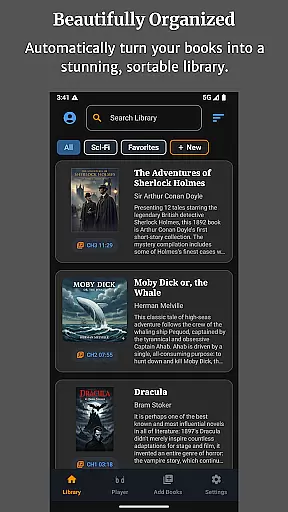
Audiobook Buddy is a comprehensive audiobook management app designed to transform your scattered audiobook files into an organized, visually appealing library. The app supports syncing from local folders and popular cloud services like Google Drive, OneDrive, and Dropbox, creating a unified library with smart organization features.
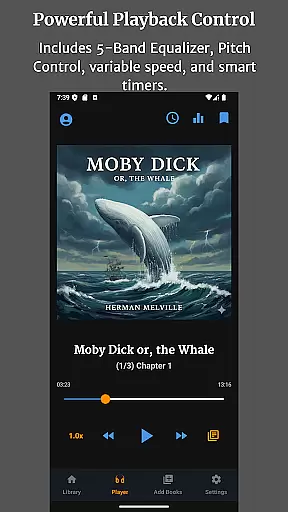
With Audiobook Buddy, users can create custom collections to group related audiobooks by series, genre, or any preferred category. It offers seamless playback options including a 5-band equalizer, pitch control, per-book speed settings, and a sleep timer. The app also provides full lock-screen controls, background playback, and customizable themes, ensuring a personalized and convenient listening experience across devices.
This app is ideal for avid audiobook listeners who want to manage large libraries efficiently while enjoying advanced playback features and cloud-synced progress tracking.
Audiobook Buddy stands out with its robust feature set tailored for audiobook enthusiasts. The app's smart library organization system automatically sorts audiobooks from multiple sources, including local folders and cloud storage services, into a single, easy-to-navigate library.
Playback customization is a key strength, offering users a 5-band equalizer, variable speed control, and pitch adjustment. Each audiobook can have individualized playback settings, and the built-in sleep timer ensures uninterrupted listening sessions. Background playback and lock-screen controls enhance the user experience, while the mini player and optional home screen widget provide quick access to playback controls.
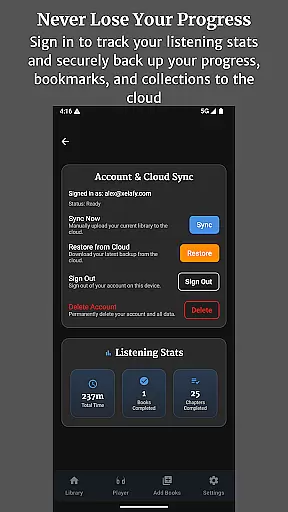
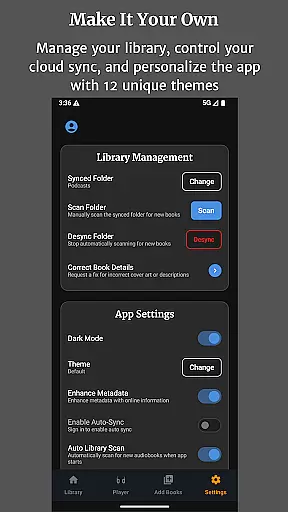
Additional notable features include support for 11 customizable themes, full translations in four languages, and comprehensive file format compatibility. Audiobook Buddy also offers automatic cloud backup for bookmarks and listening progress, making it a reliable choice for managing extensive audiobook collections.
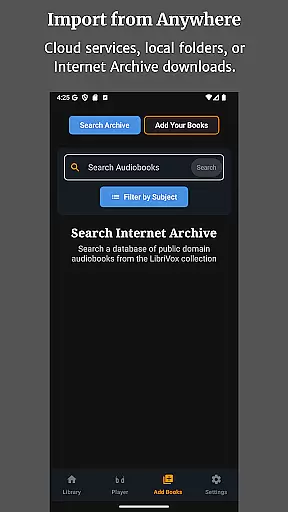
Audiobook Buddy offers an extensive library of public domain audiobooks sourced from LibriVox, providing users with a vast selection of titles to choose from. Beyond the built-in library, the app supports importing personal files and ZIP archives, allowing users to expand their collection with their own content.
The app ensures copyright authenticity by focusing on public domain books and enabling users to import their legally acquired audiobooks. This approach guarantees that all content within the library is legitimate and respects intellectual property rights.
With full support for various audio formats such as MP3, M4A, FLAC, and more, Audiobook Buddy makes it easy to integrate a wide range of audiobooks into your library. The app reads metadata formats like CUE and NFO, ensuring accurate book information and cover art display.
Audiobook Buddy boasts impressive format compatibility, supporting a wide array of audio formats including MP3, M4A, M4B, AAC, OGG, FLAC, WAV, and WMA. This comprehensive support ensures that users can enjoy their entire audiobook collection without worrying about file type restrictions.
In addition to audio formats, the app recognizes metadata formats such as CUE, NFO, and TXT files, allowing for rich book information and proper organization within the library. Cover art is also supported in various formats including JPEG, PNG, and WebP, enhancing the visual experience of browsing your collection.
The app's robust format compatibility extends to cloud services too, enabling seamless sync of audiobooks from Google Drive, OneDrive, or Dropbox. This feature ensures that regardless of where your files are stored, Audiobook Buddy can access and organize them into a beautiful, unified library.
User-friendly interface
Advanced playback options
Cloud sync functionality
Multi-language support
Customizable themes
No DRM support
Limited to audiobooks
Requires manual import
Occasional sync issues
Premium feature costs

A guide for the Court of Atonement spiritual healing process.
 4.1
4.1
Mirror Bible - eye-opening paraphrase translation of the NT by Francois du Toit
4.30
Words spoken by native English speakers and full definitions.
4.60
University of North Carolina Herbarium presents the flora of TN, AL, & MS.
4.5
F9 Cookbook Mobile App
4.60
My Bible offers a comprehensive app by providing offline access, daily verses.
4.80
Read the Quran in Arabic alongside its translation, with color coded Tajweed.
4.50
Learn to tie more than 200 knots in 3D!
4.90
Follow complex state CCW permit laws and lawfully carry firearms in each state.
4.80
King James Bible read offline, AI Priest, Bible Quiz, Guiding Prayers & Plans
4.80
Liturgy of the Hours totally off-line
4.80
Read the KJV Bible with Strong’s offline: reading plans, audio Bibles, and more.
4.70
Read unlimited novels, audiobooks, stories & Unlock ebooks, fanfiction and more!
4.70
Full text, sheet music, and recordings of the print edition
4.60
Build family tree & discover DNA, family history heritage, origins and ancestors
4.60
7 Languages, Google, Wiki, Vocabulary.com, Cambridge & Urban Dictionary!
4.50
Daily Bible app: King James Version with verses and audio for studying&prayer
4.40
Shop over 13 million new and used books at up to 80% off list price
4.20
Fast loot guide for ARC Raiders. Simple tips, stats, maps, and item details.
4.2


User Reviews