

Look Up - Pop Up Dictionary Pro is an innovative offline dictionary application designed for book lovers and language enthusiasts who value convenience and efficiency. The app eliminates the need to search online every time you encounter a challenging word, making it perfect for avid readers and former iOS users missing the built-in lookup feature.
With support for seven languages including English, Italian, Spanish, German, Portuguese, and French, Look Up offers versatile functionality through its integration with popular services like Moon Reader, Anki Flashcards, Urban Dictionary, Google Define, Vocabulary.com, Wikipedia, and Cambridge. Whether you're studying, reading, or simply expanding your vocabulary, this app provides a comprehensive solution with its extensive offline Wordnet database of 0.22 million words and phrases.
The app's key advantage lies in its multiple search methods and user-friendly features such as fast predictive searching, drive syncing, word starring, note-taking, dark mode, text-to-speech, and more. These features make Look Up an indispensable tool for anyone looking to enhance their reading experience while building their vocabulary effortlessly.
Look Up - Pop Up Dictionary Pro stands out with its diverse range of innovative features tailored for both casual readers and serious language learners. One of its most notable aspects is the robust offline functionality powered by the comprehensive Wordnet database, which contains an impressive 0.22 million words and phrases across seven languages.
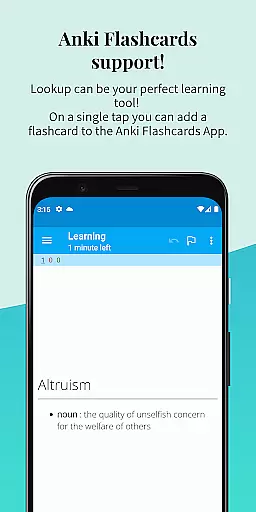
The app offers three convenient ways to look up words: by copying text (for Android versions below 9.0), using the dedicated lookup button after selecting a word (Android 6.0 and above), or sharing the selected word directly to the app. This flexibility ensures compatibility across various devices and Android versions. Additionally, Look Up supports valuable integrations such as Anki Flashcards for vocabulary building and Moon Reader for seamless dictionary lookups while reading eBooks.
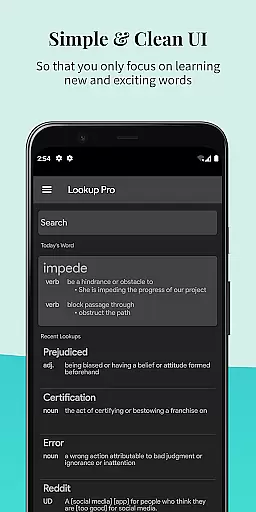
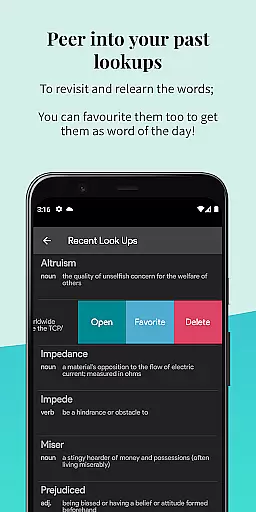
Other standout features include fast and predictive searching, automatic syncing to Google Drive (which can be disabled), the ability to star important words, adding contextual notes, and a visually appealing Material Design interface with optional dark mode. Users can also take advantage of the text-to-speech functionality, daily word notifications, and easy navigation through recent searches, making Look Up a powerful companion for mastering new languages or improving reading comprehension.
Look Up - Pop Up Dictionary Pro offers an extensive offline word database that enhances the reading experience for bibliophiles and language learners alike. With over 0.22 million words and phrases available at your fingertips, this app ensures that you have access to a vast repository of language knowledge without needing an internet connection.
The dictionary supports seven languages including English, Italian, Spanish, German, Portuguese, and French. This multilingual capability not only broadens its appeal but also solidifies its position as a valuable tool for users across the globe who are interested in linguistics or require language support.
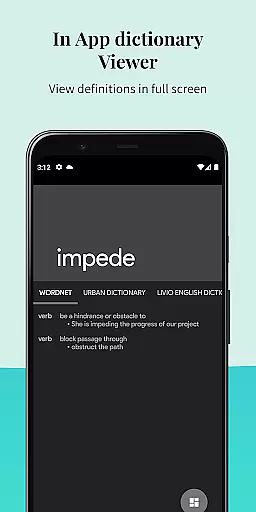
Moreover, Look Up has integrated respected plugins such as Urban Dictionary, Google Define, Vocabulary.com, Wikipedia, and Cambridge. These integrations ensure that users receive authentic and authoritative definitions and information about the words they search for, thus maintaining the credibility expected from a reference tool.
By providing a robust selection of words backed by trusted sources, Look Up - Pop Up Dictionary Pro guarantees both the size of its library and the authenticity of its content, making it an indispensable companion for anyone looking to enrich their vocabulary or delve into the intricacies of multiple languages.
One of the key strengths of Look Up - Pop Up Dictionary Pro is its versatile format compatibility, which allows seamless interaction with various applications and devices. Whether you're using Android versions lower than 9.0 or the newer iterations, Look Up provides multiple ways to search for words, ensuring that no user is left behind due to technical constraints.
For those who prefer physical actions over digital ones, selecting a word and sharing it directly to the Lookup App serves as an intuitive method to get instant definitions. Meanwhile, legacy device users can rely on the copy function to initiate searchesu2014a feature that remains accessible even in modern Android versions.
In addition to supporting different search methods, Look Up integrates smoothly with other apps like Moon Reader for enhanced eBook navigation and Anki Flashcards for memory reinforcement. Such integrations highlight the app's commitment to creating a cohesive ecosystem where learning tools work together harmoniously.
With these capabilities, Look Up - Pop Up Dictionary Pro demonstrates exceptional adaptability across formats and platforms, positioning itself as a highly compatible and user-friendly reference solution for diverse audiences.
Offline functionality
Multi-language support
User-friendly interface
Fast predictive search
Versatile integrations
Limited advanced grammar tools
No live pronunciation guide
Premium price point
Occasional sync issues
Heavy on older devices

"Five Dr. Seuss titles in one omBook!"
 4.60
4.60
The Bible Audio Guide
4.80
University of North Carolina Herbarium presents the flora of TN, AL, & MS.
4.3
Learn Electricians' Handbook PRO complete guide beginners to advance.
4.40
My Bible offers a comprehensive app by providing offline access, daily verses.
4.80
Identify birds of North America by call or picture | Bird Identification
4.20
The Apostolic Lutheran Church hymnal
4.3
A highly sophisticated app for all of your mobile reading—any format, any time
4.50
Follow complex state CCW permit laws and lawfully carry firearms in each state.
4.80
The dynamic dictionary/reference app for piano chords and scales!
4.80
The Original Tropical Freshwater Aquarium Fish And Plant Care Guide
4.80
Contains the 365 daily readings and everything other thing needed for catholics
4.70
Words spoken by native English speakers and full definitions.
4.60
Read aloud texts, audiobooks, PDFs or any eBook with text to speech AI audio
4.60
Improve your vocabulary and grammar with the 15 biggest Oxford Dictionaries.
4.30
WebNovel - Read Solo Leveling novel and comic
4.10
A story reading app: Read stories, novels and books, or write your own.
3.90
Novels, audiobooks, ebooks & fanfiction. Read anytime, anywhere!
3.40
A guide for the Court of Atonement spiritual healing process.
4.1


User Reviews