
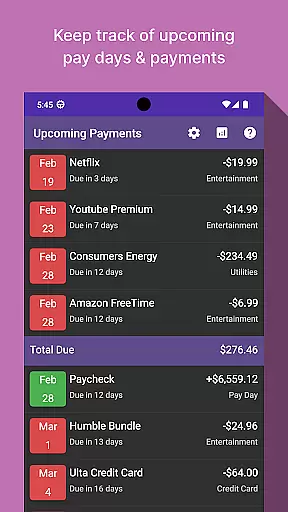
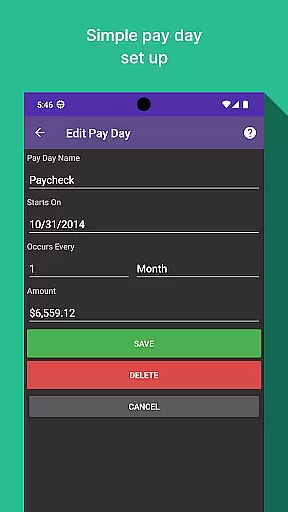
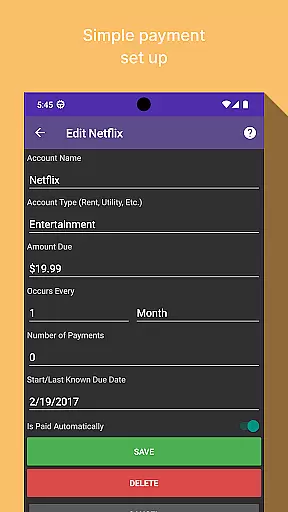
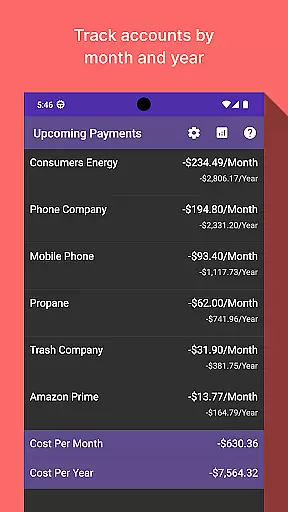
Bill Manager is a comprehensive financial management application designed to help users efficiently track and manage their upcoming bills. The app's core functionality revolves around bill tracking, providing users with clear information about pending payments, payment amounts, and relevant due dates up to their next payday. This ensures users can stay on top of their financial obligations without missing any important deadlines.
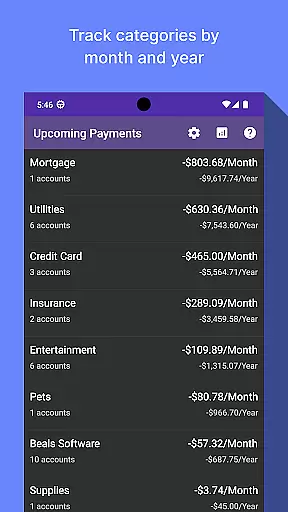
In addition to its primary bill tracking feature, Bill Manager offers an analytics view that allows users to gain deeper insights into their spending habits. Through this feature, users can review costs associated with different categories and accounts on a monthly and yearly basis. This analytical capability not only helps in managing current expenses but also aids in planning for future financial stability.
Whether you're looking to avoid late fees or aiming to better understand your financial patterns, Bill Manager serves as an essential tool for anyone seeking to maintain control over their finances. Its intuitive design and practical features make it suitable for both personal and small business use, ensuring that all users can benefit from its powerful tracking and analysis tools.
One of the standout features of Bill Manager is its ability to provide detailed insights into your financial commitments. By clearly listing which bills are still due from the current date up to your next payday, the app ensures that you never miss a payment deadline again. Each entry includes the amount due and the specific due date, allowing for precise financial planning and budgeting.
The app goes beyond simple bill tracking by incorporating an advanced analytics view. This feature enables users to categorize and analyze their expenses on a monthly and yearly basis. By breaking down costs into distinct categories and accounts, Bill Manager empowers users to identify spending trends and adjust their financial strategies accordingly. Such detailed analysis is crucial for effective long-term financial management.
Furthermore, Bill Manager's user-friendly interface makes navigating through your financial data a seamless experience. With easy access to both current and historical financial information, users can quickly adapt their spending habits to align with their financial goals. This combination of detailed tracking, insightful analytics, and intuitive design sets Bill Manager apart as a leading solution in personal finance management.
Account and fund security is a critical aspect of any financial application, ensuring that users' sensitive information remains protected. Bill Manager employs advanced encryption protocols to safeguard your data against unauthorized access. This means that all your bill details, payment schedules, and personal information are encrypted both in transit and at rest.
In addition to encryption, the app implements multi-factor authentication to further secure your account. By requiring more than just a password to access your account, it significantly reduces the risk of unauthorized access. This added layer of security ensures that only you can make changes to your billing information or view your financial details.
The benefits of these security measures are immense. Users can enjoy peace of mind knowing their financial data is handled with utmost care. With Bill Manager, you can focus on managing your bills without worrying about potential security breaches, allowing for a seamless and worry-free transaction experience.
A smooth transaction experience is essential for any finance app, and Bill Manager excels in providing an intuitive and efficient process for managing payments. The app allows users to easily track upcoming bills, ensuring they never miss a payment deadline. By displaying which bills are due from the current date up to the next payday, it simplifies financial planning.
Moreover, Bill Manager offers detailed insights into each transaction, showing the amount due and the payment date. This clarity helps users manage their finances better by understanding exactly when and how much they need to pay. Additionally, the analytics view provides a comprehensive breakdown of costs by category and account, both monthly and yearly, enhancing financial awareness.
Ultimately, this streamlined transaction experience translates into real value for users. It not only saves time but also reduces stress associated with bill management. With Bill Manager, users gain control over their financial obligations, leading to improved financial health and confidence in managing their money effectively.
User-friendly interface
Comprehensive bill tracking
Detailed expense analytics
Customizable categories
Secure data management
Limited investment tools
No multi-currency support
Occasional syncing issues
Premium features require subscription
Basic budgeting tools

Currency Converter, Exchange Rates, Widgets
 4.90
4.90
BA Financial Calculator PRO – Perfect for CFA/FRM/CPA and finance professionals
4.90
Manage your Discover account conveniently from anywhere.
4.80
The DailyPay app lets you access earned wages before your next payday.
4.70
Easily invest, save, and plan—all in one app.
4.60
Get 250$ Cash Advance to solve emergencies instantly in loan app called LendMe
4.70
Early payday & cash advances with no-fee mobile banking!
4.60
All expenses at a glance.
4.80
Amazing Financial Calculator. Based on HP 10bII, but easier to use!
4.40
Check EBT, SNAP, WIC balances, manage food stamps, and save money with benefits
4.80
PayMe helps you claim money from settlements on companies that harmed you.
4.80
Money transfer made easy. Send money to friends and family with great rates.
4.70
Manage your credit card account with the Credit One Bank mobile app.
4.70
Military retirement pay estimation calculator
4.70
Manage and cancel subscriptions, lower bills, track expenses, create budgets.
4.60
Earn cash & save money daily. Access instant cash advances* - no credit check!
4.50
Car Insurance Made For You.
4.50
Read and extract public data on NFC Contactless banking card (VISA, MasterCard
4.30
View BSC Transactions for multiple accounts
3.90


User Reviews