
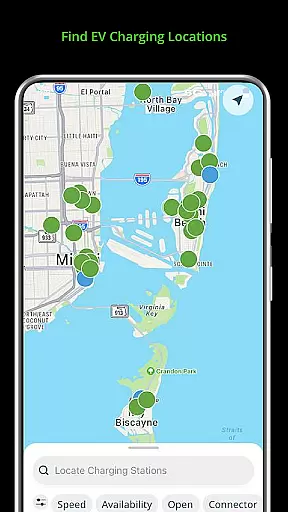
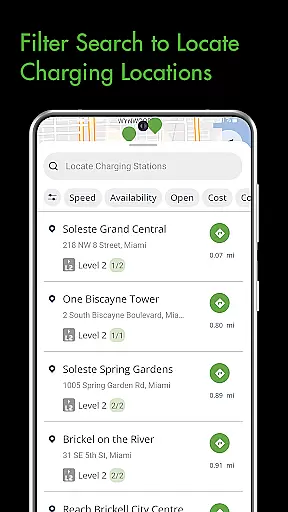
Blink Charging Mobile App is a comprehensive EV charging solution designed to simplify the charging process for electric vehicle owners. The app allows users to locate public charging stations through various search methods including zip code, city, or business name. It provides real-time monitoring of charging sessions, displaying crucial details such as energy delivered and charging speed.
One standout feature is the ability to manage home charging stations like the HQ 200 directly from the app. Users can configure settings, track charging history, and monitor costs. The Blink Network's expansion now includes compatibility with SemaConnect stations, offering an extended network of charging options. This integration creates a seamless experience across different charging infrastructures, making it an essential tool for EV drivers.
The Blink Charging app stands out with its robust feature set tailored for EV owners. Its station locator functionality offers multiple search options and provides detailed information about each charging point. The app's session management capabilities allow users to monitor all aspects of the charging process in real-time, including cost estimates and energy delivery metrics.
For home charging, the app enables complete control over Blink's HQ 200 stations. Users can customize settings, view historical data, and manage charging sessions remotely. The recent integration with SemaConnect stations demonstrates the app's commitment to network expansion and interoperability. This feature-rich application brings convenience and control to EV charging, whether at home or on the go, while supporting multiple charging networks through a single interface.
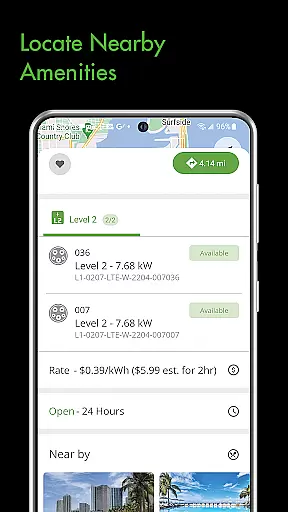
When it comes to electric vehicle (EV) charging, having access to detailed information about charging stations is crucial for a seamless experience. The Blink Charging mobile app provides comprehensive details about each charging station within its network.
Users can view specific information such as the type of chargers available, their current occupancy status, and the charging speed that can be delivered. This ensures that EV drivers can make informed decisions on where to charge based on their vehicle's compatibility and their current needs.
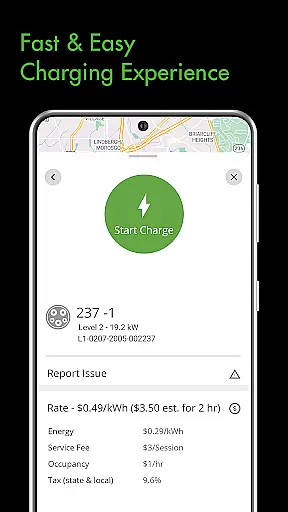
In addition to station details, the app also offers insights into energy delivery during a charge session. Drivers can monitor how much energy is being transferred to their vehicle in real time, allowing them to better understand their charging habits and optimize accordingly.
The level of detail provided by the Blink Charging app empowers EV owners with the knowledge they need to efficiently manage their charging sessions and maintain their vehicles' performance.
Price transparency is an essential factor for EV drivers when selecting a charging station. The Blink Charging mobile app excels in providing clear information regarding the costs associated with using their charging services.
Before initiating a charge, users can access an estimated cost of the charging session directly through the app. This feature allows drivers to anticipate expenses and make financially informed decisions without unexpected surprises.
Beyond just estimates, the app outlines all potential costs involved in charging sessions at different locations. Whether charging at home with the HQ 200 or utilizing public stations, users will know what fees to expect, including any additional charges beyond electricity usage.
This commitment to transparent pricing helps build trust with users, ensuring they feel confident about managing their expenses while keeping their vehicles charged and ready for the road.
User-friendly interface
Real-time charging data
Home charger management
Expanded network coverage
Convenient payment system
Occasional connectivity issues
Limited rural coverage
Subscription fees required
Complex setup process
High energy costs

Ultimate OBD2 Car Scanner: Diagnostics, Service and Modification Tool
 4.30
4.30
On the CarShield app, you can view contracts, make payments, & request roadside.
4.40
Taximeter; the professional's choice
4.30
Theme for Car Launcher
4.2
Play what you want through Android Auto
4.90
Car Values, Research and More
4.80
Secure mobile payments & fuel savings at Phillips 66®, Conoco® and 76® stations
4.40
Monitor your behind-the-wheel behavior to become a safer driver and save.
4.10
Shop cars & see your financing
4.60
1M+ high-quality auto parts at your fingertips. Fitment guaranteed.
4.70
Listings of Tesla's with FSD - Included package
4.60
Easy connect & control your cars from afar. Remote Lock & unlock car and carplay
4.60
Instant diesel savings. No credit checks or fees. Nationwide growing network.
4.40
A smarter way to park and reserve your spot ahead of time.
4.40
Boost profits and hit your goals faster with GigU's amazing tools for gigworkers
4.00
Simplify your drive
3.90
The Smarter Way Forward
3.30
Club Car Wash Mobile App—the fast lane to managing your wash membership.
3.30
Better fuel to help keep you on the road
3.20


User Reviews