

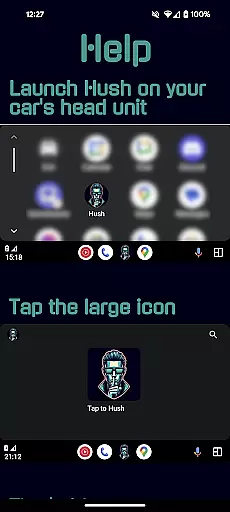
Hush is an innovative solution designed to address audio-related issues with Android Auto. The app plays a silent audio track on repeat, allowing users to safely adjust their vehicle's volume without interruptions from other audio apps. This prevents unexpected audio switching, such as going from a soft podcast on YouTube to loud music on Spotify, which can be distracting while driving.
The application is particularly useful for drivers who want to use Google Maps while listening to audio from apps that don't support Android Auto. Hush acts as the currently active audio app, ensuring a seamless audio experience and enhancing driver safety by eliminating sudden volume changes.
Hush offers several key features that make it an essential tool for Android Auto users. First, it resolves known issues with some vehicles' Android Auto implementation that cause unwanted audio app resumption when adjusting the volume. By playing a silent audio track, Hush ensures that non-Android Auto audio apps remain uninterrupted.
Another notable feature is its ability to act as the active audio app, preventing apps like Spotify or YouTube from being resumed by Android Auto. This functionality provides users with greater control over their audio experience, allowing them to enjoy their preferred audio content without unexpected interruptions. Additionally, Hush was developed based on real-world user experiences, specifically addressing long-standing issues faced by Toyota Camry owners.
Detailed vehicle information is crucial for drivers who want to understand their car's compatibility with applications like Android Auto. Hush addresses a common issue faced by many drivers, particularly those using vehicles such as Toyota Camry, where the system resumes the last Android Auto audio app after adjusting the volume.
This application provides insight into how certain cars interact with Android Auto apps, offering users a workaround that ensures an uninterrupted audio experience while driving. By playing a silent audio track, it prevents unexpected switches to other audio sources like Spotify or YouTube when you modify your vehicleu2019s volume settings.
For users, this means they can enjoy their preferred non-Android Auto audio apps without worrying about sudden and jarring changes in audio output. This feature not only enhances user satisfaction but also contributes significantly to safer driving conditions by minimizing distractions caused by abrupt audio transitions.
Price transparency is essential for users looking to download applications without hidden costs. For Hush, the pricing model is straightforward, ensuring users know exactly what they are getting without any additional charges.
The app offers its core functionality free of charge, allowing users to benefit from its primary purposeu2014preventing unwanted audio interruptions while using Android Auto. There are no in-app purchases or subscription fees, making it an accessible solution for all drivers facing similar issues with their vehicleu2019s infotainment systems.
By providing clear information about its cost structure, Hush builds trust with its user base. Users appreciate knowing upfront if an app is free or involves costs, which aids them in making informed decisions regarding downloads and usage. This approach fosters a positive relationship between developers and users, enhancing overall satisfaction and reliability.
Prevents audio interruptions
Enhances driving safety
Seamless integration with Android Auto
User-friendly interface
Addresses specific vehicle issues
Limited to Android Auto users
Requires manual activation
No iOS version available
May consume additional battery
Specific use case only

ODB2 based monitoring application for the Chevy Bolt (2017-2021)
 4.00
4.00
Theme for Car Launcher
4.4
Theme for Car Launcher
4.0
Simplify your drive
3.90
Take state-specific DMV permit tests and ace the exam.
3.90
Available in select states.
4.00
Your go-to app for car, truck & SUV parts, DIY tools, and expert repair help.
4.70
Find Your Local Store or Shop Online for the Car, Truck, or SUV Parts You Need
4.70
PayByPhone: A quick and easy way to pay for parking.
3.80
Car Values, Research and More
4.80
View your car’s service records and find out when maintenance is due.
4.70
Launcher for use in the car
4.40
Your Path to Driving Licensing Success Begins Here! Develop your driving skills.
4.40
Taximeter; the professional's choice
4.30
Boost profits and hit your goals faster with GigU's amazing tools for gigworkers
4.00
By enthusiasts, for enthusiasts
4.00
Discover new and used cars in Syria easily! Browse ads and connect with sellers.
3.70
Theme for Car Launcher
4.4
Ferrari inspired analog & digital watch face with quick access and premium style
4.2


User Reviews