
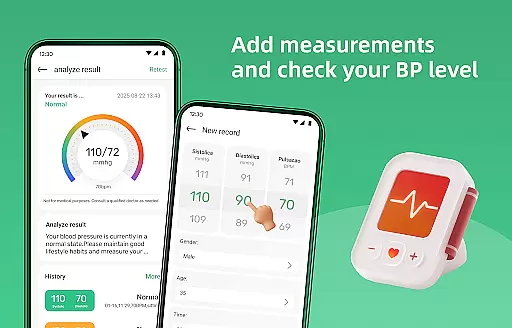
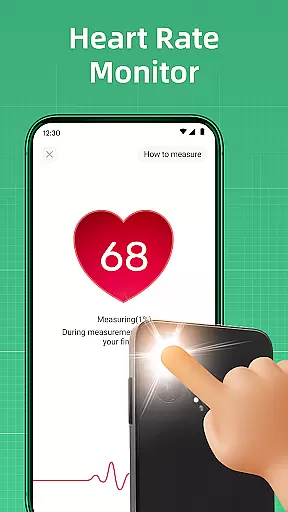
Blood Pressure Log is a comprehensive health tracking application designed to help users monitor and manage their blood pressure effectively. The app features an intuitive interface that makes recording blood pressure readings simple and efficient, allowing users to track changes over time with ease.
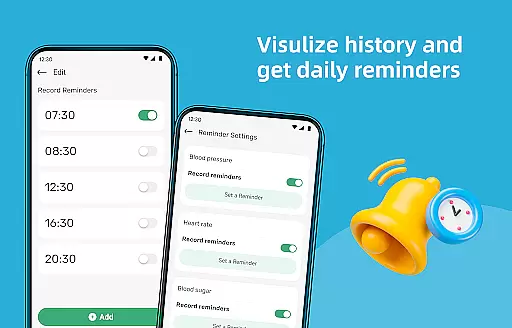
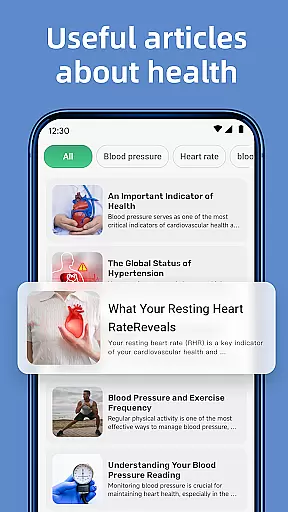
In addition to its core tracking functionality, the app provides access to a wealth of informative articles covering topics such as lifestyle changes, dietary tips, and stress management techniques. Users can also view detailed graphs and trends of their blood pressure history, set personalized measuring reminders, and utilize additional wellness tools like a steps tracker and BMI calculator.
Whether you're focused on improving your cardiovascular health or simply maintaining a healthy lifestyle, Blood Pressure Log offers the tools and insights needed to take control of your well-being. By providing a holistic approach to health management, this app serves as an essential companion for anyone looking to lead a healthier life.
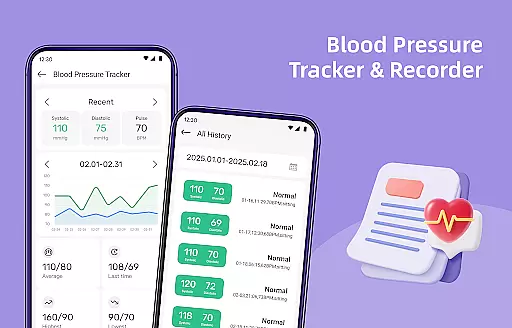
Blood Pressure Log stands out with its robust feature set tailored specifically for health-conscious individuals. The app's primary function allows users to effortlessly track their blood pressure readings through an intuitive interface. This feature not only simplifies data entry but also empowers users by presenting their information in easy-to-understand graphs and trends.
A unique aspect of this app is its collection of expert-curated articles that cover various aspects of blood pressure management and overall wellness. These resources provide valuable insights into lifestyle modifications and self-care strategies. Additionally, the app includes practical tools such as personalized reminders for regular measurements, a steps tracker to encourage physical activity, and a BMI calculator for comprehensive health monitoring.
The combination of these features creates a powerful tool for users seeking to improve their cardiovascular health. By integrating tracking capabilities with educational content and motivational tools, Blood Pressure Log delivers a complete solution for managing one's health effectively.
Personalized planning in health applications refers to the ability to tailor health management strategies according to individual user data and goals. This feature is crucial as it allows users to receive customized advice that aligns with their specific health conditions and objectives.
In Blood Pressure Log, personalized planning is implemented through tracking blood pressure readings and providing detailed history graphs. The app intelligently analyzes trends over time, offering insights into how lifestyle changes impact blood pressure levels. By understanding these patterns, users can adjust their daily habits for better cardiovascular health.
Users benefit significantly from this feature as they gain a clear action plan based on real data. Instead of generic advice, individuals receive targeted recommendations that are more likely to result in tangible health improvements. This personal approach fosters motivation and adherence to healthier practices.
The true value of personalized planning in Blood Pressure Log lies in empowering users to take proactive steps towards managing their health. With informed decisions derived from personalized data analysis, users can work towards reducing risks associated with high blood pressure while achieving peace of mind knowing they are actively improving their well-being.
Progress visualization is an essential feature in health apps that allows users to see their advancements over time visually. This functionality is important because it provides motivation and clarity by presenting complex data in an easily digestible format.
Blood Pressure Log excels in progress visualization by offering detailed graphs and trend analyses of blood pressure readings. Users can view their measurement history over days, weeks, or months, making it simple to spot improvements or identify potential issues early on. Visual cues such as color-coded charts enhance understanding at a glance.
By utilizing these visual tools, users can celebrate milestones and maintain momentum in their health journey. Seeing consistent positive trends encourages continued adherence to healthy habits while highlighting areas needing attention fosters timely interventions. This interactive element transforms routine tracking into an engaging experience.
Ultimately, progress visualization in Blood Pressure Log not only informs but also inspires users to sustain long-term commitment to heart health. With clear evidence of progress readily available, individuals feel empowered and motivated to pursue lasting lifestyle changes that contribute positively to overall wellness.
User-friendly interface
Comprehensive tracking system
Informative health articles
Personalized reminders
Holistic wellness tools
Limited professional medical advice
Premium features require subscription
Occasional syncing issues
Notifications may be intrusive
Data export options limited

Your plan in your pocket 24/7
 3.00
3.00
Transform your body and soul with DBFFitness, with a 40-day fitness journey.
4.1
Get alert about getting out of desired heart rate zone.
4.10
The Official Blood Type Diet® App - know your categorized foods anytime.
4.50
Turn your steps into cash, gift cards & rewards with our step counting pedometer
3.80
Medbridge GO gets you moving - get back to doing what you love, faster!
4.90
Personal step counter for you, private and accurate
4.50
This is an application that serves as a companion app for smart watch.
4.20
Point, scan, and unlock truth in every bite.
4.50
Protect your healthy sleep
4.80
a fun app full of surprises :)
4.70
Easy reconstitution calc for mixing peptides and creating protocols
4.70
Binaural Beats - Fully Customizable Waves - Pure Sound - No Loops
4.50
Relax. Sleep Better. Feel Better.
4.50
Chair Workout: Women's Edition for safe, flexible, and personalized fitness.
4.40
Looking to take control of your health? Our psychology-based programs can help.
4.10
Track sleep cycle, relax with white noise, sleep sounds & smart alarm clock
3.80
Control your sleep in real-time wearing Garmin device
3.60
HRV4Training helps you optimize goals and improve performance. No sensors needed
3.30


User Reviews