
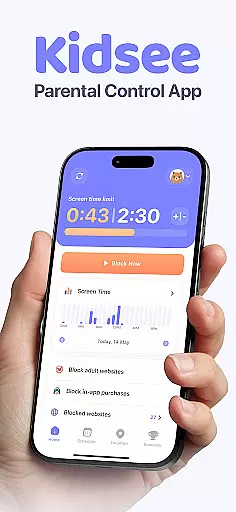
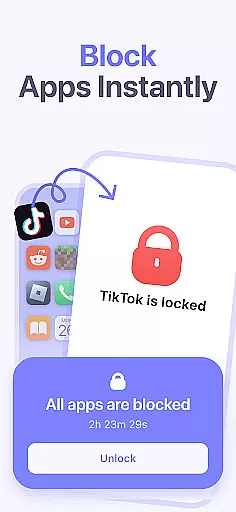
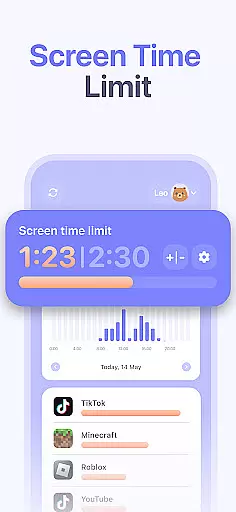
Kidsee Parental Control is a comprehensive family safety solution designed to help parents manage their children's digital habits while ensuring their safety. The app offers flexible screen time controls, allowing parents to remotely lock apps, set daily usage limits, and create custom schedules for different times of the week. This ensures that children maintain a healthy balance between screen time and other activities.
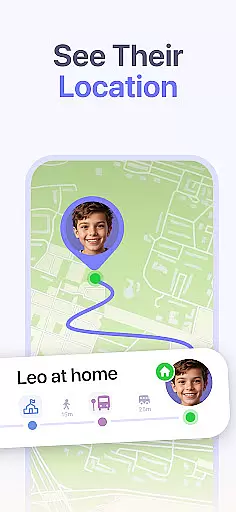
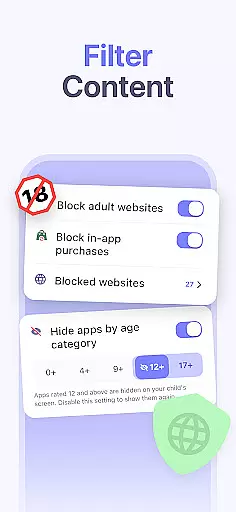
In addition to screen time management, Kidsee provides real-time GPS tracking and location history, giving parents peace of mind about their child's whereabouts. Parents can also monitor phone battery levels to avoid losing connection. With features like content filtering, blocking of adult websites, and prevention of in-app purchases, Kidsee creates a safer online environment for children. The app supports multiple child devices from a single parent account, making it convenient for families with more than one child.
By promoting digital wellbeing and preventing phone addiction, Kidsee empowers parents to guide their children toward responsible device usage. Its intuitive interface and cross-platform compatibility with Android and iOS devices make it an essential tool for modern parenting.
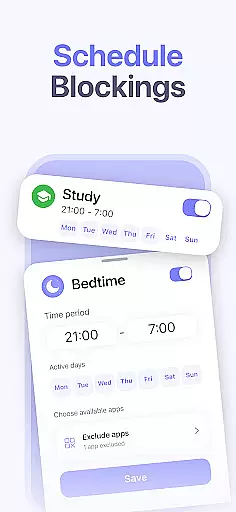
Kidsee Parental Control stands out with its robust feature set tailored for family safety. One of its core functionalities is the ability to control screen time and app usage remotely. Parents can instantly lock distracting apps, set specific time limits for daily use, and establish schedules based on school days or weekends. This granular control helps children focus on important tasks without being sidetracked by games or social media.
The app also includes advanced GPS tracking capabilities. Parents can view their child's real-time location and access historical data to track where they have been. Additionally, Kidsee allows monitoring of the child's phone battery level, ensuring that the connection remains active. These features collectively enhance child safety both online and offline.
Another key aspect of Kidsee is its content filtering system. It automatically blocks inappropriate websites and allows manual additions to the blocklist. By preventing in-app purchases, the app avoids accidental charges and promotes responsible spending habits. Supporting up to 10 child devices from a single parent account, Kidsee simplifies the management process for large families. Its compatibility with both Android and iOS platforms further extends its usability.
When it comes to parenting apps, the credibility of content and expert validation are paramount. Kidsee Parental Control App ensures that all features are designed with the guidance of child psychologists and digital safety experts. This guarantees that the app not only helps in managing screen time but also promotes a healthy digital environment for children.
The app's ability to block adult content and manage in-app purchases is backed by rigorous testing and validation processes. These processes involve experts who understand the nuances of online safety and digital addiction among children. By setting up robust filters and monitoring systems, Kidsee ensures that parents can trust the app to keep their children safe from inappropriate content.
Parents using Kidsee can be confident that the app's recommendations for screen time limits and app blocking are based on expert advice. The custom schedules and daily time limits are crafted to support educational and developmental needs, ensuring that children develop healthy screen habits without compromising on their growth and learning.
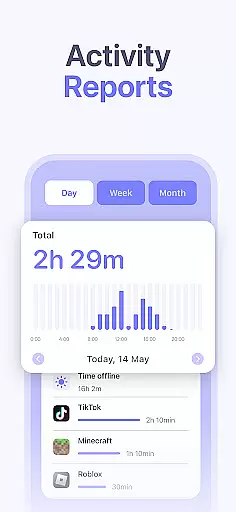
Growth tracking in parenting apps involves monitoring various aspects of a child's digital behavior and development. Kidsee Parental Control App offers precise tracking of app usage, screen time, and location history, providing parents with accurate data to make informed decisions about their child's digital wellbeing.
The app meticulously records every interaction, allowing parents to track which apps their children use most frequently and at what times. This level of detail helps in understanding behavioral patterns and making necessary adjustments to screen time schedules. With real-time GPS tracking, parents can also monitor their child's physical whereabouts, adding another layer of safety.
Kidsee's growth tracking feature extends beyond mere data collection. It includes analytical tools that help interpret the data, offering insights into potential areas of concern such as excessive gaming or social media use. By combining accurate tracking with expert interpretation, Kidsee empowers parents to guide their children towards balanced and healthy digital consumption.
Comprehensive parental controls
Real-time GPS tracking
Supports multiple child devices
Blocks inappropriate content
Promotes digital wellbeing
Requires constant internet
Limited free trial period
Some features need permissions
Premium subscription required
Interface may feel complex

With BabyCam you can monitor your baby using your mobile phone, tablet, PC or TV
 4.40
4.40
Pregnancy and baby formula tips for moms, plus Enfamil coupons & cash back
4.10
Keep Your Family Safe with Pollog Family Assistants
4.10
The 10 development leaps of your baby | newborn milestones & leap days tracker
4.10
Screen Time, App and Web Block & Monitoring, Location Tracker
3.60
App/Game blocker & GPS tracker
4.50
All-In-One Pregnancy Tracker, Your Baby's Milestones, Growth Stages & Parenting.
4.90
Monitor screen time and build healthy habits with Family Safety
3.90
Track baby’s development & growth week by week with BabyCenter’s pregnancy app!
4.90
A simple way to track your baby’s breastfeeding, diaper changes, sleep patterns.
4.90
3D Baby size, Fruit comparisons, Smart Checklist, Trending Names & Training.
4.90
Track your labor contractions
4.90
Kids story books for children. Baby reading books with audio for pre-k toddlers
4.70
Cherish every beat - capture your baby's heart sounds with our app
4.30
Protect kids online safety through GPS tracking,screen time control,app blocking
4.20
Educational resource for parents to inspire creativity in their children.
4.00
Parental Control including Screen time control, GPS tracking, App/Game blocker.
3.90
Discover fun videos, kids songs, bedtime stories and games
3.60
Play activities, milestones, expert-led classes, baby tracker, and more!
3.00


User Reviews