
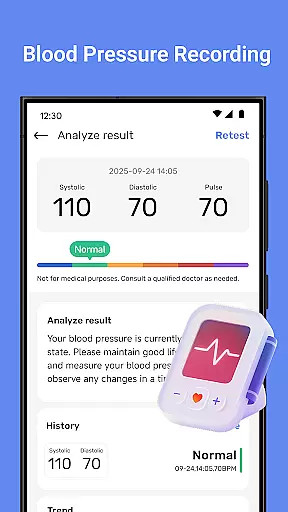
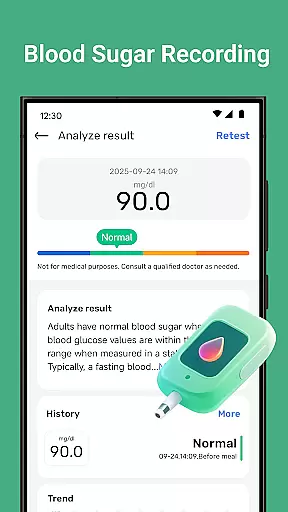
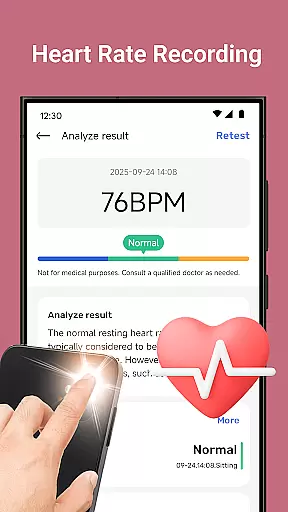
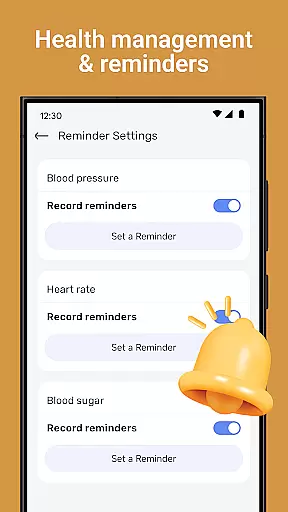
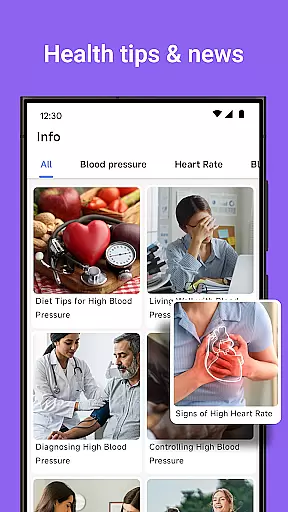
Blood Pressure Tracker is a comprehensive health companion app designed to help users monitor and manage their heart rate, blood pressure, and blood sugar levels. With smart trend analysis and visual charts, the app provides clear insights into your health patterns over time.
The app goes beyond basic tracking by offering wellness reminders, weight management tools, nutrition tips, and mindfulness exercises. These features work together to support a holistic approach to health management. Whether you're looking to track daily fluctuations in vital signs or seeking personalized recommendations for lifestyle improvement, Blood Pressure Tracker serves as a valuable tool in maintaining overall well-being.
Blood Pressure Tracker stands out with its robust feature set tailored for health-conscious individuals. The app allows effortless logging of heart rate, blood pressure, and blood sugar readings, presenting the data through intuitive visual charts that make it easy to understand health trends at a glance.
In addition to tracking, the app offers wellness reminders to drink water, exercise, and rest, ensuring users maintain healthy habits. It also includes guided meditation and breathing exercises to reduce stress, alongside curated daily health tips. Personalized recommendations based on individual health metrics further enhance the user experience, making it an indispensable tool for anyone serious about managing their health effectively.
Personalized planning in health applications refers to the ability to create tailored health strategies based on individual user data. Blood Pressure Tracker exemplifies this by offering personalized recommendations derived from your unique health metrics.
The app meticulously records heart rate, blood pressure, and blood sugar levels, enabling a precise understanding of your health trends. With smart trend analysis, users receive insights into their daily health fluctuations, empowering them to manage their wellness effectively.
Beyond tracking, the application provides customized advice for weight management and nutrition, alongside mindfulness and relaxation features. This holistic approach ensures that each user's health journey is catered to their specific needs, enhancing overall well-being.
Progress visualization is crucial for maintaining motivation and understanding health improvements over time. Blood Pressure Tracker excels in transforming complex health data into easy-to-understand visual charts.
Users can effortlessly review their heart health, blood pressure, and blood sugar changes through intuitive graphs. These visual aids offer instant clarity on health patterns, making it simpler to grasp how lifestyle choices impact overall wellness.
In addition to its tracking capabilities, the app fosters a proactive health mindset by clearly illustrating progress. This empowers users to make informed decisions, ultimately leading to a healthier lifestyle backed by tangible data.
User-friendly interface
Comprehensive health tracking
Smart trend analysis
Personalized recommendations
Wellness reminders
No direct measurement
Limited medical use
Premium features cost
Data entry manual
Internet required

Your Health Has Met Its App (℠)
 3.90
3.90
Home workouts for fitness & fast bodybuilding at home - no equipment needed.
4.90
Control your sleep in real-time wearing Garmin device
3.60
A simple way to calculate peptide doses and also to convert different units.
4.5
Relax. Sleep Better. Feel Better.
4.50
You deserve easy access to important insurance information. Download for FREE.
4.70
Track sleep cycle, relax with white noise, sleep sounds & smart alarm clock
3.80
Easy to use step counter, calorie counter helps lose weight, count steps offline
4.80
Focus on BP & Health
3.80
A brain game that moves you
4.70
When the night comes, we prepare your eyes for deep, sweet dreams
4.70
Load the bar with this barbell & plate calculator. It's leg day, not brain day!
4.70
Build Healthy Habits!
4.60
Period Tracker, the easiest way to track your periods!
4.50
Personal step counter for you, private and accurate
4.50
Pupillary distance PD with camera quick and easy, checking glasses frames on you
3.70
The Sleep Miracle Sound Machine: Soothes baby to sleep with a gentle "Shhh"
3.00
Use your watch as a bike computer, heart rate monitor and cycling power meter
2.50
Text notifications, button control, heart monitor & more for your Amazfit.
2.40


User Reviews