






Facebook is a dynamic social networking app that connects users with real people and communities. It offers a comprehensive platform for exploring interests, shopping, and sharing content. With features like AI-driven information, personalized feeds, and creative tools, it helps users engage meaningfully.
The app supports various forms of communication including video and voice calls, private messaging, and public posts. Users can join groups, follow creators, and customize their profiles to control who sees their content. Facebook's versatility makes it suitable for both casual socializing and professional networking.
Whether you're looking to expand your social circle, promote a business, or stay updated on global trends, Facebook provides the tools to make it happen. Its integration with Meta technologies ensures a safer and more interactive user experience.
Facebook boasts an array of features designed to enhance user engagement. The Marketplace allows users to shop for unique items, while the personalized Feed ensures relevant content visibility. Meta AI provides instant answers to user queries, enhancing the informational aspect.
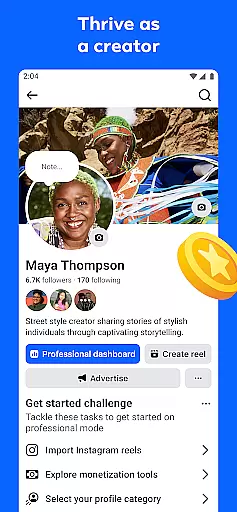
Creative expression is supported through customizable profile settings, AI-generated stickers, and a robust suite of editing tools for creating engaging reels. The app also facilitates meaningful connections via group interactions, direct messaging, and multimedia sharing options.
Privacy controls let users manage their audience and content visibility. Additionally, Facebook's commitment to safety and community guidelines ensures a secure environment for all users. These features collectively contribute to a rich, interactive social media experience.
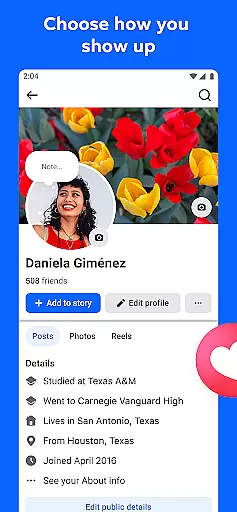
User profile customization is a crucial aspect of any social platform, allowing individuals to express their identity and preferences. Facebook offers extensive options for users to personalize their profiles, from choosing profile pictures and cover photos to detailed 'About' sections.
The platform ensures authenticity through its verification processes. Users can verify their accounts via phone numbers or email addresses, adding a layer of security and trustworthiness to their profiles. This verification helps prevent fake accounts and enhances the overall community experience.
By customizing their profiles, users can control how they present themselves to others. They can highlight their interests, showcase their achievements, and share their life stories. This level of personalization fosters deeper connections and more meaningful interactions within the community.
Ultimately, Facebook's robust customization and verification features empower users to create authentic, trustworthy profiles that reflect their true selves, enhancing both personal expression and community engagement.
Discovering new connections is a fundamental feature of social networks, enabling users to expand their networks and engage with diverse communities. Facebook excels in this area by offering powerful tools for finding and connecting with people who share similar interests or backgrounds.
The platform's recommendation algorithms analyze user behavior, such as groups joined and pages liked, to suggest potential friends and communities. These suggestions are based on mutual connections, shared interests, and common activities, increasing the likelihood of meaningful interactions.
Facebook also facilitates connection discovery through its Groups feature. Users can join specialized groups where they can meet like-minded individuals, participate in discussions, and build relationships around shared passions or goals.
By providing these comprehensive connection discovery tools, Facebook not only helps users grow their social circles but also fosters a sense of belonging and community, making it easier for individuals to find and engage with relevant communities worldwide.
User-friendly interface
Versatile communication tools
Extensive customization options
AI-driven content enhancement
Strong privacy controls
Potential data privacy concerns
Feature availability varies by region
Occasional technical glitches
Ad-heavy interface
Steep learning curve for new users

Match, chat & date with singles nearby. The dating app to find true love
 4.50
4.50
Meet Strangers Online, Live Video Chat & Make Random Video Calls on Joi!
4.30
A gathering place for 300 million people's life interests and hobbies
4.30
Social calendar for friends to make plans, group chat, share events & schedules
4.60
The world's leading social networking app for gay, bi, trans, and queer people.
4.10
Random chat & meet online. Find your soulmate or someone special and have fun!
3.90
Connection Beyond Content
4.50
A warm, simple dating app for adults seeking real connection.
4.20
Reddit is where you’ll find your people and feel at home in every conversation.
4.60
Watch super live shows 24/7, chat & meet friends in Plamfy social networking app
4.70
Live pics from your friends - Only the photos you want to see
4.60
SuperLive is a super popular video-streaming social network
4.60
This version of Facebook uses less data and works in all network conditions.
4.60
Watch 24/7 live stream, and make real friends nearby
4.30
Unlimited messages, WiFi Calling, Texting app. Text now with Second Phone Number
4.10
Create your personal AI chatbot: talk, roleplay, and connect with characters!
4.10
Dive into diverse fandoms. Connect, create, reblog.
3.90
Instant video chat with cool people. Live video call & make friends with Monkey!
3.80
This is to support the developer of Infinity for Reddit. No exclusive features.
4.1


User Reviews