
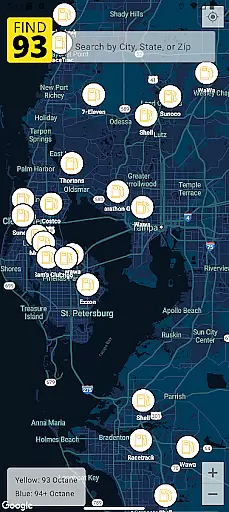
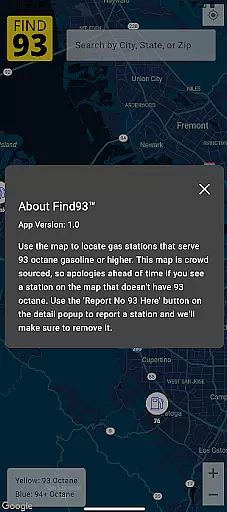

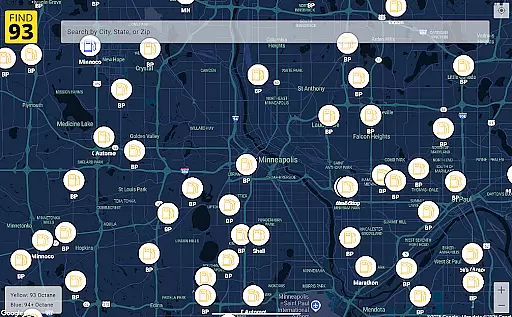
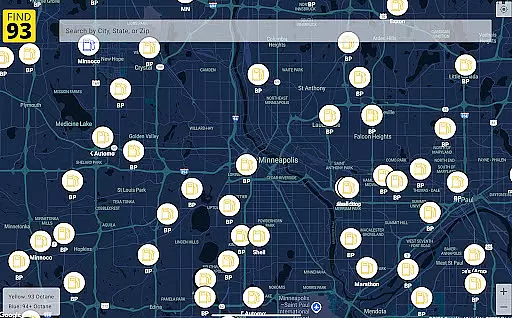
Find93 is a specialized navigation app designed to help drivers locate gas stations that offer 93 octane gasoline or higher. The app's core functionality revolves around its crowdsourced map system, which provides real-time information about fuel stations.
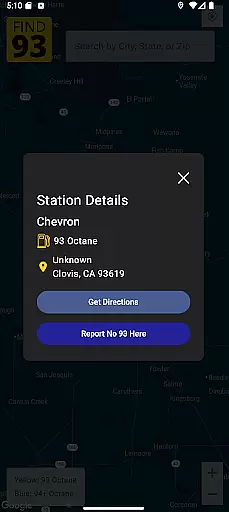
Key features include detailed station information with addresses and fuel types, seamless integration with major navigation apps like Apple Maps and Google Maps, and a user-friendly reporting system for stations that no longer serve high-octane fuel. Whether you're on a long road trip or need premium fuel near your location, Find93 ensures you can find the right station quickly and efficiently.
This app is particularly useful for owners of high-performance vehicles that require premium gasoline, offering peace of mind when traveling through unfamiliar areas.
Find93 stands out in the navigation category through its unique focus on premium fuel locations. The app's crowdsourced map system enables users to both contribute and benefit from real-time updates about gas stations carrying 93 octane fuel.
The reporting feature allows users to flag stations that have stopped providing high-octane options, ensuring the database remains current. Each station listing includes comprehensive details such as exact location, available fuel types, and additional descriptions provided by fellow users.
Integration with multiple navigation systems sets Find93 apart from generic mapping applications. Users can choose their preferred navigation app - whether Apple Maps, Google Maps, or Waze - directly from the station information page, streamlining the process of finding and reaching suitable gas stations.
Map accuracy is essential for any navigation app, and Find93 excels in this area by providing users with the most up-to-date information on gas stations that serve 93 octane or higher. Powered by a crowdsourced map, the app ensures that every station's location and details are current and reliable.
The app's reliance on user contributions means that the map data is continuously updated, reflecting real-time changes reported by the community. This dynamic updating mechanism guarantees that drivers can trust the locations and information displayed on the map when planning their routes to find high-octane fuel stations.
For users, this translates into confidence while traveling. Whether on a road trip or daily commute, they can depend on Find93 to guide them accurately to the nearest suitable gas station without worrying about outdated or incorrect data. This level of precision saves time and enhances overall driving efficiency.
Route planning in Find93 is designed to offer maximum convenience and flexibility for drivers seeking high-octane fuel stations. The app integrates seamlessly with popular navigation apps like Apple Maps, Google Maps, and Waze, allowing users to choose their preferred platform for obtaining directions.
Upon selecting a gas station from the detailed listings available, users can effortlessly initiate route planning. The integration provides multiple routing options based on real-time traffic conditions, ensuring an optimal path tailored to current circumstances. This feature not only simplifies travel logistics but also significantly reduces the stress associated with finding specific types of fuel during journeys.
Ultimately, Find93u2019s route planning capability empowers drivers by equipping them with reliable tools for efficient trip management. By combining accurate station data with advanced navigation technology, it delivers a seamless experience that prioritizes both convenience and reliability in reaching desired destinations swiftly and safely.
User-driven data accuracy
Real-time station updates
Multiple navigation options
Detailed fuel information
Simple reporting system
Limited to premium fuel
Dependent on user input
No offline functionality
Regional limitations
Interface could improve

Offline maps for phone and smart watch: topographic maps, satellite images...
 3.30
3.30
Easy, Moderate and difficult offroad adventures.
4.00
All of NHSA's trail information at your fingertips for the 2025-2026 season
4.1
Navigate confidently with our precise Digital Compass app & Direction Compass!
4.70
Parcel map, property lines, owner, acres, land use, zoning and more from Regrid.
4.60
Get directions, Maps, GPS navigation & GPS Maps using GPS App
4.10
Get route, find shortest path, near by places and weather update
3.90
Get there with the Waymo Driver — The World’s Most Experienced Driver™
4.90
Avoid delays. Get real-time GPS navigation, safety alerts and live traffic.
4.10
GPS Speedometer & Odometer: Track car, bike, truck speed & distance in real-time
4.70
Ride or drive at YOUR price
4.70
Park in Chicago, NYC, Boston, SF, Houston & more!
4.70
Rideshare, taxi cabs, and more for your airport travels and everyday trips.
4.50
Find radar maps, GPS coordinates, altitude, offline maps, location, travel route
4.40
Maps, Driving Directions & GPS navigation using directions app & GPS App
4.30
Simple & easy to use a compass app. Get accurate directions.
4.20
Navigate seamlessly with Real-Time Traffic, Offline Maps, and Voice Navigation.
4.10
Get real-time bus and train schedules for easy, hassle-free city transportation.
3.90
Discover over 800 points of interest along the canal.
3.70


User Reviews