
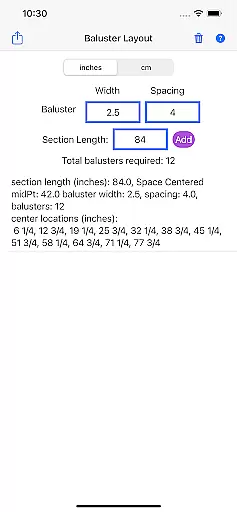
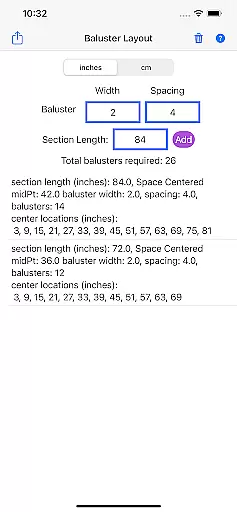
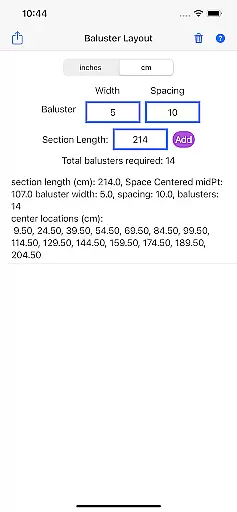
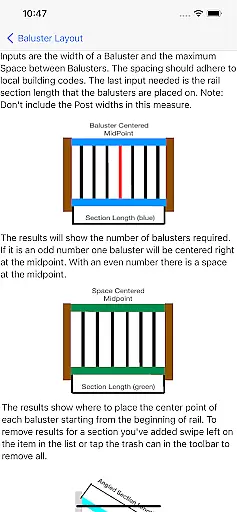
Baluster Layout is a specialized application designed for deck and stair builders who need precise calculations for baluster spacing. The app ensures compliance with building codes by providing accurate measurements and placement recommendations.
With its user-friendly interface, Baluster Layout allows users to input railing length, baluster width, and desired spacing. It then calculates the optimal number of balusters needed and their exact positions. This feature is particularly beneficial for projects involving multiple rail sections with varying dimensions.
Whether you are a professional builder or a DIY enthusiast, Baluster Layout simplifies the process of creating safe and visually appealing structures. By eliminating manual calculations, it saves time and reduces the risk of errors, ensuring that your projects meet all necessary safety standards.
Baluster Layout offers a range of features that cater to both professionals and DIY enthusiasts. One of its standout capabilities is precision spacing, which calculates the optimal distance between balusters to comply with building codes.
The app also supports projects with multiple railing sections, each having unique dimensions. Users can choose between inches or centimeters, providing flexibility to match project specifications. Detailed results include a comprehensive breakdown of the number of balusters required for each section and their exact placement.
By using Baluster Layout, users can save significant time and effort, avoiding costly mistakes associated with manual calculations. This ensures not only the safety and stability of deck or stair railings but also enhances the visual appeal of the final structure.
In the realm of home improvement and construction, having reliable information is crucial. Baluster Layout provides accurate calculations for baluster spacing, ensuring that all data you receive is authentic and complies with building codes. This precision in calculation acts as a verification mechanism for your project's requirements.
The app meticulously processes each set of inputsu2014railing length, baluster width, and desired spacingu2014to generate results that match your specific project needs. By supporting both inches and centimeters, it caters to a global audience, making certain that users can operate within their preferred measurement system.
With features designed to handle multiple rail sections, each with unique dimensions, Baluster Layout offers detailed breakdowns that enhance the authenticity of its listings. Users can trust that every output is not only precise but also tailored to meet diverse project specifications.
Beyond just calculating baluster spacing, Baluster Layout incorporates essential home management features that streamline deck or stair building projects. Its ability to save time and reduce errors by eliminating manual calculations is a significant advantage for both professionals and DIY enthusiasts.
The app ensures safety and stability in your structures by providing exact placements and comprehensive breakdowns of materials needed. This feature helps prevent costly mistakes, ensuring that installations comply with relevant building codes and standards.
Additionally, Baluster Layout enhances user experience through intuitive design and easy-to-understand outputs. By focusing on creating visually appealing and code-compliant structures, it supports users in executing their projects efficiently while maintaining high-quality standards.
Accurate calculations
User-friendly interface
Time-saving tool
Flexible unit options
Comprehensive results
Limited to baluster projects
No 3D visualization
Basic design
Few customization options
Requires manual input

Draw your floor plan smartly. Make house design blueprint with home planner app
 3.60
3.60
Parcel Pending Resident App
4.50
Convert your Phone to HiSense Smart TV Remote Control
4.70
AI floor creator to design your dream house, plan rooms & style your home
4.00
Resident Center, powered by Buildium, is designed with simplicity in mind.
4.50
Control your Vivint Smart Home with the next generation Vivint App.
4.30
Apartment finder for apartments for rent. Compare prices, amenities & rentals.
4.50
Set up your devices, customize settings, and monitor your home—from anywhere
4.40
Houses for Sale & Homes for Rent: Buy Homes, Rent Apartments & Sell Real Estate
4.80
Find your next home, house, apartment, condo, casa, flat, rental, studio, or bed
4.70
Map-based search app for apartments and homes for rent.
4.60
Rent on-the-go with TurboTenant’s app made just for renters
4.50
Control your Daikin, Amana & Goodman heating & cooling systems from anywhere
4.40
AI Home Designer & Room Planner: Decorate your interior space with AI
4.40
Plan your remodel AI home renovation easily using planner 5D and home decor AI.
4.40
Turn your phone into a wifi cam with smart features and umlimited reach.
4.20
Samsung remote app helps control all Samsung Smartthings TVs. Fast and Stable!
4.10
Our app allows Sunrun customers to monitor systems, pay bills, and get support.
3.80
Use Home by ShowingTime to easily manage showings, tours, feedback and more
3.60


User Reviews