


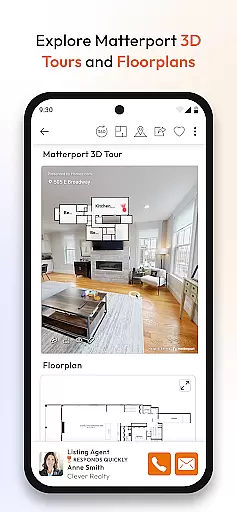


Homes.com Real Estate Search is a comprehensive homebuying platform designed for both homebuyers and real estate agents. The app provides access to homes for sale and rent across the U.S., including detailed neighborhood and school data, mortgage calculators, and collaboration tools. Homebuyers can easily connect with listing agents, estimate home values, and co-shop with family and friends.
For agents, Homes.com offers Homes Pro, a suite of free tools that streamline client collaboration and lead management. Agents can create comparative market analyses (CMAs), share listings on social media, and build their brand through enhanced profiles. The app's robust features help agents provide exceptional service while growing their business in a competitive market.
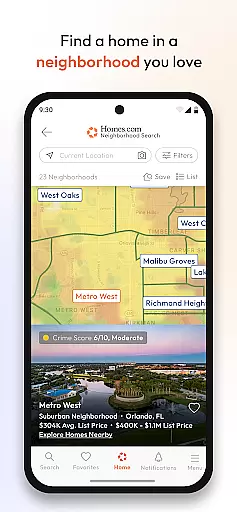
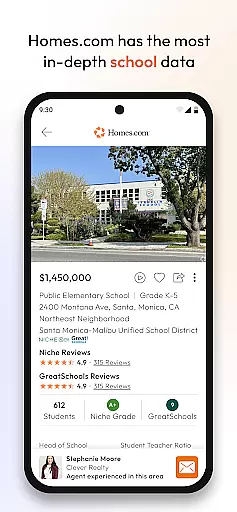
The Homes.com app stands out with its extensive feature set tailored for modern homebuying. Users can search homes using interactive maps with GPS-driven location finders, view current and historical listing photos, and access detailed neighborhood insights. The app includes trusted data from sources like Niche and Great Schools, covering nearby schools, parks, walk scores, and local amenities.
One of the app's key innovations is its collaboration tools, which allow agents and homebuyers to work together seamlessly. Real-time feedback, note sharing, and co-shopping capabilities eliminate the chaos of traditional communication methods. Additionally, exclusive Homes Pro features enable agents to manage leads efficiently, respond promptly to client inquiries, and enhance their professional presence through customizable profiles.
Property listing authenticity is a cornerstone of any real estate application, ensuring users have access to accurate and verified property information. The Homes.com app excels in this area by sourcing its listings directly from MLSs and their data providers, guaranteeing the most up-to-date and reliable data available on homes for sale and rent across the U.S.
The app goes beyond just listing properties; it provides current and historical listing photos, allowing users to see how a property has evolved over time. This feature not only adds transparency but also builds trust with users who can make more informed decisions based on visual evidence.
Furthermore, Homes.com offers detailed neighborhood overviews curated by an in-house team of researchers and photographers. These overviews include insights into nearby schools, parks, walk scores, restaurants, and social events, all of which contribute to verifying the authenticity of the listings by giving context to each property's location.
By combining verified property listings with rich contextual data about neighborhoods, Homes.com ensures that users are presented with genuine and comprehensive property information, enhancing their homebuying experience significantly.
Home management features in real estate apps provide essential tools for both homebuyers and agents to streamline the property search process. Homes.com offers robust collaboration tools that allow users to co-shop with friends, family, and agents seamlessly. This feature transforms the traditionally chaotic process of sharing emails, texts, and PDF attachments into a cohesive, real-time feedback system.
For agents, Homes Pro extends these capabilities by integrating lead management, client collaboration, and social media sharing into one platform. Agents can create Comparative Market Analyses (CMAs) quickly, respond promptly to client inquiries, and share listings directly on social platforms, thus enhancing their service quality and efficiency.
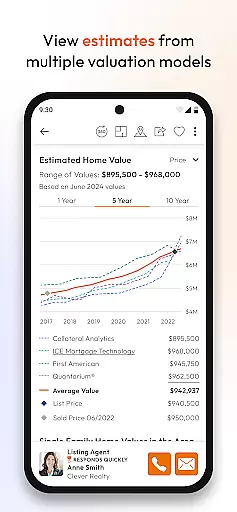
In addition to collaboration tools, Homes.com provides mortgage calculators and home value estimates from multiple sources. These financial planning instruments empower users to estimate monthly payments and understand the true cost of potential homes, making the homebuying journey more transparent and manageable.
Overall, Homes.com's home management features offer a comprehensive suite of tools designed to simplify and enhance the homebuying process for all parties involved, setting a new standard for user experience in the real estate industry.
User-friendly interface
Comprehensive property listings
Advanced collaboration tools
Detailed neighborhood insights
Free agent tools
Limited international listings
Premium features require subscription
Occasional performance issues
Steep learning curve for new users
Ads in free version

Make Renting Easy
 4.40
4.40
Technology powering many in-home services for residents across the United States
3.80
Find paints using a Color Muse & ColorSnap® Match
3.60
Parcel Pending Resident App
4.50
Resident Center, powered by Buildium, is designed with simplicity in mind.
4.50
Control the scent and ambiance of your home and car, right from your phone.
4.50
AI Home Designer & Room Planner: Decorate your interior space with AI
4.40
Turn old phones into security cameras, baby monitors, pet cams, and more.
4.70
Make your phone a surveillance camera remote with a home camera app for Android!
4.40
Connect with reliable pros for maintenance services, plumbing, and home design!
4.80
Real estate app to find homes for sale or rent in the right neighborhood for you
4.70
Find your next home, house, apartment, condo, casa, flat, rental, studio, or bed
4.70
Tailored Care Guides For Houseplants, Indoor Plants, Garden Plants & Flowers.
4.60
Night Owl Protect helps you secure, protect, and connect your world!
4.60
Apartment finder for apartments for rent. Compare prices, amenities & rentals.
4.50
Find contractors for all home renovation projects. Remodeling, repair, and more.
4.20
Floor Plan Creator Home Design with 2D interior design and 3d view.
3.90
Our app allows Sunrun customers to monitor systems, pay bills, and get support.
3.80
IP camera view and playback, for your WiFi cam or home security cctv system.
3.70


User Reviews