
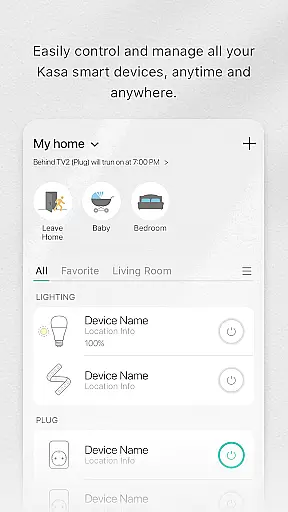
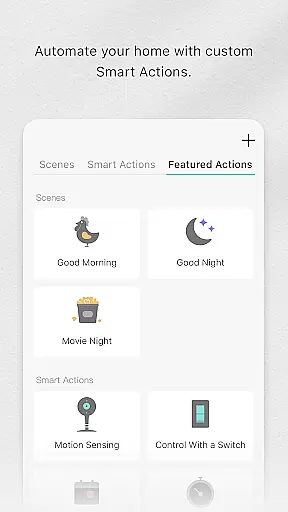
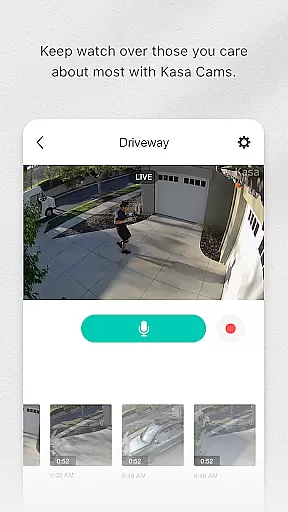
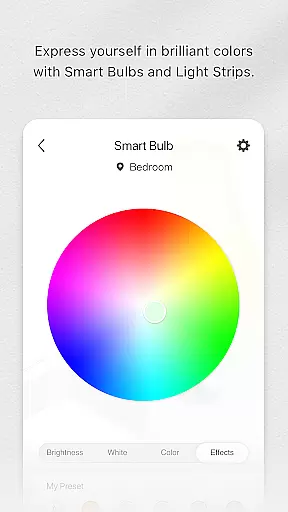
Kasa Smart is a comprehensive home automation app designed to manage TP-LINK smart devices. It allows users to remotely control and schedule appliances such as smart plugs, switches, power strips, bulbs, cameras, routers, and range extenders. With its intuitive interface, users can easily configure and monitor their smart home ecosystem from anywhere in the world.
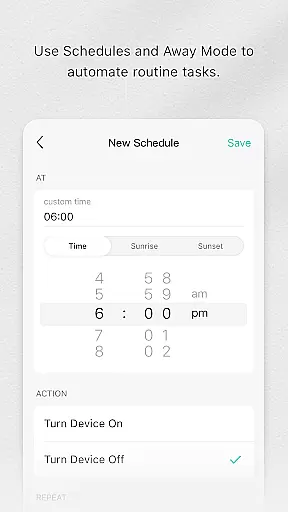
The app's standout feature is its scheduling capability, which enables users to automate device operations based on their daily routines. Additionally, the Away Mode provides an extra layer of security by simulating occupancy to deter potential intruders. Whether you're looking to enhance convenience or improve energy efficiency, Kasa Smart offers practical solutions for modern living.
Kasa Smart stands out with its extensive compatibility across various TP-LINK smart devices, making it a versatile tool for home automation enthusiasts. The app supports advanced scheduling features, allowing users to create customized routines for different devices. This ensures optimal energy usage and convenience tailored to individual preferences.
Beyond basic control, Kasa Smart incorporates security-focused features like Away Mode, which automatically turns lights on and off to simulate occupancy. The app also provides detailed monitoring capabilities, enabling users to track device status and energy consumption patterns. These features collectively contribute to a smarter, safer, and more efficient home environment.
Kasa Smart by TP-LINK offers a comprehensive range of smart home devices that cater to various lifestyle needs. The app supports an extensive lineup including smart plugs, switches, power strips, bulbs, IP cameras, routers, and range extenders.
With this broad selection, users can automate and control multiple aspects of their home environment. Whether it's managing lighting, securing the home with cameras, or optimizing network coverage, Kasa Smart ensures all essential areas are covered.
The integration of these devices into one platform provides convenience and simplicity. Users can easily add, configure, monitor, and control all their connected devices from anywhere in the world.
This wide-ranging compatibility makes Kasa Smart a versatile choice for anyone looking to enhance their living space with smart technology.
The Kasa Smart app assures content authenticity by offering genuine TP-LINK products and features that are verified and reliable. Each device is designed and tested to meet high standards of performance and safety.
Expert credibility is established through rigorous testing and certification processes. All devices comply with industry standards and regulations, ensuring they perform as advertised.
Users benefit from the peace of mind that comes with using professionally endorsed equipment. This reliability fosters trust and confidence in the smart home ecosystem created by TP-LINK.
Moreover, regular updates and support from TP-LINK experts ensure that the app remains up-to-date with the latest technological advancements and security protocols.
User-friendly interface
Extensive device compatibility
Advanced scheduling options
Away Mode for enhanced security
Remote access from anywhere
Limited to TP-LINK devices
Requires stable internet connection
No voice assistant integration
Basic energy monitoring only
Occasional connectivity issues

Pay your rent, submit work orders and much more with the RentCafe Resident App.
 4.70
4.70
Designed to delight, impress and energize your festive spirit every single day
4.5
Unique Dark Analog style for Wear OS watches.
4.1
BILT interactive 3D instructions help you get the job done right
3.50
Digital smart watch face made for Wear OS.
4.70
Retro animated weather with hourly forecast Watch Face for Wear OS
4.60
Celebrate the holidays with Advent Calendar: daily surprises and festive fun!
4.2
PARAVOX 4 is a professional ITC paranormal research application.
4.50
Remotely monitor the time and temperature of food cooking on your grill.
4.60
Have your Tehillim with you at all times
4.70
Colorful minimal digital watch face for Wear OS
4.60
Stay connected with your loved ones & vehicles | Share live GPS location updates
4.60
Discounts, savings, and rewards
4.20
Fly your Solo like a boss.
4.10
SmartHQ: Your Connected Home Command Center
4.10
Spiritus Ghost Box is an Audio and Visual ITC tool for paranormal research.
4.00
Design and brew great homebrewing beer, mead, cider and wine recipes on the go!
3.60
Connect to your Shark ROBOT™ from anywhere using the SharkClean™ App.
3.60
Creativity and savings for kids, beginners and experts in arts and crafts
3.50


User Reviews