
Micro SD Card Formatter is a specialized application designed to help users format and repair their SD cards directly from their mobile devices. The app provides an efficient solution for erasing and formatting damaged memory cards while ensuring the safety of important files and data.
Key features include the ability to browse all folders and files on both the device and Micro SD Card, select specific memory types for formatting, and resolve common issues like write protection or sudden changes in storage capacity. Its lightweight design and user-friendly interface make it an ideal tool for managing your SD card needs.
This app is particularly useful for individuals who frequently use memory cards for data storage and transfer. Whether you need to clean up memory space, recover lost files, or simply maintain optimal card performance, Micro SD Card Formatter offers a reliable solution that ensures your data remains secure throughout the process.
Micro SD Card Formatter stands out with its comprehensive feature set tailored specifically for SD card management. One of its core capabilities is the ability to format damaged Micro SD cards efficiently, allowing users to transform their malfunctioning cards into usable storage again.
The app also includes advanced recovery options, enabling users to retrieve lost data such as pictures, videos, and files. It supports browsing of all folders and files on both internal storage and external SD Cards, providing flexibility in file management. Users can easily copy, move, or delete files between their phone and SD Card, streamlining the data organization process.
Additional notable features include resolving common SD card issues like write protection errors and unexpected capacity changes. The app's lightweight nature and intuitive design ensure smooth performance without compromising device resources, making it an essential tool for anyone looking to maintain their SD card's health and functionality.
When it comes to formatting and recovering data from a damaged SD card, the Micro SD Card Formatter app offers a comprehensive set of features that ensure functionality completeness. The app allows users not only to format their memory cards but also browse all folders and files on their device or Micro SD Card.
The application provides an extensive selection of tools for memory management, including the ability to choose between internal memory or SD Card for formatting purposes. It addresses common issues like the inability to write or transfer files to the SD card and the sudden change in the overall size of the SD card, making sure every aspect of SD card maintenance is covered.
Users benefit from having an all-in-one solution that is lightweight and easy to use, which consolidates various functions into a single platform. This means they no longer need multiple apps for different tasks related to their SD cards. With this app, users can efficiently erase and format their damaged memory cards while keeping important files and data safe.
Micro SD Card Formatter stands out with its commitment to usability and operational smoothness. The app's interface is designed to be user-friendly, ensuring that even those who aren't tech-savvy can navigate through its features with ease. Its lightweight nature contributes to its operational efficiency, allowing users to perform tasks without experiencing lags or crashes.
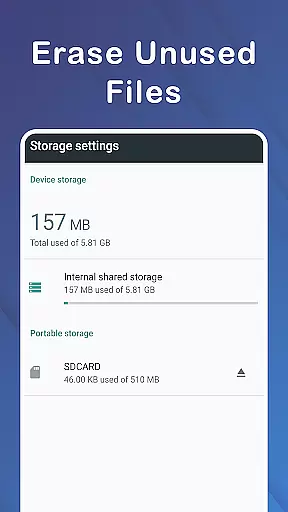
In addition to formatting, the app enables users to clean up memory, copy, and move files between their phone and SD Card seamlessly. This versatility enhances the overall user experience by providing practical solutions for everyday storage management challenges.
By focusing on smooth operations, Micro SD Card Formatter ensures that users can transform their SD Cards into what feels like new ones without any hassle. The peace of mind that comes with knowing your data is safe and secure during these processes exemplifies the app's dedication to delivering a reliable and stress-free service.
Efficient formatting
Data recovery
User-friendly
Lightweight
Versatile file management
Limited to SD cards
Basic UI design
No cloud backup
Occasional bugs
Ads in free version

Game Booster GFX for smoother gaming experience. Enjoy 120 FPS and 4x Game Space
 4.20
4.20
Enjoy Minecraft Mod Scary Neighbor Granny for Minecraft PE.
4.30
An essential GFX utility developed for specific FPS mobile games
4.50
Collection of Maps and Mods for Dmod
3.30
use your smartphone as Remote control drones .
4.20
Mirror Link Car Display to share your screen with car dashboard wirelessly
4.0
Mobs maker Minecraft help MCPE creators make their own mob by using Blockbench
3.50
CloudEye 365 is a easy-handling APP
3.60
The best PS2 games from your childhood come to life in their mobile version!
4.00
Demo for Key Attestation feature of the Android system.
4.80
Study Bible King James Version: the correct way to learn the Bible with audio
4.80
Explore The Holy Quran Majeed for Muslim. Listen to MP3 Quran & Al Quran Kareem.
4.80
Barcode scanning made simple!
4.40
Unlock the hidden menus of your phone with our mobile secret codes app.
4.20
Connect and find your Smarttag devices through our app.
4.00
Demo version of the mcpro24fps manual video camera. Try and buy a full version!
4.00
DamonSx2 is the open Source LGPL Emulator
3.20
Record with Double Camera Video Recording using Dual Camera Front and Back Video
3.00
Turn your phone into a wireless Xbox controller – play, stream & control anytime
4.0


User Reviews