
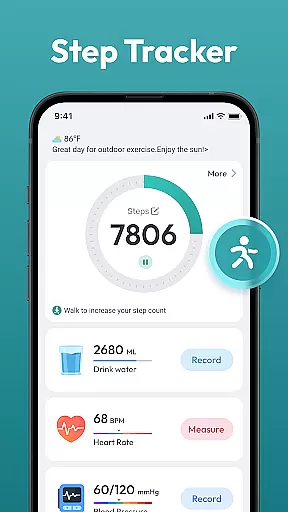
Step Counter - Pedometer App is a comprehensive health and fitness tool designed to help users track their daily physical activity. This app automatically counts steps and calculates distance traveled, making it ideal for those looking to monitor their walking or running routines.
In addition to basic step tracking, the app offers advanced features such as daily, weekly, and monthly activity charts, training courses, and personalized plans. These tools are particularly useful for individuals aiming to lose weight, improve their overall fitness, or achieve specific goals like walking 10,000 steps per day.
The app's compatibility with most Android devices and its user-friendly interface make it accessible to a wide audience. Whether you're a fitness enthusiast or just starting your health journey, Step Counter - Pedometer App provides valuable insights into your daily activities without requiring any additional wearable devices.
Step Counter - Pedometer App stands out with its automatic step counting feature, ensuring accurate tracking without manual input. The app supports a variety of Android devices, eliminating the need for external wearables while still delivering precise data on steps and distance covered.
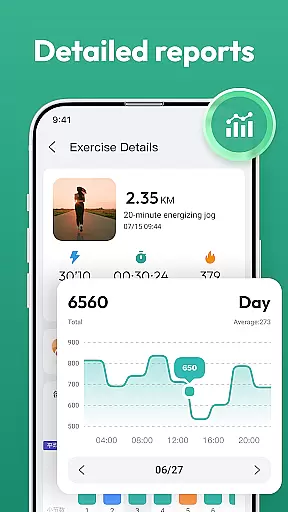
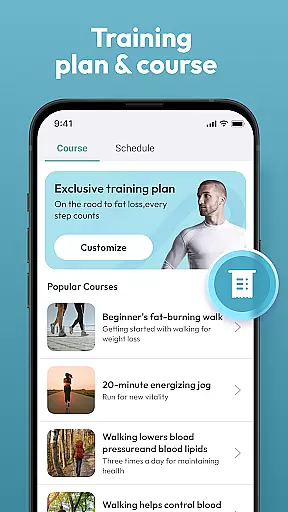
One of the key highlights is the availability of detailed activity charts that display daily, weekly, and monthly progress. These visual representations help users understand their activity patterns over time and stay motivated. Additionally, the app includes training programs and plans tailored to different fitness levels, enhancing the user experience by providing structured guidance.
The interface is designed to be intuitive and easy to navigate, allowing users of all ages to utilize the app effectively. With features like health data tracking and goal setting, Step Counter - Pedometer App not only monitors but also encourages a healthier lifestyle through consistent engagement and feedback.
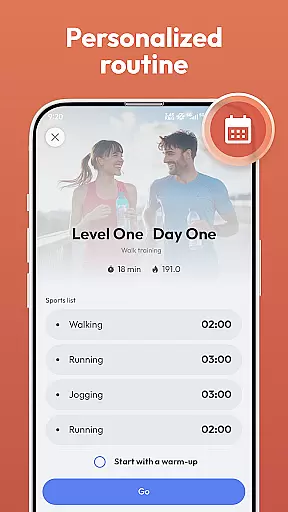
Personalized planning in a health and fitness app refers to the ability to create tailored workout and activity plans that align with individual goals. Step Counter - Pedometer App offers personalized planning by allowing users to choose specific training programs that suit their fitness objectives.
The app supports automatic step counting, which means it can track your daily movements without any manual input. This feature enables the app to gather data on your activities and adjust its recommendations accordingly. For instance, if you consistently surpass your step goals, the app might suggest more challenging targets.
Users benefit from this feature as it helps them stay motivated by providing realistic and achievable goals. The app's compatibility with most Android devices ensures that a wide range of users can access these personalized plans without needing additional wearable devices.
Progress visualization is crucial for maintaining motivation and tracking improvements over time. In Step Counter - Pedometer App, progress visualization is achieved through detailed charts and records that display various health data such as steps taken, distance covered, and other metrics.
The app provides daily, weekly, and monthly charts that give users a clear picture of their activity trends. These visual aids help users understand their performance and make necessary adjustments to their routines. Additionally, the app tracks different types of health data, offering a comprehensive view of oneu2019s fitness journey.
With progress visualization, users can celebrate milestones and maintain momentum towards their fitness goals. The user-friendly interface ensures that all users, regardless of age or tech-savviness, can easily interpret their progress and stay engaged with their health objectives.
User-friendly design
Accurate step tracking
No extra hardware needed
Detailed progress charts
Customizable training plans
Limited to Android
Drains battery life
Occasional inaccuracies
Ads in free version
No iOS support

Create powerful subliminal audio with custom affirmations and background music.
 4.00
4.00
Personal Measurements - Track your gains!
4.50
Pack of 66 calming lullabies for smooth fall asleep and relaxation
4.10
Relax. Sleep Better. Feel Better.
4.50
Walk. Earn: Get rewarded for every step! Walk, move, and earn real rewards.
4.70
Pilates, Calisthenics, Yoga
4.50
Manage your and your family's health information.
4.60
Mood journal, habits, self-care tracker, self-love
4.90
Workouts for everyone
4.70
Protect your healthy sleep
4.80
A brain game that moves you
4.70
Build Healthy Habits!
4.60
Raccoon AI Calorie Counter. Intermittent Fasting & Timer. Macro, Carb, Protein
4.50
50 HD sounds to help you relax during the day and sleep great at night!
4.40
Your Health Has Met Its App (℠)
3.90
Control your sleep in real-time wearing Garmin device
3.60
GloryFit is a companion app for the smart bracelet.
3.60
The Sleep Miracle Sound Machine: Soothes baby to sleep with a gentle "Shhh"
3.00
Use your watch as a bike computer, heart rate monitor and cycling power meter
2.50


User Reviews