
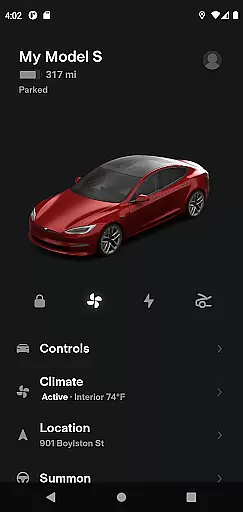
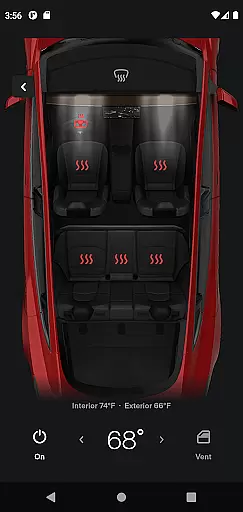
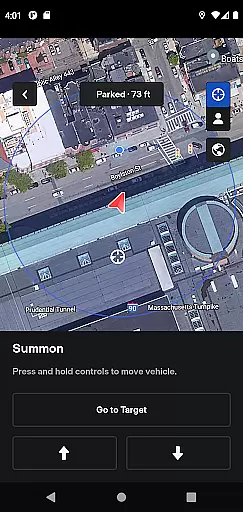
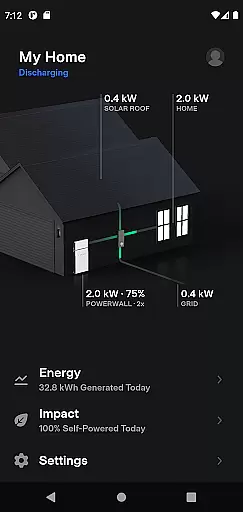
Tesla is a comprehensive lifestyle app that connects vehicle owners with their Tesla cars and Powerwalls in real time. The app allows users to remotely control charging, climate settings, locking, and navigation while offering unique features like Summon for self-parking assistance and solar energy monitoring.
Designed for Tesla owners, the app enhances convenience by enabling remote management of vehicle functions and home energy systems. Whether you're checking your car's location or managing solar power storage, Tesla provides an intuitive interface that seamlessly integrates vehicle and energy management into daily life.
The Tesla app stands out with its robust feature set tailored for both vehicle and energy management. Users can monitor charging progress in real time, pre-condition their car's temperature remotely, and even locate their vehicle using GPS. These features are particularly useful for owners who want to maximize convenience and efficiency.
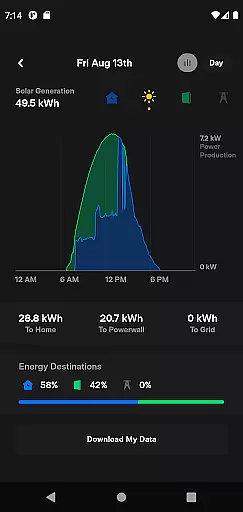
Additionally, Tesla offers advanced capabilities such as Summon, which helps navigate tight parking spaces, and software updates that ensure your vehicle remains up-to-date with the latest features. For Powerwall users, the app provides detailed insights into solar energy production, home usage, and grid export, making it an essential tool for sustainable living.
The Tesla app offers an extensive range of features that cater to various aspects of a user's lifestyle, ensuring comprehensive coverage of needs for both vehicle and home energy management.
With functionalities ranging from real-time charging updates and climate control to remote locking and solar energy monitoring, the app integrates seamlessly into daily life, providing convenience and efficiency.
Owners can manage their vehicles and Powerwalls with ease, accessing controls for navigation, media, and even summoning their car remotely, all tailored to enhance the modern living experience.
This broad spectrum of services ensures users have everything they need at their fingertips, making the Tesla app an indispensable tool for a connected and sustainable lifestyle.
The Tesla app provides authentic and credible content directly from Tesla, a renowned leader in electric vehicles and renewable energy solutions, guaranteeing reliable information and functionality.
All features within the app are developed based on Tesla's deep expertise in automotive engineering and energy storage, offering users accurate and trustworthy data about their vehicles and energy usage.
Regular software updates ensure that the app remains up-to-date with the latest advancements and improvements, reflecting Tesla's commitment to quality and innovation.
Users can trust the app to deliver precise information regarding their vehicleu2019s status and energy consumption, backed by Tesla's reputation for excellence and cutting-edge technology.
Real-time vehicle control
Remote charging management
Energy monitoring tools
Intuitive user interface
Advanced Summon feature
Limited to Tesla owners
Requires Powerwall 2
No third-party integrations
Dependent on internet connectivity
Premium feature access costs

Fly your Solo like a boss.
 4.10
4.10
Paranormal EVP, Ghost Box, Spirit box, ITC, Haunted, Spirit communication device
3.70
The go to app for taking unlimited notes!
4.50
Smart & Healthy Living
4.60
SmartHQ: Your Connected Home Command Center
4.10
Creativity and savings for kids, beginners and experts in arts and crafts
3.50
AAA Mobile provides on-the-go access to the services you know and trust.
4.60
Decorate your home screen with custom icons, color widgets, themes & wallpapers
4.70
Just play, earn rewards, fetch gift cards, and turn gaming into real payouts!
4.80
My Diary - Daily Journal with lock: Diary journal app and secret diary with lock
4.80
Tap to the beat with interactive videos — warm up your reflexes & have fun
4.70
Have your Tehillim with you at all times
4.70
Stay connected with your loved ones & vehicles | Share live GPS location updates
4.60
Colorful selection floral watch face with gyro for Wear OS
4.60
Vehicle ownership simplified. Get the myChevrolet® app today.
4.60
Digital watch face design. Modern looking, hi-res & battery friendly.
4.00
Spiritus Ghost Box is an Audio and Visual ITC tool for paranormal research.
4.00
Smart home security protection
3.20
Cute animated Thanksgiving watchface for your WearOS smartwatch
4.2


User Reviews