
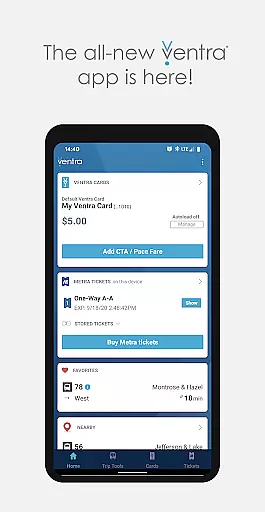
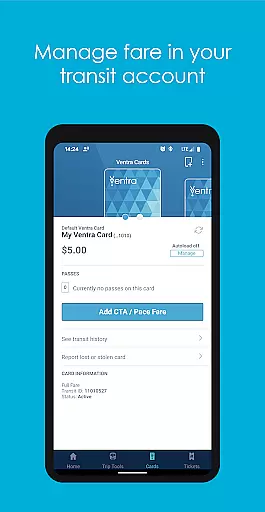
Ventra is a comprehensive transit management app designed specifically for the Chicago metropolitan area. This powerful application allows users to effortlessly manage and pay fares across all major transit systems, including CTA, Metra, and Pace buses and trains. With its intuitive interface, Ventra provides real-time account notifications, ensuring you never miss a fare reload or ticket purchase.
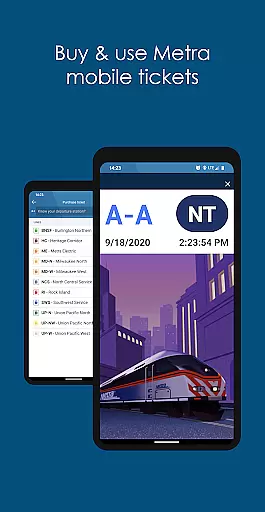
The app goes beyond basic fare management by offering advanced features such as mobile ticketing for Metra trains and real-time arrival/departure information from multiple transit providers. Whether you're commuting to work or exploring the city, Ventra streamlines your transit experience by consolidating all essential features in one convenient location, making urban navigation simpler than ever before.
Ventra distinguishes itself through its robust feature set tailored for Chicago commuters. The app enables users to check their Ventra Card's balance and available passes instantly, while also providing the ability to load value or passes directly to their transit account. Its innovative mobile ticketing system for Metra trains revolutionizes traditional paper-based tickets, allowing passengers to purchase and use tickets directly from their smartphones.
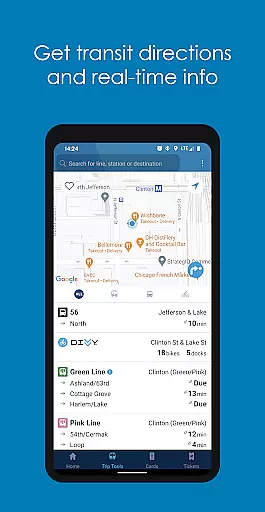
Additional features include customizable autoload settings for transit value or passes, real-time arrival/departure information from CTA, Metra, and Pace, and location-based service alerts. These capabilities ensure that users can plan their journeys effectively and make informed decisions about their travel routes. By integrating multiple transit systems into a single platform, Ventra significantly enhances the convenience and efficiency of navigating Chicago's complex transportation network.
Map accuracy is essential for any navigation app, and Ventra excels in this area by providing precise transit information for the Chicago area. The app aggregates real-time data from CTA, Metra, and Pace, ensuring that users receive the most up-to-date transit details.
Ventra's mapping feature allows users to access real-time arrival and departure information from multiple transit services all within a single platform. Whether you're picking a specific stop, using favorites, or checking service near your current location, the app delivers accurate and reliable mapping data.
The value of this accuracy is immense for commuters who rely on timely transit information to plan their journeys efficiently. With Ventra, users can make informed decisions about their routes, reducing wait times and avoiding travel disruptions.
Effective route planning is crucial for seamless urban transit, and Ventra offers robust tools to help users navigate Chicago's complex transportation network. By integrating various transit modes into one interface, the app simplifies the process of planning multi-segment journeys across buses and trains.
Ventra provides options for different route preferences, including the shortest travel time, least number of transfers, or even specific transit modes. Real-time updates ensure that any changes in schedules or unexpected delays are immediately reflected in the planned routes.
Users benefit from enhanced travel efficiency and peace of mind, knowing they have the optimal route mapped out. This comprehensive approach to route planning makes Ventra an indispensable tool for both daily commuters and occasional travelers in the Chicago metropolitan area.
User-friendly interface
Real-time notifications
Mobile ticketing
Multi-system integration
Location-based alerts
Limited to Chicago area
Occasional bugs
Requires internet
Account linking issues
Learning curve

Start your next adventure confidently using our Accurate Compass App
 3.70
3.70
Discover over 800 points of interest along the canal.
3.70
CamSam PLUS - The speed and red light camera warning system!
4.40
OpenCPN is a full featured ChartPlotter and Navigator for Android.
3.60
"Balad" is a map and navigator with a Persian voice assistant and a complete city guide
4.40
Parcel map, property lines, owner, acres, land use, zoning and more from Regrid.
4.60
GPS Speedometer & Odometer: Track car, bike, truck speed & distance in real-time
4.70
Ride or drive at YOUR price
4.70
Rideshare, taxi cabs, and more for your airport travels and everyday trips.
4.50
Navigate with your watch and keep the phone in your pocket!
4.60
Voice GPS with driving directions, offline maps navigation GPS for safe travel
4.50
GPS navigation offers route finder, compass, translator, currency converter, etc
4.30
Get matched with a nearby driver — you’ll be on your way in minutes.
4.30
Phone Tracker and GPS Location Sharing
4.20
Lets explore the world's famous places by using Live Cams, GPS & Satellite View.
4.20
Navigate seamlessly with Real-Time Traffic, Offline Maps, and Voice Navigation.
4.10
Explore Earth with live GPS, satellite view & street navigation
3.60
Your guide to the recreational opportunities of the Bureau of Land Management!
3.40
Fully offline 1:50k New Zealand topographical map North Island
4.3


User Reviews