
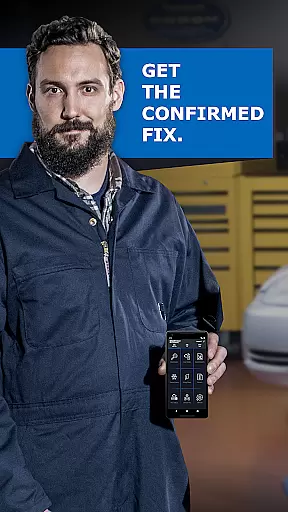
BlueDriver OBD2 Scan Tool is a professional-grade automotive diagnostic application that transforms your smartphone or tablet into a powerful vehicle scanning tool. Designed for both professional mechanics and DIY enthusiasts, the app pairs seamlessly with the BlueDriver Bluetooth Sensor (sold separately) to provide comprehensive diagnostic capabilities.
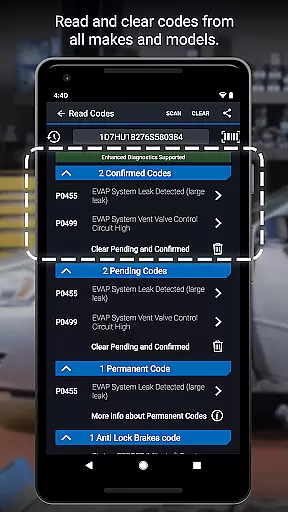
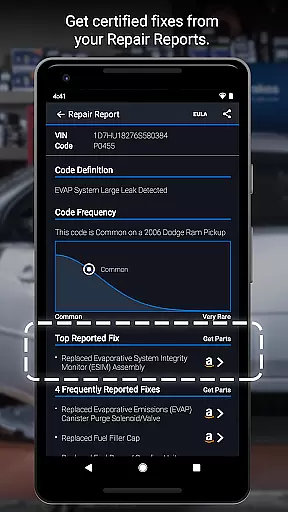
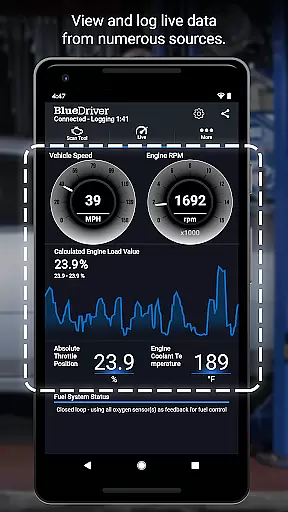
The application allows users to read and clear trouble codes across multiple systems including engine, ABS, airbag, and transmission. Its standout feature is the ability to generate detailed Repair Reports specific to your vehicle's make, model, and year. These reports help users understand issues and make informed repair decisions. Additionally, the app offers advanced functionalities like Mode 6 test results, smog readiness checks, and live data graphing.
Whether you're diagnosing a check engine light or performing pre-smog tests, BlueDriver provides clear, actionable information. The wireless Bluetooth connectivity ensures a hassle-free experience while the extensive vehicle coverage makes it suitable for most modern cars. This combination of features delivers exceptional value for car owners seeking reliable diagnostic solutions.
BlueDriver distinguishes itself through its comprehensive diagnostic capabilities and user-friendly interface. The app supports reading and clearing codes from various vehicle systems including engine, ABS, airbag, and transmission modules. Its unique Repair Report feature generates professional-grade reports based on your vehicle's specific VIN and trouble codes.
Advanced diagnostic functions include Mode 6 test result interpretation, freeze frame data capture, and multi-PID live data graphing. Users can monitor real-time sensor data and switch between metric and imperial units. The application also provides plain-language explanations for likely fixes, making complex diagnostics accessible to non-professionals.
The app's enhanced diagnostics cover major manufacturers including GM, Ford, Toyota, and Nissan, with specific support for newer models from Hyundai, Kia, and Mitsubishi. Its global compatibility, combined with a robust database of real-world fixes, ensures accurate and relevant diagnostic information. The wireless Bluetooth connection simplifies the diagnostic process while maintaining reliable communication with the vehicle's onboard systems.
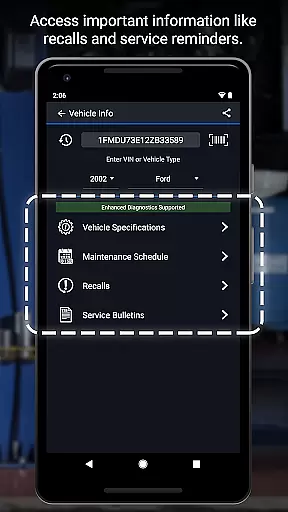
Accessing detailed vehicle information is crucial for effective diagnostics and maintenance. BlueDriver OBD2 Scan Tool provides comprehensive data about your vehicle's health, including trouble codes from various systems like ABS, airbag, transmission, and more.
The app generates professional-grade Repair Reports specific to your vehicleu2019s year, make, and model. These reports not only list the issues but also suggest likely fixes in plain language, making it easier for both professional mechanics and DIY enthusiasts to understand and address problems.
With features like Mode 6 on-board monitoring test results and freeze frame data, users can dive deep into their vehicle's performance metrics. This level of detail ensures that you have all the necessary information at your fingertips to make informed repair decisions.
Price transparency is essential when choosing diagnostic tools, as hidden costs can significantly impact your budget. BlueDriver offers a unique advantage by providing an app that is free to install and use without any subscription fees.
The BlueDriver Sensor, which pairs with the app via Bluetooth, is sold separately but represents a one-time purchase. This straightforward pricing model allows users to know exactly what they are paying for upfront without worrying about recurring charges or hidden fees.
Additionally, the availability of enhanced diagnostics coverage for various car models across different regions ensures that users get value for their money. Whether you own a GM, Ford, Toyota, or other popular brands, BlueDriver delivers reliable and cost-effective diagnostic solutions tailored to your needs.
User-friendly interface
Comprehensive system coverage
Detailed repair reports
Wireless connectivity
Extensive vehicle support
Sensor sold separately
Limited free features
Device compatibility issues
Occasional connection problems
Subscription required for advanced features

Take Control of Your Car
 4.80
4.80
DIY Vehicle Wheel Alignment
4.1
Listings of Tesla's with FSD - Included package
4.60
CVT diagnostics with ELM327 for Nissan-based vehicles
4.40
AlfaOBD software for Fiat Group cars native diagnostic
3.70
DMV Test Pro offers all the updated FREE DMV tests online.
4.60
Car Values, Research and More
4.80
Quick and easy car diagnostics to get you the right fix.
4.70
Easy connect & control your cars from afar. Remote Lock & unlock car and carplay
4.60
Lexus app currently supports 2010 or newer vehicles (2018 or newer for Hawaii).
4.80
MySubaru: Download. Connect. Love.
4.70
Autolist - The Largest Selection of Local Used Cars and Trucks
4.50
Launcher for use in the car
4.40
Autotrader is your online solution for buying and selling new and used cars.
4.40
Simplify your drive
3.90
Mobile Phone Parking - So easy to park
3.70
Wonder how much horsepower and torque your car/truck makes? Look no further.
3.40
Easily notify car owners in urgent situations, safe, fast, multilingual.
4.4
Theme for Car Launcher
4.3


User Reviews