

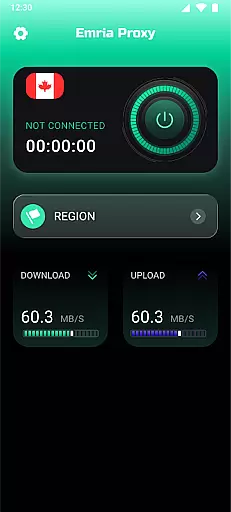
Emria Proxy is a secure and reliable VPN solution designed to protect your online privacy. This app creates an encrypted tunnel for your internet connection, ensuring that your data remains private and secure wherever you go. With its simple one-tap interface, Emria Proxy allows users to browse, chat, and stream without the worry of being tracked or monitored. The app operates on Android's VpnService API, providing system-level encryption that safeguards all traffic between your device and Emria's servers.
Whether you're traveling abroad or simply looking to enhance your digital security, Emria Proxy offers a seamless experience. It ensures no logs are kept of your activities, locations, or communications, making it an ideal choice for those who prioritize privacy. By encrypting your connection and preventing data interception on public networks, this app provides peace of mind for everyday internet use.
Emria Proxy stands out with its robust feature set tailored for privacy-conscious users. One of its key features is the use of Android's official VpnService API, which enables the creation of a secure network tunnel at the system level. This ensures that all traffic between your device and Emria's servers is fully encrypted, protecting against data leaks and unauthorized access. Additionally, the app does not engage in any form of traffic rerouting for advertising purposes, maintaining a clear focus on user privacy.
The app also boasts a minimalistic design with no heavy interface elements, allowing for a distraction-free experience. With just a single tap, users can activate the VPN connection, instantly shielding their online activities from trackers and potential threats. Emria Proxy is committed to transparency, complying fully with Google Play’s User Data and VPN policy requirements. This dedication to privacy and security makes Emria Proxy a reliable tool for maintaining anonymity while browsing, streaming, or communicating online.
Task creation and detail customization are essential for users who need to organize their schedules effectively. Emria Proxy offers a streamlined approach to managing online tasks with precision and ease.
The app allows users to create secure connections tailored to their specific needs. Whether it's setting up a temporary tunnel for streaming or ensuring privacy during chats, the level of customization is designed to match individual preferences.
Users benefit from the ability to activate the proxy with just one tap, making it simple to protect their data whenever necessary. This intuitive feature eliminates complexity, offering a hassle-free experience.
Ultimately, Emria Proxy empowers users by giving them control over how they connect online. With no heavy interface or unnecessary distractions, the focus remains on maintaining a stable and invisible connection across borders.
Reminder settings play a crucial role in keeping users on track with their privacy goals. Emria Proxy ensures that staying secure doesn't slip through the cracks by providing reliable notification options.
While the app itself operates quietly in the background, its reminder system can be configured to alert users about connection status changes. This helps maintain awareness without overwhelming notifications.
For those who prioritize discretion, reminders can also ensure that connections are turned off when not needed. This prevents any unintended usage while preserving device performance.
By combining simplicity with functionality, Emria Proxy delivers an optimal balance between security and convenience. Users can trust that their reminders will keep them informed without disrupting their workflow.
Strong encryption
No-log policy
One-tap connection
Compliance with Google Play policies
Lightweight interface
Limited advanced features
No free version available
Server locations undisclosed
Premium subscription required
Occasional connectivity issues

Mobile Event Guide for Greater NY Dental Meeting
 4.2
4.2
Find tickets to upcoming concerts, sports events, festivals, shows, attractions
4.70
Invitation card maker for birthday party & Wedding. Digital greeting card editor
4.90
Track birthdays, habits & goals. Unlimited countdowns and count-ups
4.20
For weddings, parties & events
4.60
Soft Proxy for Your Online World
4.1
Freebie Games for Epic Games, Steam, Amazon, Rockstar etc.
4.40
TodayTix is the easiest way to get tickets to the best shows in your city.
4.90
Buy and sell tickets to sports, concerts, theater, festivals, and comedy events
4.10
Fast Scans. Happy Fans. For Every Hometown!
4.60
Text message invitations for birthday party, wedding, graduation, baby shower +
4.60
Octrober 2025: We've updated the MyGenMobile App with a new look and feel!
4.40
Get live football here
4.30
Rocket Monkey - Space rocket launch schedule for launch sites around the world
4.20
The official app for Sched events! View your event schedule here.
4.20
Introducing the official Magic: The Gathering app for mobile.
4.20
Buy tickets for any event!
3.90
Create Birthday Cards in Birthday Invitation Maker and Birthday Card Creator App
3.00
The Official Football Ticketing App for Fans in Qatar
4.5


User Reviews