
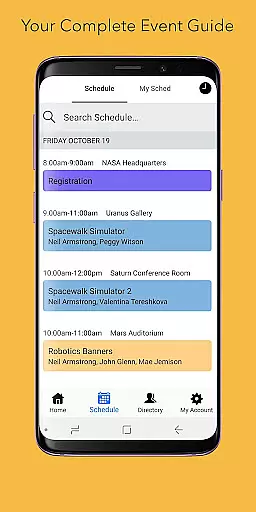
Sched is a leading platform for session registration and attendance management, designed to streamline the organization of complex multitrack events. This app allows event planners and attendees to manage all event details in one place, enhancing the overall event experience.
With features like a full schedule display, personalization options, a comprehensive directory of speakers, and offline caching, Sched ensures users can efficiently access and manage event information. Whether you're attending a conference or managing one, Sched provides tools that make events more accessible and enjoyable.
This app is particularly useful for professionals attending large-scale conferences who need quick access to schedules and speaker information. By centralizing event management, Sched transforms how events are experienced, making them more interactive and less cumbersome.
Sched offers a robust set of features tailored for efficient event management. One of its standout capabilities is the full schedule view, which lets users browse entire event schedules conveniently without needing an event guide.
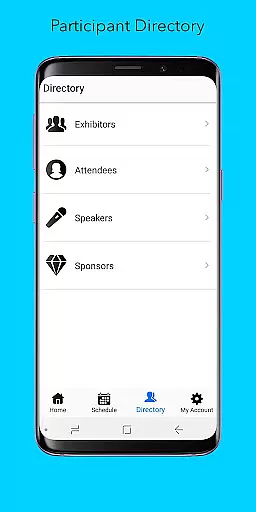
The app also excels in personalization, allowing users to log in and view their personalized schedules on the go. Attendees can create accounts to save favorite sessions instantly, ensuring they never miss important events. Additionally, the directory feature provides detailed profiles of speakers and exhibitors, enriching the user's event experience.
Offline caching is another significant feature, enabling users to access their schedules even without an internet connection. These functionalities collectively ensure that Sched not only simplifies event management but also enhances attendee engagement and satisfaction.
Task creation and detail customization are essential features for event management applications like Sched. This functionality allows event organizers to design and manage sessions with precision, ensuring that every aspect of the event is well-coordinated.
Sched offers a comprehensive suite of tools for creating detailed session descriptions, including time slots, speaker information, and session tracks. The platform enables users to customize each session's specifics, such as location, capacity, and multimedia content, enhancing the attendee experience.
For users, this means they can expect a meticulously organized event where all sessions are easy to navigate and select. The ability to personalize session details ensures that attendees can tailor their schedules according to their interests and professional needs.
Ultimately, the task creation and customization capabilities of Sched empower both event organizers and attendees by providing a seamless and engaging event management and participation experience.
Reminder settings in event applications play a crucial role in ensuring attendees do not miss important sessions. For an application like Sched, which specializes in session registration and attendance management, reminders are vital for keeping participants informed and engaged.
Sched provides flexible reminder options, allowing users to set notifications for upcoming sessions. Attendees can choose how and when they receive alerts, whether through push notifications, emails, or SMS. This flexibility ensures that users stay updated according to their preferences and schedules.
The benefit to users is significant; they can fully immerse themselves in the event without worrying about losing track of time or missing key sessions. Timely reminders help attendees manage their time effectively, enhancing their overall event experience.
By offering robust reminder settings, Sched not only keeps attendees on track but also adds a layer of personalization and convenience, making event participation more enjoyable and stress-free.
User-friendly interface
Comprehensive event management
Personalized scheduling
Offline access
Speaker directory
Limited free features
Requires account creation
Occasional sync issues
Interface not intuitive for all
Advanced features need subscription

The calendar app in this 2026 year see all dates.
 4.20
4.20
The Ultimate Tournament Hub
4.70
CUE Live utilizes ultrasonic sound waves to sync devices at CUE enabled events
4.80
Rocket Monkey - Space rocket launch schedule for launch sites around the world
4.20
No invest, Easy way to earn USDT through crypto cloud mining
3.80
The Official Football Ticketing App for Fans in Qatar
4.3
RAISE-365 makes fundraising easy and fun!
3.20
Buy and Sell Tickets for Concerts, Sports, and Theater.
4.70
Find Live Event Ticket Deals to Sports, Concerts, Festivals, & Comedy For Less!
4.80
Here you can choose tickets for films, performances, concerts and other events
4.60
Text message invitations for birthday party, wedding, graduation, baby shower +
4.60
Get live football here
4.30
Microsoft Build is an annual developer conference hosted by Microsoft
4.20
Buy and sell tickets to sports, concerts, theater, festivals, and comedy events
4.10
Purchase line-skip passes, drinks, cover, and more at bars and clubs
3.50
Browse events, find transportation, keep up with the latest news from your team
4.2
Digital Income Wallet of the Final Libertadores 2025
4.0
Soft Proxy for Your Online World
4.1
Thanksgiving Wishes, Thanksgiving Stickers & Animated GIF for Whatsapp Stickers
4.2


User Reviews