
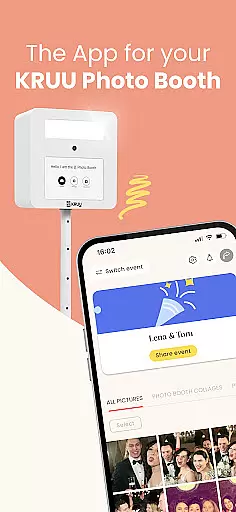
KRUU is an innovative mobile application designed specifically for event photography management, catering particularly to celebratory occasions. The app's core functionality revolves around capturing, storing, and sharing precious moments from events through photographs. It offers a seamless platform where guests and photographers can upload images, ensuring no significant moment is missed or forgotten.
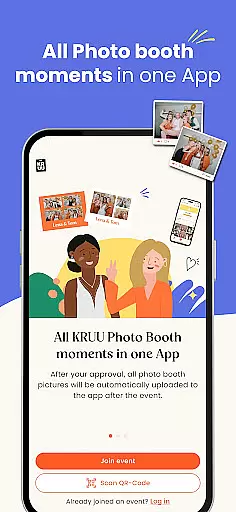
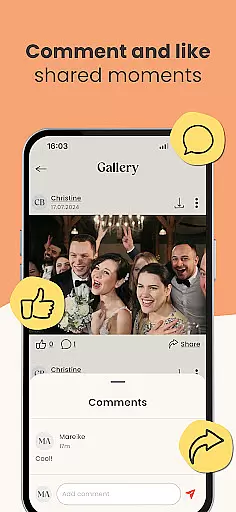
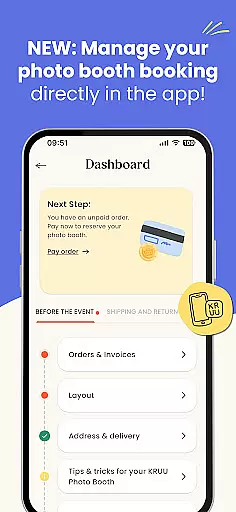
One of the standout features of KRUU is its integration with the KRUU Photo Booth, which automatically transfers photos taken during events directly to users' galleries within the app. This feature not only simplifies the process of gathering all event photos in one place but also enhances user engagement by allowing them to interact with the content through likes and comments. Additionally, the app provides a secure and private environment compliant with GDPR standards, ensuring that all memories are protected and accessible only to authorized participants.
The practical value of KRUU extends beyond just storing images; it serves as a dynamic gallery where users can relive their special moments anytime within three months post-event. This makes it an ideal tool for anyone looking to preserve and share their celebration memories conveniently and securely.
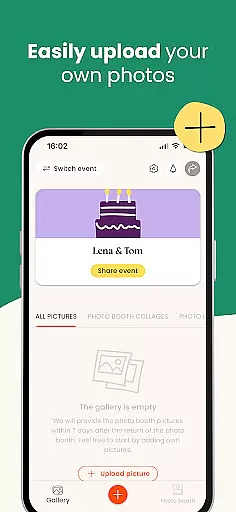
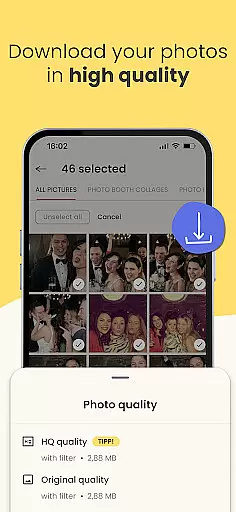
KRUU stands out in the Events category due to its comprehensive suite of features tailored for managing event photography efficiently. At the heart of its offerings is a large online storage space that allows users to upload and share photos with family and friends effortlessly. This feature ensures that all memorable moments captured during an event are preserved and easily accessible to all relevant parties.
A unique aspect of KRUU is its automatic integration with the KRUU Photo Booth, enabling instant transfer of photos taken at events directly into the app. This seamless connection not only saves time but also enhances the overall user experience by streamlining the photo collection process. Furthermore, the app includes an admin area where users can manage event participants effectively, providing clarity on who has access to shared memories.
Another notable feature is the app's commitment to privacy and security, adhering strictly to GDPR standards by storing data on German servers. This ensures that sensitive memories remain protected while being readily available for users to revisit over the subsequent three months following an event. Such robust functionalities make KRUU an indispensable tool for preserving cherished memories securely and engagingly.
Task creation and detail customization are essential features for event management applications like KRUU. This functionality allows users to set up events with specific details that make each occasion unique.
KRUU enables users to create new events or join existing ones, inviting friends and family to participate. The app provides options to customize event details, ensuring that every aspect of the celebration is captured and shared according to the user's preferences.
By offering a dedicated space for uploading and sharing photos, KRUU ensures that all participants can contribute to the event's story. Users benefit from having a personalized gallery where they can interact with content through likes and comments, making it easier to relive those special moments.
This level of customization not only enhances user engagement but also helps preserve the essence of each event by allowing detailed personalization, thus creating a more meaningful and memorable experience for all involved.
Reminder settings in event applications play a crucial role in keeping participants informed and engaged. For an app like KRUU, which focuses on capturing and sharing event memories, reminders ensure that users don't miss out on any important updates or activities.
KRUU offers flexible reminder settings that notify users about new photo uploads, likes, and comments. This feature keeps the community active and encourages continuous interaction among guests even after the event has concluded.
Users can manage their notification preferences within the app, choosing how and when they want to be reminded. This flexibility allows individuals to stay connected without feeling overwhelmed by constant alerts.
Ultimately, well-designed reminder settings enhance the overall user experience by maintaining engagement and ensuring that no precious memory is overlooked, thereby strengthening the sense of community around shared experiences.
User-friendly interface
Free with no in-app purchases
GDPR compliant storage
Automatic photo booth integration
Interactive gallery features
Limited to event photography
Three-month storage limit
No advanced editing tools
Dependent on guest uploads
Requires internet connection

The Ultimate Tournament Hub
 4.70
4.70
Here you can choose tickets for films, performances, concerts and other events
4.60
Fantasy of Lights Event App
5.00
For weddings, parties & events
4.60
The Official Football Ticketing App for Fans in Qatar
4.1
Events, Meetings, Photo Shoots
4.50
Discover events, experiences, and things to do near you - Anytime, Anywhere!
4.70
Octrober 2025: We've updated the MyGenMobile App with a new look and feel!
4.40
Discover events & experiences in NYC, LA, Chicago, DC, Miami and more!
4.70
Clubs, Festivals, Discounted Tickets, Guest Lists & VIP Tables
4.90
Find EDM shows near you! See your favorite artists live, and discover new music.
4.90
CUE Live utilizes ultrasonic sound waves to sync devices at CUE enabled events
4.80
Buy and Sell Tickets for Concerts, Sports, and Theater.
4.70
Fast Scans. Happy Fans. For Every Hometown!
4.60
Introducing the official Magic: The Gathering app for mobile.
4.20
Buy tickets for any event!
3.90
ETH Mining provides secure way to mine Ethereum & earn ETH in Cloud mining app
3.50
An App for Bhutanese
4.3
Buy event tickets easily with our user-friendly App. Stay updated on hot events
4.5


User Reviews