
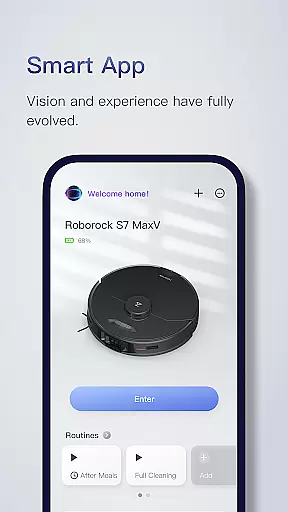
Roborock is a cutting-edge home cleaning solution that combines advanced hardware with intelligent software. The app provides complete control over your Roborock robot, allowing you to manage everything from cleaning schedules to suction strength. With features like Precision LIDAR navigation and VibraRise mopping technology, it ensures efficient and thorough cleaning tailored to your home's needs.
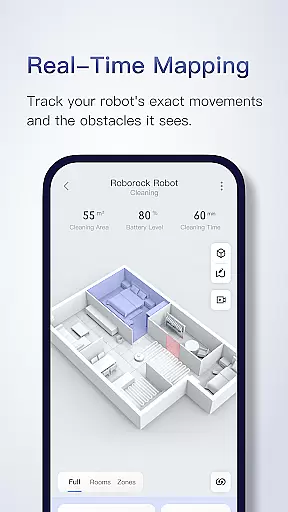
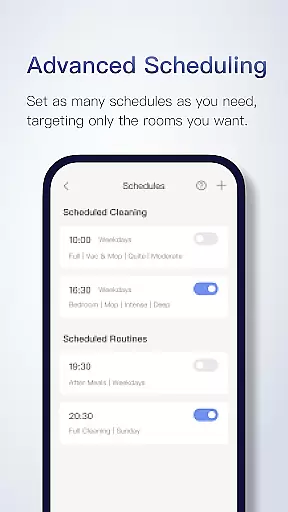
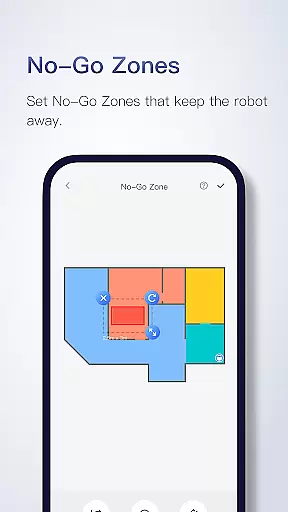
The app supports seriously smart mapping, enabling users to view their home layout and customize cleaning for each room. You can set advanced schedules, create no-go zones, and even save multiple floor maps for multi-level homes. This level of customization makes Roborock ideal for modern households seeking convenience and precision in their cleaning routines.
Roborock stands out with its array of innovative features designed to enhance user experience. The app offers advanced scheduling options, allowing you to program cleaning sessions based on time and specific rooms. Its customizable cleaning settings let you adjust suction power and water flow according to different surfaces and needs.
One of the key highlights is the multi-level mapping capability, which supports up to four unique floor plans. The real-time viewing feature lets you track your robot's progress and see how it navigates obstacles. Additionally, technologies like ReactiveAI and OpticEye ensure safe and intelligent movement throughout your home, making Roborock a leader in smart home cleaning solutions.
The Roborock app offers extensive lifestyle category coverage by integrating advanced home cleaning features with smart technology. This application supports various products, each designed to cater to different aspects of home maintenance and cleanliness.
With functionalities like Precision LIDAR navigation, sensor matrices for safer movements, and highly accurate vision-based motion control, the app ensures comprehensive home care. These cutting-edge technologies allow users to maintain their homes efficiently and effortlessly.
Additionally, the app provides customizable cleaning options tailored to specific room demands, multi-level mapping, and real-time viewing of the cleaning process. Such features ensure that every corner of the living space is adequately addressed, enhancing the overall lifestyle management experience.
Roborock app stands out due to its content authenticity and expert credibility. The detailed descriptions and feature support information provided within the app assure users of its reliability and precision in delivering promised functionalities.
Each feature, such as Sensient, OpticEye, and ReactiveAI, is backed by expert engineering ensuring efficient and intelligent home cleaning solutions. The incorporation of VibraRise technology for effective mopping further demonstrates the app's commitment to high standards of performance.
Moreover, the availability of customer service via phone and email across different regions highlights the app's dedication to user satisfaction and expert support. Users can trust the app's sophisticated solutions for maintaining a clean and orderly home environment.
Advanced AI navigation
Customizable cleaning modes
Multi-floor mapping support
Real-time tracking system
Efficient mopping technology
Limited device compatibility
Some features are model-specific
Occasional mapping errors
Premium price point
Requires stable internet

What is my face shape? Find out your face shape from picture, see fitting frames
 3.90
3.90
Premium floor cleaning robots
4.50
Cute animated Thanksgiving watchface for your WearOS smartwatch
4.1
Get the news, events and savings that matter to you with AARP Now.
4.80
Colorful selection floral watch face with gyro for Wear OS
4.60
Have your Tehillim with you at all times
4.70
Going above and beyond known spirit communication
3.60
AAA Mobile provides on-the-go access to the services you know and trust.
4.60
Earn money for every survey and game you play, and get real rewards every time
4.50
Stay connected with your loved ones & vehicles | Share live GPS location updates
4.60
This app is intended to support professional EMDR therapy.
4.50
Redecor your home with Home AI interior design, room planner and home designer.
4.50
Share opinions, get paid cash
4.30
Smart controls for your Ember Smart Mugs
4.10
Spirit Communicator is a real paranormal ghost hunting app with many fun modes.
3.90
Your home in your hand
3.80
Subwoofer school’s in session! You’ve now enrolled into KICKER U.
3.80
A daily quote for success
4.3
Bring the warm colors of fall directly to your wrist with Autumn Leaves!
4.3


User Reviews