
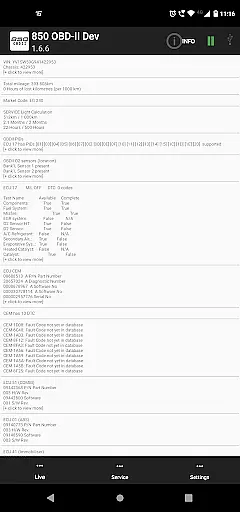
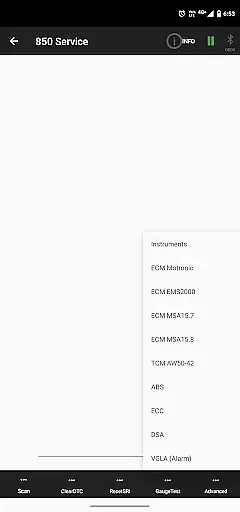
850 OBD-II is a specialized diagnostic tool designed for Volvo vehicles, particularly P80 models from 1996-2000. This application works with ELM327 Bluetooth/WiFi/USB dongles to provide advanced vehicle diagnostics and programming capabilities beyond standard OBD-II functions. Users can directly access individual modules to diagnose issues, making it an invaluable tool for both professional mechanics and car enthusiasts.
The app supports a wide range of Volvo models including 850/900 series, S40/V40 up to 2004, S70/V70/XC70, C70 up to 2004, and P2 platform models from 2000 onwards. It offers comprehensive coverage of various modules such as ABS, TCM, ECM, ECC, and more. Whether you need to reset service lights, read fault codes, or perform live data monitoring, this app provides the necessary tools to keep your vehicle in top condition.
With its ability to program and adjust module parameters, 850 OBD-II stands out as a powerful solution for maintaining and troubleshooting Volvo vehicles. Its detailed diagnostic information and advanced commands make it suitable for users who require precise control over their vehicle's systems.
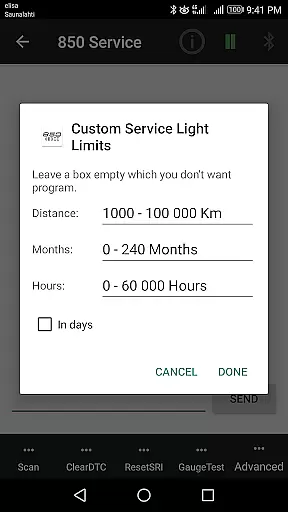
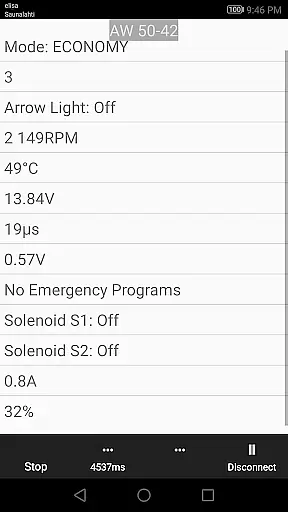
850 OBD-II boasts a rich set of features tailored for Volvo diagnostics. One of its standout capabilities is the ability to reset and program service lights (SRI), read and clear fault codes (DTC), and monitor live sensor data in real-time. These features allow users to gain deep insights into their vehicle's performance and quickly address any issues that arise.
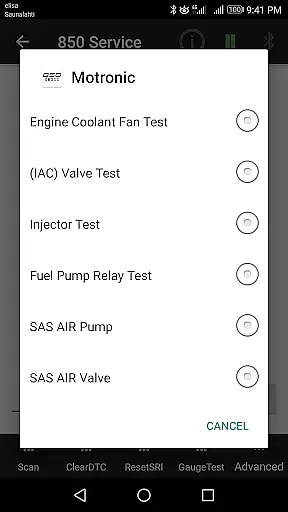
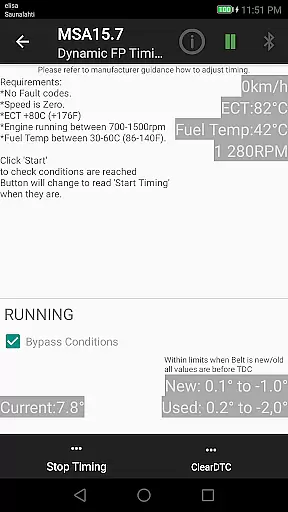
In addition to basic diagnostics, the app provides advanced commands for specific tasks like injector testing (Motronic M4.4) and TDi fuel pump dynamic timing (MSA15.7). Users can also perform remote programming for certain modules without needing dealership assistance. The app supports reading basic OBD-II information such as part numbers of ECUs and configurations, enhancing its versatility.
Live data monitoring covers multiple systems including ABS/BCM, SRS (airbag), instrument panel (COMBI), automatic gearbox, and various engine management systems. By translating Volvo-specific DTCs and offering component tests, 850 OBD-II ensures thorough diagnostics. Furthermore, the app functions as a terminal for sending custom commands via ELM327, providing unparalleled flexibility for advanced users.
Accessing detailed vehicle information is crucial for effective diagnostics and maintenance. The 850 OBD-II app goes beyond standard OBD-II capabilities to provide comprehensive data about individual modules within supported Volvo models. This includes reading specific fault codes (DTCs), live sensor data, and system information such as part numbers and configurations of ECUs.
This application supports a wide range of Volvo models, including the 850/900 series, S40/V40 up to 2004, S70/V70/XC70, P80 year models 1999-2000, C70 up to 2004, and P2 platform models from 2000 onwards. Each model has its own set of accessible modules, ensuring that users can retrieve precise information tailored to their vehicle's specifications.
By using an ELM327 Bluetooth/Wi-Fi/USB dongle, users can connect to their vehicle's systems and access advanced commands for tasks like injector testing, fuel pump dynamic timing adjustments, and remote programming. This level of detail empowers car owners and mechanics to diagnose issues accurately and perform necessary adjustments without visiting a dealership.
The ability to read and clear fault codes, view real-time sensor data, and adjust module parameters significantly enhances the diagnostic process. Whether you're checking the ABS, airbag systems, or automatic gearbox performance, this app provides the detailed insights needed to maintain your vehicle effectively.
Price transparency in automotive diagnostics tools ensures that users understand the costs involved before making a purchase. The 850 OBD-II app offers clear information regarding its pricing structure and additional costs associated with required hardware. To use the app effectively, users need an ELM327 dongle (version 1.4b or greater), which may involve an extra cost if not already owned.
The app itself provides extensive functionality without hidden fees, allowing users to reset service lights, read and clear fault codes, and access live sensor data. It also supports advanced commands for various systems, including ABS, SRS, and engine control units. These features ensure that users get comprehensive diagnostic capabilities at a transparent price point.
Additionally, the app highlights potential compatibility issues with certain vehicle systems, such as Yazaki dashboards and specific engine management systems. By clearly stating these limitations, users can make informed decisions about whether the app meets their needs. This openness helps prevent unexpected expenses related to unsupported functionalities or firmware issues.
Overall, the 850 OBD-II app delivers significant value by combining robust diagnostic features with clear pricing and compatibility details. Users can confidently invest in this tool knowing exactly what they are getting and any additional investments required for optimal performance.
User-friendly interface
Comprehensive module coverage
Advanced programming options
Real-time data monitoring
Wide vehicle compatibility
Requires ELM327 dongle
Limited to supported models
Some features need CAN bus setup
No SRS light reset if faults exist
Firmware issues may affect functionality

Take Control of Your Car
 4.80
4.80
OBD1 ECMs application. Data log or tune directly from your phone or tablet!
4.60
Realtime Charts is a plugin for the Torque Pro App (OBD 2 & Car)
4.20
Practice the drills within MotoJitsu Master Riding Program Volume 1 & 2!
4.80
DIY Vehicle Wheel Alignment
4.2
App Mirroring for Tesla Car's Browser
2.80
Oil change service & coupons for car maintenance at Valvoline Instant Oil Change
4.70
Lexus app currently supports 2010 or newer vehicles (2018 or newer for Hawaii).
4.80
Get price alerts, vehicle history details and more for cars near you!
4.50
Play what you want through Android Auto
4.90
Shop cars & see your financing
4.60
Instant diesel savings. No credit checks or fees. Nationwide growing network.
4.40
ODB2 based monitoring application for the Chevy Bolt (2017-2021)
4.00
Available in select states.
4.00
Mobile Phone Parking - So easy to park
3.70
Better fuel to help keep you on the road
3.20
Theme for Car Launcher
4.1
Theme for Car Launcher
4.4
Theme for Car Launcher
4.5


User Reviews