
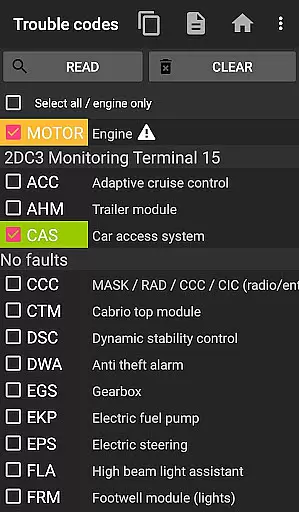
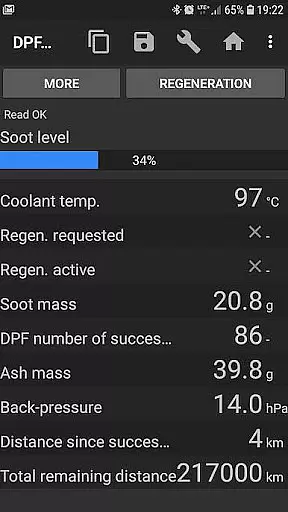
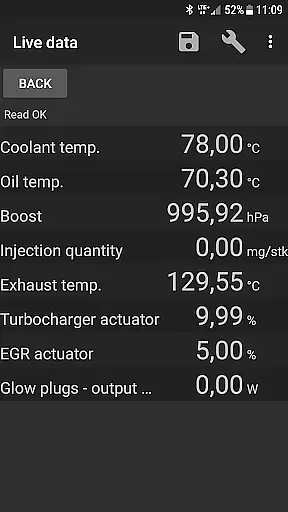
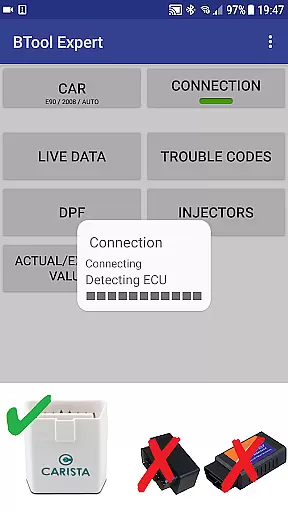
bimmer-tool is a comprehensive diagnostic application designed specifically for BMW car owners and enthusiasts. This app allows users to read and clear fault codes, request DPF regeneration, and access real-time engine data in compatible BMW models. With support for various OBD adapters, including K+DCan USB cables and ENET adapters, the application provides an extensive range of functionalities for monitoring and maintaining vehicle health.
For older BMW models manufactured before 2008, bimmer-tool recommends using a K+DCan USB cable connection for optimal performance. The app also supports wireless ELM adapter connections, although functionality may be limited. Whether you need to reset oil service intervals or log critical engine data to CSV files for further analysis, bimmer-tool offers a reliable solution for BMW diagnostics.
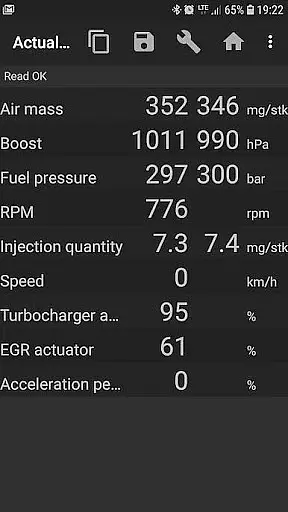
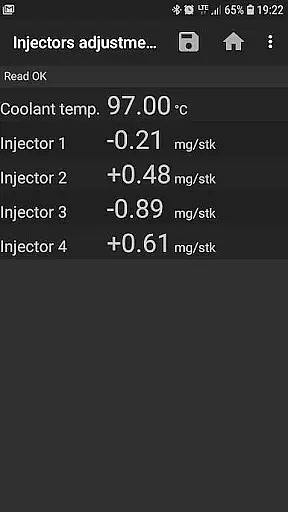
This application is particularly useful for DIY mechanics and professional technicians who require detailed insights into their BMW's performance metrics. By providing access to live data such as exhaust fumes pressure, injectors adjustments, and air mass readings, bimmer-tool empowers users to make informed decisions about vehicle maintenance and repairs.
bimmer-tool stands out with its diverse feature set tailored for BMW diagnostics. One of the key capabilities is the ability to read and clear fault codes, which helps users quickly identify and resolve issues without visiting a service center. Additionally, the app enables DPF regeneration requests and resetting adaptation values after filter replacement, ensuring optimal diesel particulate filter performance.
The application's support for multiple OBD adapters, including K+DCan USB cables, ENET adapters, and various Bluetooth/WiFi options, demonstrates its versatility. Users can choose the most suitable connection method based on their vehicle model and personal preference. For instance, while K+DCan cables offer the most reliable connection for older models, ENET adapters are recommended for newer F & G series BMWs.
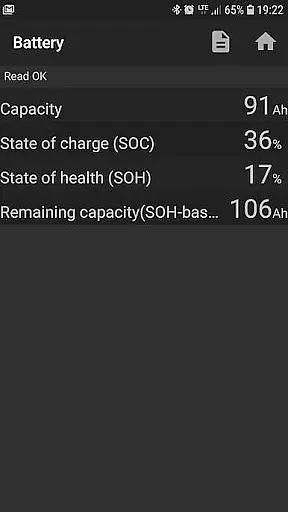
Another notable feature is the ability to log engine data to CSV files. This functionality allows users to record important metrics such as fuel pressure, intake manifold pressure, and air mass readings for detailed analysis. The app also includes practical tools like battery replacement registration and service interval resets, making it an indispensable companion for comprehensive BMW maintenance.
bimmer-tool provides comprehensive access to detailed vehicle information, which is crucial for BMW owners who want to understand their car's performance and health. The app allows users to read engine live data, including parameters such as air mass, intake manifold pressure, and fuel pressure. This real-time insight into the vehicle's operations enables proactive maintenance and troubleshooting.
Moreover, the application goes beyond just reading data; it also permits actions like requesting DPF regeneration and resetting DPF adaptation values after a filter replacement. These capabilities ensure that critical systems are maintained optimally, enhancing both vehicle longevity and performance.
The value of having such detailed vehicle information at oneu2019s fingertips cannot be overstated. Users can log data to CSV files for further analysis, making it an indispensable tool for those interested in the intricate workings of their BMWs. Whether monitoring exhaust fumes pressure or injectors adjustments, bimmer-tool equips drivers with knowledge essential for maintaining peak vehicle condition.
While bimmer-tool itself offers its features without hidden costs, understanding the investment required for full functionality is important. The app requires a reliable OBD adapter, with recommendations including K+DCan USB cables, ENET adapters for newer models, and specific Bluetooth adapters like Vgate vLinker and UniCarScan.
These adapters vary in price and connectivity method, ensuring that users can choose according to their budget and vehicle model year. For example, while K+DCan cables provide a robust connection, Bluetooth options offer convenience albeit potentially slower speeds. Such choices empower users by providing clear options aligned with individual preferences and needs.
Additionally, some advanced functions within bimmer-tool may necessitate specific hardware purchases, reinforcing the importance of price transparency. By clearly outlining these requirements, users can make informed decisions about additional investments needed to maximize the utility of this powerful automotive diagnostic tool.
User-friendly interface
Comprehensive diagnostic tools
Wide adapter compatibility
Detailed engine data logging
Regular feature updates
Limited old model support
Requires specific adapters
Occasional connection issues
Advanced features need premium
Steep learning curve

Ultimate OBD2 Car Scanner: Diagnostics, Service and Modification Tool
 4.30
4.30
Take Control of Your Car
4.80
Attention! This is the theme for the Car Launcher app
4.4
Theme for Car Launcher
4.0
A full featured, real-time transit locator system
4.30
Club Car Wash Mobile App—the fast lane to managing your wash membership.
3.30
Automotive Electrical Wiring Diagrams
4.40
Trip computer+car diagnostic tool with widest variety of features and dashboard!
4.70
Find Your Local Store or Shop Online for the Car, Truck, or SUV Parts You Need
4.70
Marathon ARCO Rewards members earn rewards & apply the rewards for fuel savings!
4.80
DMV practice test 2025: Driver License permit test & written test for all states
4.70
Find Fast EV Chargers | Charge Your Vehicle at 1,100+ Fast Car Charging Stations
4.60
Autotrader is your online solution for buying and selling new and used cars.
4.40
Taximeter; the professional's choice
4.30
* This app needs an adapter cable and a certain OBD2 adapter to work *
4.20
Car Sounds Engine Sounds app welcomes Auto Lovers to feel Car Simulator Sound
4.20
BlueDriver® is a Premium Diagnostic OBD2 Scan Tool. www.BlueDriver.com
3.90
PayByPhone: A quick and easy way to pay for parking.
3.80
Discover new and used cars in Syria easily! Browse ads and connect with sellers.
3.70


User Reviews