

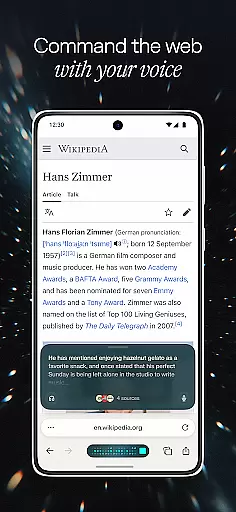
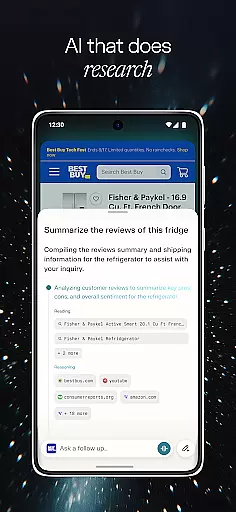




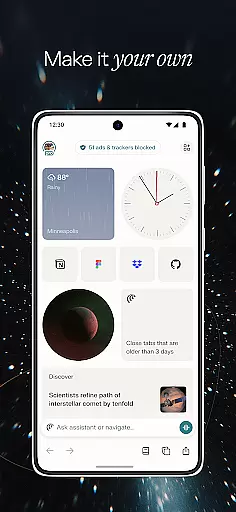
Comet is a cutting-edge communication app designed to revolutionize mobile browsing with its AI-driven capabilities. As the first agentic AI browser built for Android, Comet offers users an intelligent assistant that enhances their browsing experience. With features like voice recognition, smart summarization, and an ad blocker, Comet ensures a seamless and efficient browsing session. Whether you're looking to multitask across tabs or avoid intrusive ads, Comet provides a comprehensive solution for modern mobile users.
The app's standout feature is its AI assistant, which allows users to interact naturally through voice commands and receive synthesized information from multiple open tabs. This makes Comet particularly useful for professionals and students who need quick access to consolidated data while on the go. By integrating advanced technology with user-friendly design, Comet delivers significant value to those seeking an enhanced mobile browsing experience.
Comet distinguishes itself through several innovative features tailored for optimal communication and information processing. The app's AI assistant is readily accessible, enabling users to ask questions and delegate tasks with ease. Its expanded reasoning capability provides transparency in the assistant's actions, allowing users to intervene when necessary. This level of control and insight enhances the overall user experience.
Another remarkable feature is the ability to chat with your tabs using voice recognition technology. This functionality lets users efficiently search for information across all open tabs without manual navigation. Additionally, Comet's smart summarization tool synthesizes content from multiple sources, presenting concise summaries that save time and effort. Coupled with a built-in ad blocker, Comet ensures users can focus on relevant content without distractions, making it an indispensable tool for productive browsing.
Comet for Android offers exceptional real-time messaging capabilities, ensuring that users experience seamless communication without delays. The app's infrastructure is designed to handle high volumes of messages with minimal latency, making it ideal for both personal and professional use.
The reliability of Comet's messaging system is reinforced by its robust server network, which maintains stable connections even under fluctuating network conditions. This means you can send and receive messages without worrying about interruptions or lost communications.
What sets Comet apart is its integration with an AI assistant, enhancing the messaging experience by providing instant responses and actions based on your commands. Whether you're coordinating with a team or chatting with friends, Comet ensures your conversations are fluid and uninterrupted.
Comet facilitates effortless media sharing, allowing users to exchange photos, videos, and documents with ease. The app supports a wide range of file formats, ensuring compatibility and convenience when sharing different types of media content.
In addition to basic media sharing, Comet incorporates advanced features such as smart summarization and voice recognition technology. These tools enable users to extract key information from shared media across multiple tabs, streamlining workflows and enhancing productivity.
With Comet's built-in ad blocker, media viewing is not only efficient but also free from distractions. Users can focus on the content that matters most, enjoying an uninterrupted experience while browsing through shared links or multimedia messages.
User-friendly interface
Advanced AI capabilities
Voice command support
Smart summarization
Built-in ad blocker
Limited to Android
Requires internet
Premium features cost
Learning curve
Occasional bugs

 3.90
3.90
Quickly and easily identify and block unknown callers
3.70
This app enables the phone to receive and send FT8 traffic!
3.80
Simplify texting with Messages SMS, offline messaging, themes & smart tools!
4.30
Experience real private browsing without tracking, surveillance, or censorship.
4.50
Create a secure hotspot on-the-go with Portable WiFi - Mobile hotspot.
4.40
Use this SMS app standalone or as a TREK: Total Interface companion.
4.30
A customizable phone number in the cloud
4.20
Simple tool for businesses to talk to their customers.
4.40
A browser that does more than load page, like keeping your privacy safe.
4.70
Read OBD2 data and DTCs Create custom dashboards Enhanced diagnostics available
4.70
Identify unknown numbers, block spam calls, customize calls with cool themes.
4.60
Build your web browser around you with private search, and more.
4.60
Chill zone on your phone: relax with fun reels & hype shorts!
4.20
A softphone with crystal clear SIP Calling & Reliable VoIP dialer
4.00
At select facilities, you now have an easy way to video visit your loved ones!
3.30
TeamSpeak - Secure Chat for Gaming & Business
3.10
Watchgram for Telegram: Experience seamless Telegram messaging on your watch
1.80
Radio communication simulator for gaming communities
4.3


User Reviews