
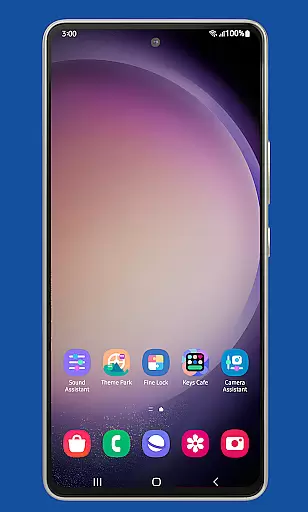
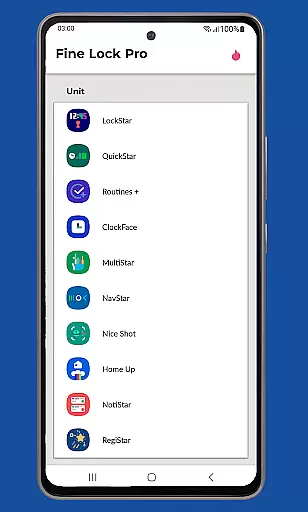
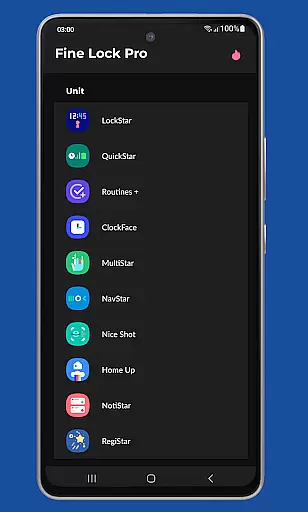
Fine Lock is a specialized customization tool designed exclusively for Samsung devices running official One UI. This application serves as a launcher for Good Lock and Galaxy Labs modules, enabling users to personalize and optimize their Android experience on Samsung smartphones. With its unique functionality, Fine Lock bridges the gap for users in regions where these modules are not readily available through Galaxy Store.
The app offers PRO features that enhance user convenience, such as module app shortcuts on the home screen, background update checks, and the ability to hide uninstalled modules. Additionally, it provides a dynamic wallpaper feature that adapts to the device's Dark/Night modes. These capabilities make Fine Lock an essential utility for power users seeking advanced customization options on their Samsung devices.
Fine Lock stands out with its innovative approach to solving regional availability issues for Good Lock and Galaxy Labs modules. The app acts as a central hub, allowing users to manage and launch these customization tools effortlessly. Its intuitive interface ensures that even novice users can navigate and utilize its features effectively.
Among its notable features, Fine Lock offers dynamic wallpaper functionality that responds to the device's theme settings. This feature, available on Android 9 and later, provides a seamless visual experience by automatically adjusting wallpapers based on the system's Dark/Night mode schedule. The app also includes practical tools like background update notifications and module hiding options, making it a comprehensive solution for Samsung device personalization.
Fine Lock offers a unique approach to personalizing Samsung devices by acting as a launcher for Good Lock and Galaxy Labs modules. These modules provide an extensive range of customization options that allow users to tailor their Android experience on Samsung devices with official Oreo and One UI. The app enables users to access features such as module app shortcuts on the home screen, which is part of the PRO features that enhance the personalization journey.
For those seeking further customization, Fine Lock supports dynamic wallpapers that adapt to the device's Dark or Night modes, provided the device runs on Android 9 or later and has scheduled Dark/Night mode enabled. This feature adds a layer of personal touch, making each user's experience distinct. However, it's important to note that these advanced customization options require users to download the latest APK modules from trusted sources like APKMirror or Sammobile, as per Google Play policy.
The ability to hide modules that are not installed also contributes to a streamlined and personalized interface, ensuring that users see only what is relevant to them. With these comprehensive customization options, Fine Lock empowers users to craft an Android experience that truly reflects their personal preferences and style.
Theme compatibility is at the heart of Fine Lock's functionality, ensuring that Samsung device users can enjoy a cohesive visual experience across their customized interfaces. As a launcher for Good Lock and Galaxy Labs modules, Fine Lock facilitates the integration of various themes that align with the user's aesthetic preferences and the system's One UI design language. This seamless compatibility allows for a harmonious look and feel throughout the device.
Despite the limitation of not being able to download modules directly due to Google Play policy, Fine Lock encourages users to obtain APKs from reliable sources, thus maintaining theme integrity and system stability. By doing so, users can be confident in the consistent application of their chosen themes without worrying about potential security risks or incompatibilities.
Moreover, Fine Lock's support for dynamic wallpapers enhances theme compatibility by allowing the background to shift according to the device's Dark or Night mode settings. This ensures that no matter the time of day or lighting conditions, the visual continuity of the user's selected theme remains uninterrupted, providing both aesthetic pleasure and functional benefits.
User-friendly interface
Dynamic wallpaper feature
Background update checks
Module management tools
Custom shortcut creation
Limited to Samsung devices
No direct module downloads
Regional restrictions apply
Requires official One UI
Premium features need purchase

Classic analogue watch face. For wear os devices.
 4.60
4.60
A light in the dark, a unique style and an andless cutomization!
4.30
Winter's Journey: digital watch face for Galaxy Watch & Wear OS
4.80
Wear Os Watch Face - Seasonal - Animated Snow Effect - 9 Animals
4.20
Unique Android Launcher
4.60
Turn text & photos into stunning AI videos, art, and creative visual stories.
4.50 4.10
4.10
Your home screen, just the way you like it.
4.30
Your home screen, just the way you like it.
3.80
Enjoy a variety of amazing live wallpapers and colorful EDGE lighting borders!
4.80
Over 28,000 high quality icons to bring color & homogeneity to your phone.
4.60
Want to make your phone more special than ever?
4.60
3D, live, and moving wallpapers & themes in 4K and HD for your device.
4.50
Aesthetic Widgets, HD Wallpapers, Themes in Mico Widget for Home and Lock Screen
4.50
Fingerprint Lock Screen & Live Animations with 4K Wallpapers as Live Wallpaper
4.40
More than 3000+ themes and 9000+ wallpapers for everybody!
4.10
Transfer your live wallpapers from Windows to Android using Wallpaper Engine!
4.00
Your go to Weather App & Home Screen. Get your weather at a swipe of a finger!
3.80 3.50
3.50


User Reviews