
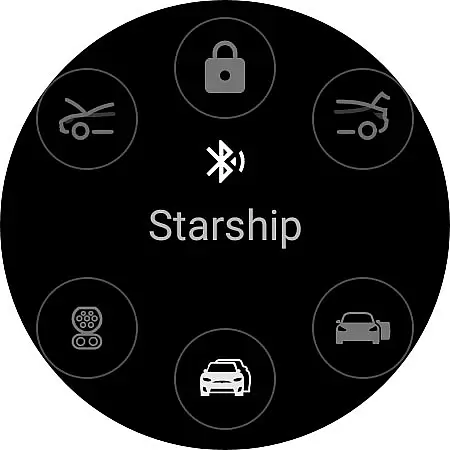
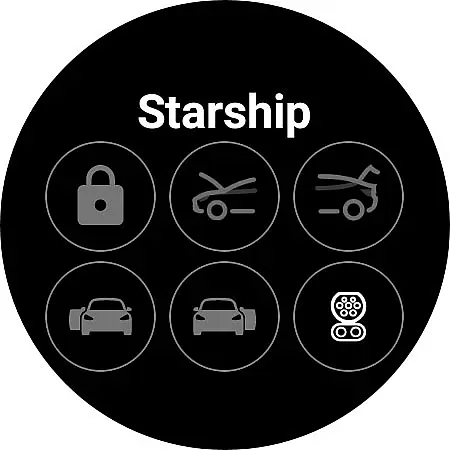
Watt Key is a cutting-edge Wear OS application that transforms your smartwatch into a key fob for Tesla vehicles. Designed specifically for Tesla models with Bluetooth key functionality, including Model 3/Y and the refreshed Model S/X, this app offers seamless interaction with your vehicle directly from your wrist.
The application enables automatic locking and unlocking as you approach or leave your Tesla, manual control options, and access to various car functions such as opening the frunk and trunk. With quick-access tiles and support for summon features, Watt Key provides an immediate and intuitive way to interact with your Tesla without needing your phone or physical keys.
Optimized for Samsung Galaxy Watch 4 and newer models, along with Google Pixel Watch, Watt Key ensures secure authentication through encrypted cryptographic keys stored on your device. This makes it not only convenient but also safe to use, supporting Tesla's end-to-end encrypted commands.
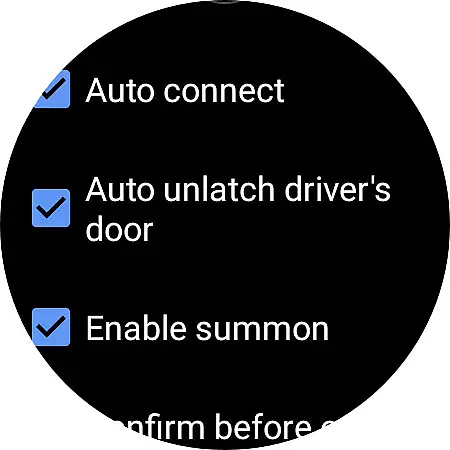
Watt Key stands out with its comprehensive feature set tailored for Tesla owners. The app connects via Bluetooth, allowing users to automatically unlock or lock their vehicles as they move towards or away from them. It also supports automatic unlatching of the driver's door upon approach and provides manual controls for all doors.
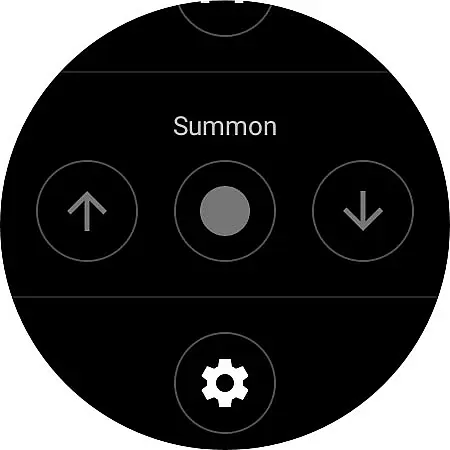
Additional functionalities include opening the frunk, trunk, and charge port, as well as initiating summon actions if enabled in settings. These features are accessible through intuitive quick-access tiles designed for ease of use on Wear OS watches.
Security is paramount, with Watt Key generating encrypted keys for vehicle authentication. Users can manage these keys within the app’s settings or Tesla’s Lock menu, ensuring complete control over their vehicle's access permissions at all times.
Watt Key offers comprehensive lifestyle functionality by transforming your Wear OS watch into a versatile key fob for Tesla vehicles. This app covers various aspects of vehicle interaction, making daily life more convenient for Tesla owners.
The application supports an extensive range of commands including automatic locking and unlocking as you approach or leave your Tesla, unlatching specific doors, opening the frunk and trunk, and managing the charge port. These features ensure users can handle most vehicle access needs directly from their smartwatch.
In addition to basic access functions, Watt Key also provides advanced functionalities like Summon forward and reverse, which requires Enhanced Autopilot or Full Self-Driving capabilities. Such features enhance user convenience significantly, offering a seamless blend of technology and lifestyle enhancement.
Watt Key ensures content authenticity by providing reliable and secure interactions with Tesla vehicles. The app generates a secure cryptographic key for authenticating with your Tesla, stored encrypted on your watch and accessible only by the app itself.
Users can manage their cryptographic keys through the Settings menu, allowing deletion at any time. Additionally, these keys can be removed via the Lock menu within the Tesla interface, ensuring complete control over security credentials.
This focus on security extends to supporting Tesla's new end-to-end encrypted commands, reinforcing the appu2019s commitment to safeguarding user data and interactions. Although not officially endorsed by Tesla, Watt Key emphasizes its dedication to maintaining high standards of privacy and security.
Instant access to Tesla functions
Secure cryptographic authentication
Supports multiple languages
No internet connection required
Seamless Wear OS integration
Limited to compatible Teslas
Requires Wear OS 2+
Not supported on Tizen OS
Manual setup needed
Potential connectivity issues

Unique "Isometric" style digital watch face for Wear OS
 4.50
4.50
Smart & Healthy Living
4.60
Discounts, savings, and rewards
4.20
Colorful minimal digital watch face for Wear OS
4.60
A unique and customizable watch face which rotates its layout every minute.
4.80
Redecor your home with Home AI interior design, room planner and home designer.
4.50
DailyGift can help you record your habits and get rewards along the way!
4.60
AAA Mobile provides on-the-go access to the services you know and trust.
4.60
Control your Tapo smart devices from anywhere.
4.60
Get the news, events and savings that matter to you with AARP Now.
4.80
Share opinions, get paid cash
4.30
Mixing Colors for Menswear
4.20
Paranormal EVP, Ghost Box, Spirit box, ITC, Haunted, Spirit communication device
3.70
Unique informative Dial with Live Moon Phase at a glance!
3.60
Communicate with your vehicles and Powerwalls anytime, anywhere
3.60
Take Hobby Lobby with you wherever you go!
3.40
Discover how to help puppies stay calm around noise with this helpful app.
4.3
Cute animated Thanksgiving watchface for your WearOS smartwatch
4.0
Bring the warm colors of fall directly to your wrist with Autumn Leaves!
4.0


User Reviews