
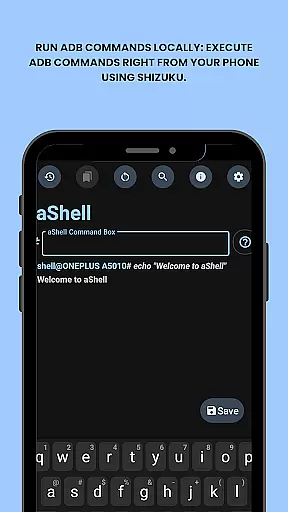
aShell is a specialized Android tool that allows users to execute ADB commands directly from their mobile devices without requiring a PC. Designed for developers, power users, and tech enthusiasts, this app provides full control over device internals by leveraging the Shizuku environment. It supports continuous command outputs, saving results to files, and includes preloaded examples for quick execution.
With features like dark/light mode support, live command output monitoring, and bookmarking frequently used commands, aShell ensures both convenience and efficiency. Whether you're debugging apps, managing system settings, or exploring Android's internal structure, aShell offers an intuitive interface and powerful functionality to streamline your workflow.
aShell stands out with its unique set of capabilities tailored for advanced Android users. The app enables local execution of ADB commands through Shizuku, offering real-time outputs for operations such as logcat or top. Its search functionality within command outputs helps users quickly locate specific information, while the ability to save outputs to .txt files enhances usability for documentation or sharing purposes.
Additional highlights include preloaded command examples for faster onboarding, automatic adaptation to system themes (dark/light mode), and a feature to bookmark frequently used commands. These aspects make aShell not only versatile but also user-friendly despite its technical nature. By integrating seamlessly with Shizuku and supporting external resources like GitLab source code access, it caters to those seeking customization and control over their Android experience.
aShell is designed to provide accurate and effective execution of ADB commands directly on Android devices. This eliminates the need for a PC, allowing developers and power users to manage their device's internals with precision.
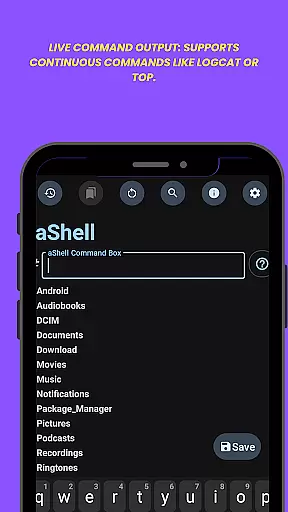
The app leverages a fully functional Shizuku environment to ensure that all commands are executed reliably. With features like live command output, users can run continuous commands such as logcat or top without any hiccups.
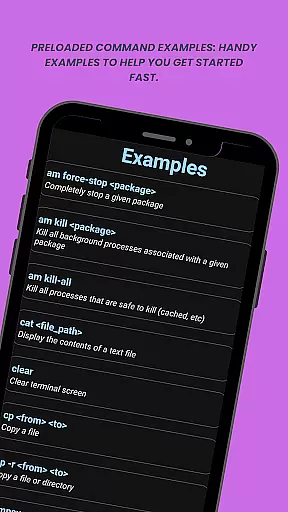
For those unfamiliar with ADB/Linux operations, aShell includes preloaded command examples. These handy examples help users get started quickly while ensuring they execute commands correctly every time.
By supporting functionalities like search within output and saving outputs to files, aShell enhances usability. Users can easily find specific results and export important data, making their experience both efficient and reliable.
The interface of aShell is crafted to be simple and intuitive, catering to both novice and experienced users. Its straightforward design allows users to execute complex ADB commands without feeling overwhelmed by unnecessary complexities.
With dark/light mode support, the app adapts seamlessly to the user's system theme. This ensures a comfortable viewing experience regardless of the time of day or personal preference settings.
One key feature is the ability to bookmark frequently used commands. This functionality simplifies repeated tasks by providing quick access to saved commands, thus streamlining workflow significantly.
Additionally, aShell provides an issue tracker and translation resources, enhancing its accessibility and ease-of-use globally. By offering these tools, it maintains an intuitive user experience while addressing potential localization challenges effectively.
Lightweight design
Live command output
Dark mode support
Preloaded examples
Bookmark functionality
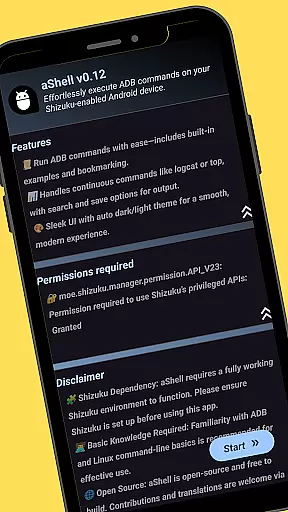
Requires Shizuku
ADB knowledge needed
Limited to tech-savvy users
No standalone use
Paid version only

Easily install aab(Android App Bundle) files on your Android device with our app
 4.80
4.80
PDF Reader - Document Viewer: Read, Manage & Organize Your Documents
3.10
eXtended Permission Manager - a small app to manage permissions and AppOps
4.50
Amateur Radio app for APRS: Track friends, exchange messages, get tactical info.
3.90
Smart and comfortable browsing experience.
3.80
Making emulation easy for everyone!
4.30
Create your own custom widget with endless possibilities
3.90
NFC Tools can read and write NFC tags.
4.70
Enhance your Beats
3.70
Change your GPS location instantly. Simulate routes anywhere in the world.
4.90
Best leveling tool for your Android device. Hang paintings like a pro.
4.90
ADB support Android 4.X-Android 13(Support wireless pair mode).No root required!
4.70
Creation, Learning, Entertainment & More — The All-in-One AI Search Engine
4.70
With videos, electrical calculators, and built-in ebook, Ugly’s has your answer.
4.50
Universal TV remote control all TVs, Roku, LG, Samsung, Fire, Vizio, Sony, TCL.
4.40
Quickly & easily calculate the spacing of handrail balusters
4.20
Screen Mirroring with sound for Samsung TV, LG TV, Sony TV, Smart TV and Browser
4.20
Introducing Smart Printer, your ultimate destination for printing solutions!
4.00
1-Click close all background apps on Android TV
3.90


User Reviews