
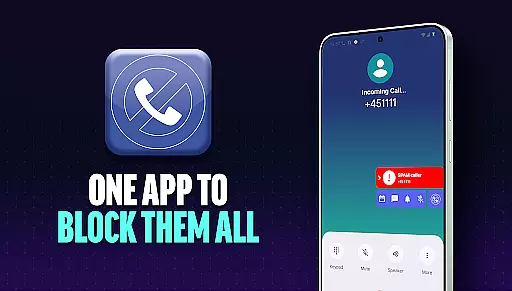
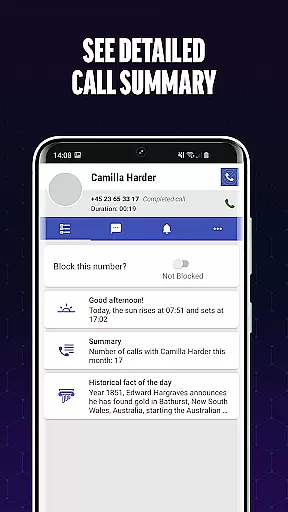
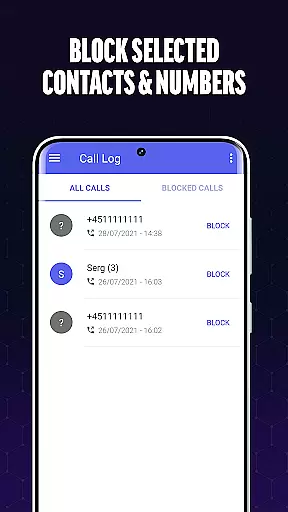
Call Blocker is a powerful communication app designed to protect users from spam calls and unwanted interruptions. The app's core functionality revolves around its advanced call filtering technology, which identifies and blocks potential spam calls in real-time. With features like Blacklist management, instant call blocking, and unknown caller identification, it provides comprehensive protection against telemarketers, fraudsters, and robocalls.
The app stands out with its user-friendly interface that allows easy management of blocked numbers while giving users complete control over their preferences. Whether you're receiving frequent scam attempts or simply want to avoid sales calls, Call Blocker offers an effective solution for both Android users who value their time and peace of mind.
Call Blocker distinguishes itself through several key features that enhance the user experience. First and foremost is its Spam Call Blocker functionality, which uses sophisticated algorithms to detect and block spam calls before they reach the user. This feature alone saves valuable time by preventing unwanted interruptions from telemarketers, surveys, and fraudulent schemes.
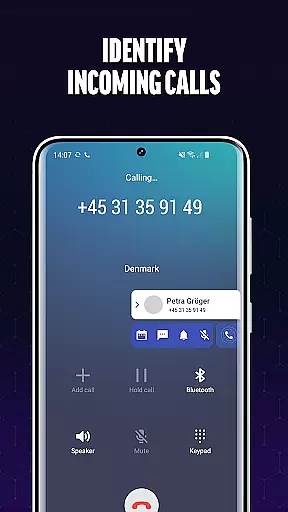
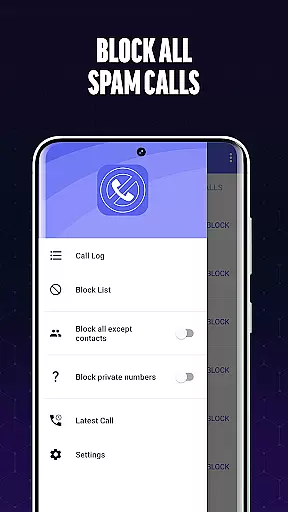
Another notable feature is the Blacklist capability, where users can manually add specific numbers or number patterns to their personal block list. This gives users granular control over who can reach them. Additionally, the app provides real-time caller identification for unknown numbers, ensuring users always know who's calling. These features work together seamlessly, creating a robust defense system against unwanted communications while maintaining ease of use.
In today's fast-paced digital environment, the speed and reliability of real-time messaging are crucial for effective communication. Call Blocker excels in this area by providing instantaneous call scanning and filtering. The app's advanced algorithms work tirelessly to identify and block spam calls the moment they come in.
The technology behind Call Blocker ensures that every incoming call is checked against an extensive database of known spam numbers. This process happens within milliseconds, allowing users to enjoy uninterrupted service without delay. The app's efficiency in handling high volumes of calls guarantees that legitimate communications always get through without any noticeable lag.
For users, this means peace of mind knowing that their phone lines are clear of unwanted interruptions. Whether at work or home, Call Blocker maintains a consistently reliable performance, ensuring that important calls are never missed due to technical delays or system inefficiencies.
While Call Blocker primarily focuses on filtering unwanted calls, it also offers essential support for media sharing functionalities. Although not its main feature, the app facilitates seamless interaction with other communication tools, allowing users to share blocked number lists or call logs via various media formats.
This capability extends the app's utility beyond simple call blocking. Users can export their blacklists or call histories and share them with friends or across devices. Such functionality is particularly useful for those looking to synchronize their call management settings across multiple smartphones or tablets.
Moreover, the app supports standard file formats, making it easy to integrate with other applications. This ensures that users can leverage Call Blocker's data in broader communication strategies, enhancing overall connectivity and information exchange. By incorporating these media sharing features, Call Blocker provides a comprehensive toolset for managing modern mobile communications effectively.
Effective spam blocking
User-friendly interface
Real-time call identification
Customizable blacklist options
Lightweight and efficient
Limited to Android platform
No automatic blocking
Manual number entry required
Occasional false positives
Basic design aesthetics

Identify unknown numbers, block spam calls, customize calls with cool themes.
 4.60
4.60
SMS Messenger ensures that communication become effortless and accessible.
3.80
Messenger app for faster and simpler SMS text messaging, and personalized themes
4.10
Chat on the Jabber network (XMPP protocol); support for SMS and other gateways
2.10
Welcome to the future of phone service.
4.60
Fast Dialer & Contact Manager with Caller ID and Spam Protection
4.00
HD Video Meeting app is a fast & unlimited video conferencing app across world.
4.30
Federated instant messaging for your mobile device (Jabber, XMPP, Snikket)
4.10
Use this SMS app standalone or as a TREK: Total Interface companion.
4.30
We’re taking the yada yada out of wireless—now we’ve taken it out of your app.
4.70
فیلتر شکن قوی پرسرعت کلید جدید برای اندرویدسریع ترین وی پی ان برای همه اپراتورها
4.70
A browser that does more than load page, like keeping your privacy safe.
4.70
Chill zone on your phone: relax with fun reels & hype shorts!
4.20
Send SMS and chat messages easily with a fast text messaging app for Android.
4.10
WazzapMigrator: transfer your WhatsApp history from iPhone to Android
4.00
Fast, Simple And Secure Application That Provides SMBv3 Server On Your Device
3.30
TeamSpeak - Secure Chat for Gaming & Business
3.10
Auto Reply SMS, Text Messaging, Away SMS Response, Busy SMS messages, Block Text
3.10
An app dedicated solely to marriage, not dating, and supported by a rigorous verification mechanism to ensure seriousness.
4.2


User Reviews