
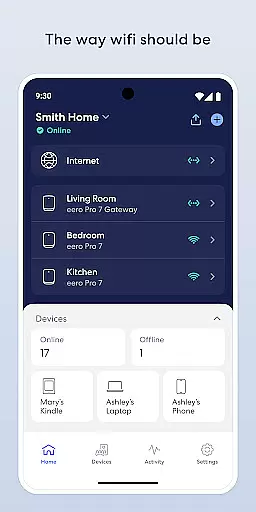
eero WiFi System is a comprehensive home networking solution designed to provide fast and reliable internet coverage throughout your entire home. The eero app allows users to easily set up and manage the eero WiFi system, ensuring optimal performance and security. With features like automatic updates, remote network management, and advanced parental controls, eero is perfect for modern households that demand uninterrupted connectivity for streaming, working, and gaming.
The system stays current with frequent software updates, bringing new features, enhanced performance, and top-notch security standards. Whether you're in the living room or the backyard, eero ensures you stay connected with its expansive network reach. Additionally, optional eero Plus subscription offers advanced security features and priority customer support, making it an ideal choice for tech-savvy users.
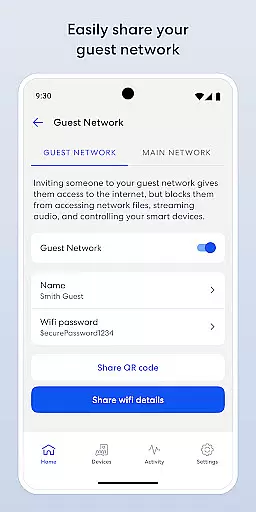
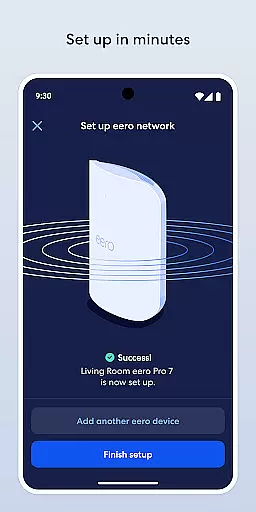
The eero app boasts an array of features that make managing your home WiFi network effortless. Setting up the system is quick and straightforward, allowing users to get online within minutes. Once operational, the app provides complete control over your network from anywhere, enabling you to view network status, add new devices, and manage guest access securely.
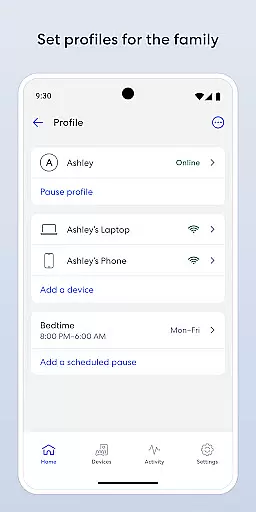
Parents will appreciate the ability to schedule or pause internet access to manage screen time effectively. For added security, you can block specific devices from accessing your network. Subscribers to eero Plus gain access to advanced security tools, including a password manager, antivirus software, and a VPN powered by Guardian. These features ensure your network remains private and secure while delivering optimal performance for all connected devices.
In today's fast-paced world, maintaining a connected and smart home is more important than ever. The eero app excels in providing comprehensive lifestyle category coverage by ensuring your home is blanketed with fast, reliable WiFi. This allows you to stream, work, and play from every corner of your home, including outdoor spaces like the backyard.
The application supports an array of features that cater to various aspects of modern living. With automatic updates, it consistently enhances performance and security, adapting to new challenges and technologies. This means your network stays current without any extra effort on your part, offering peace of mind and uninterrupted connectivity.
Moreover, the eero app empowers users to manage their home networks effortlessly. Whether it's scheduling or pausing internet access to control screen time, sharing your network securely with guests, or blocking devices from using your network, the app puts you in the driver's seat. These capabilities ensure that your home remains not only connected but also aligned with your lifestyle preferences and needs.
When it comes to setting up and managing a home WiFi system, content authenticity and expert credibility are paramount. The eero app delivers on both fronts by providing clear, accurate information and instructions that make setup a breeze, often completed within minutes. This ease of use is backed by eero's commitment to frequent software updates, ensuring that users benefit from the latest features, performance improvements, and stringent security standards.
eero doesn't stop at just offering a reliable product; it extends its expertise through excellent customer support. Users can reach out with feedback, feature requests, or thoughts on how the service can be improved, directly at support@eero.com. This open channel to experts demonstrates eerou2019s dedication to user satisfaction and continuous improvement based on genuine user experiences and insights.
Furthermore, for those seeking an elevated level of online security and parental controls, eero Plus (sold separately) offers advanced solutions. Backed by Guardian, this subscription includes a suite of tools such as a password manager, antivirus software, and a VPN. Such offerings underscore eero's position as a credible expert in creating secure, smart home environments, making certain that users' digital lives are safeguarded against emerging threats.
Fast and reliable WiFi coverage
Easy setup and management
Frequent automatic updates
Advanced parental controls
Optional eero Plus subscription
eero Plus is a paid service
Limited advanced settings for power users
Occasional connectivity issues reported
Higher cost compared to basic routers
Dependent on cloud for some features

Healthy eating timer app to track meal pace, improve habits, and eat slowly.
 4.4
4.4
Unique informative Dial with Live Moon Phase at a glance!
3.60
Unique Dark Analog style for Wear OS watches.
4.3
Immerse yourself in the serenity of lavender fields and white butterflies
4.2
My Diary - Daily Journal with lock: Diary journal app and secret diary with lock
4.80
The Miracle Box includes methods used by Steve Huff of Huff Paranormal.
3.20
AAA Mobile provides on-the-go access to the services you know and trust.
4.60
No more juggling multiple apps, now you can control everything in one place!
4.60
Just play, earn rewards, fetch gift cards, and turn gaming into real payouts!
4.80
Get roadside help, discounts, travel tools & more — AAA is with you everywhere.
4.80
Good magnifier app to see tiny things bigger and more clearly!
4.80
Kasa Smart is your portal to your TP-LINK Smart Home.
4.70
Digital smart watch face made for Wear OS.
4.70
Colorful minimal digital watch face for Wear OS
4.60
The App can control Roborock vacuum cleaners from anywhere with rich features.
4.60
Premium floor cleaning robots
4.50
Spirit Communicator is a real paranormal ghost hunting app with many fun modes.
3.90
View over 160,000 line dance stepsheets from the CopperKnob website.
3.30
Falling Fruit is a massive collaborative map of food in our cities.
3.20


User Reviews