
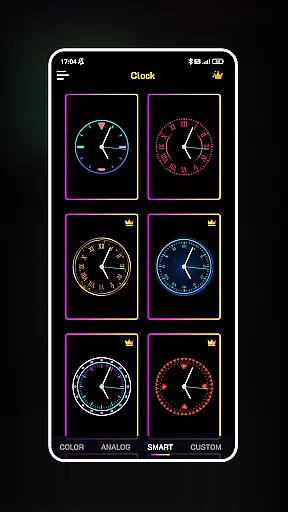
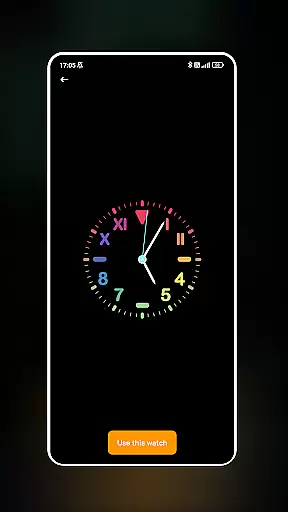
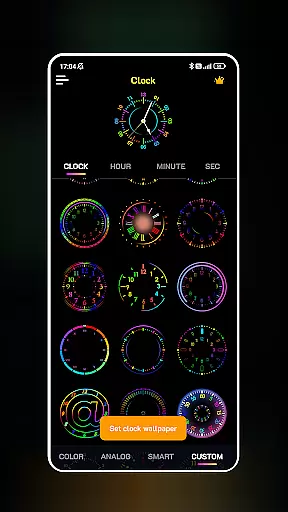
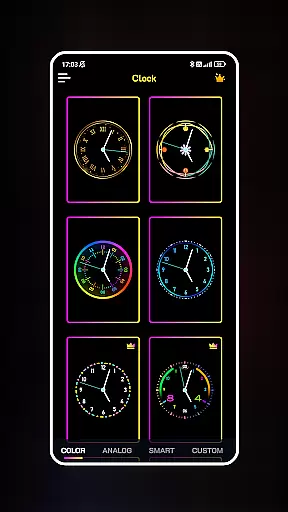
Neon Clock Wallpaper is a dynamic personalization app that allows users to design and customize unique clock wallpapers for both home screens and lock screens. The app provides diverse pre-made templates alongside creative customization options, enabling users to express their individual styles through vibrant neon effects. Whether you want a modern digital look or a colorful artistic design, this app caters to various aesthetic preferences while enhancing device personalization.
With intuitive controls, users can adjust colors, sizes, and styles, ensuring each clock is tailored to their specific tastes. This makes the app not only functional but also an engaging tool for showcasing creativity. By transforming your screen into a personalized work of art, Neon Clock Wallpaper offers both practical timekeeping and visual appeal, making it ideal for users who value aesthetics and utility in their mobile experience.
Neon Clock Wallpaper stands out with its robust feature set designed to maximize user creativity. The app includes a wide variety of pre-designed clock templates, each offering unique designs and color schemes to suit different moods and styles. Users can choose from these templates or dive into advanced customization by mixing components such as hands, numbers, and backgrounds to create entirely new clock designs.
A key highlight is the stunning neon effect feature, which adds a glowing, eye-catching touch to every clock. The ability to fine-tune elements like color shades, clock size, and style ensures that each creation is truly one-of-a-kind. Additionally, the app supports dual functionality by allowing customized clocks to be set as both wallpaper and lock screen displays. These features collectively empower users to craft visually striking screens that reflect their personality while maintaining usability.
The seamless integration of aesthetics and practicality positions Neon Clock Wallpaper as a top choice for those seeking innovative ways to personalize their devices.
Customization is at the heart of Neon Clock Wallpaper, offering users a versatile platform to express their unique style through timepieces. The app provides a rich selection of customization options that cater to various preferences and aesthetics.
With diverse clock templates ranging from classic designs to modern art-inspired visuals, users can choose a starting point that resonates with their personal taste. Beyond templates, the app allows for the creation of custom clocks by mixing and matching components, adjusting colors, sizes, and styles, ensuring that each clock is a true reflection of its creator's vision.
The inclusion of stunning neon effects adds another layer of personal expression, enabling users to craft visually striking timepieces that capture attention. These vibrant effects are not just limited to standard colors but offer a spectrum of hues to make each clock uniquely stand out.
By empowering users with extensive customization capabilities, Neon Clock Wallpaper transforms a functional necessity into an avenue for artistic expression, making it an ideal choice for those looking to personalize their digital devices with flair and originality.
Theme compatibility is a crucial aspect of any personalization app, ensuring that the created content harmonizes with the user's overall device aesthetic. Neon Clock Wallpaper excels in this area by providing seamless integration with various device themes and settings.
The app supports both wallpaper and lock screen displays, allowing users to maintain a consistent look across different device states. Whether your phone is active or locked, the customized clock remains a cohesive part of your screen's visual identity, enhancing the overall user experience.
Moreover, the app's ability to adapt to different screen sizes and resolutions ensures that the clock's appearance remains sharp and visually appealing, regardless of the device model. This adaptability extends to various Android versions, guaranteeing that users won't face compatibility issues during system updates.
By prioritizing theme compatibility, Neon Clock Wallpaper ensures that users can enjoy their personalized creations without worrying about visual disruptions or inconsistencies, making it a reliable choice for those seeking both functionality and aesthetic harmony in their device customization.
User-friendly interface
Vibrant neon effects
Customizable templates
Dual screen support
Wide design variety
Limited free options
High battery usage
Occasional glitches
Premium feature cost
Complex for beginners

Transform your phone with Launcher iOS 26 - Smooth & elegant iOS experience
 4.50
4.50
Adult video chat, dating, making friends, random matching
4.20
Gun Chase - Let the chase begin.
4.80
AI-powered Copilot. Personalized keyboard with gifs, stickers & themes
4.40
Add cute Shimeji pets to screen, interact with them and relax with cute motions
4.60
Turn your lock screen into fun with smile live wallpapers & animated wallpapers!
2.50
Try creating your own keyboard with "Keyboard theme for android" app now!
4.50
Unique Fonts, typefaces and stylish text. Fonts for Instagram, Whatsapp & others
4.20
Stylish Pink Cute Hippo keyboard with 10000+ customized keyboard themes!
4.60
Personalize your phone with stunning HD and 4K wallpapers!
4.70
Want to make your phone more special than ever?
4.60 4.50
4.50
App Icon Changer & Shortcut Creator. Customize your icons without any watermarks
4.30
Magic fluids wallpaper 4D: Relax with stunning fluid simulation wallpaper app
4.20
Run multiple accounts of the same app on a single device
4.10
Transfer your live wallpapers from Windows to Android using Wallpaper Engine!
4.00
HappyLighting is a Bluetooth lamp control software.
3.40
Struggling to find apps? Use this app to locate and open any app on your phone!
2.20
Prank your friends with realistic broken screen and cracked HD effects!
4.2


User Reviews