
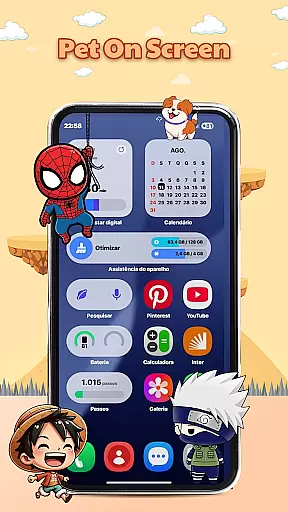
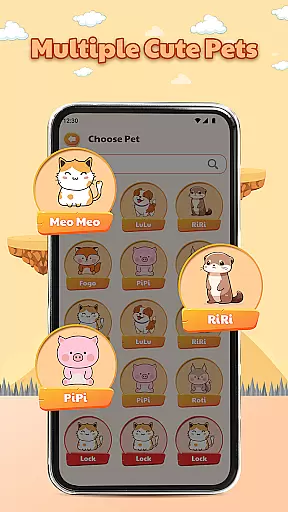
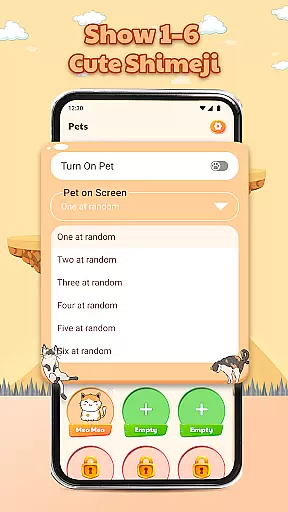
Pet On Screen - Shimeji Kawaii is a delightful personalization app that brings your phone to life with adorable animated characters. These cute, anime-style pets walk, climb, and interact on your screen, creating a lively and fun experience.
With a wide variety of charming characters to choose from, you can customize your device to match your unique style. Whether you're looking for a relaxing companion or a playful friend, this app offers endless entertainment and stress relief every time you unlock your phone.
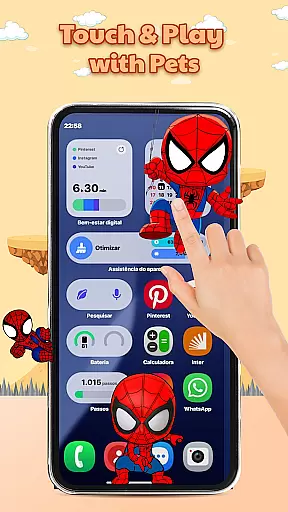
This app stands out with its collection of live mini characters that move naturally across your screen, providing an engaging user experience. Each character comes with playful interactions, allowing you to tap and hold them to see funny reactions.
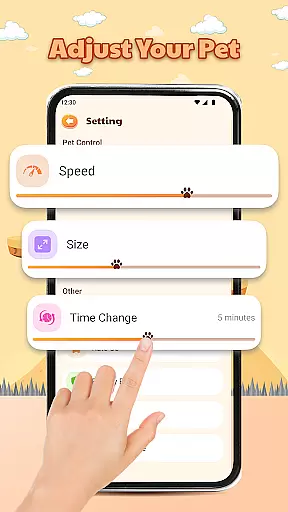
The advanced customization options let you adjust the size, speed, and timing of the characters, ensuring they fit perfectly with your preferences. With Pet On Screen - Shimeji Kawaii, you can transform your device into a personalized space full of joy and personality.
Customization is at the heart of Pet On Screen - Shimeji Kawaii, allowing users to tailor their experience with a range of adorable characters. This app offers an extensive selection of cute pets in various styles such as anime and chibi, which ensures that there's something for everyone.
The level of personalization extends beyond just choosing a character; you can also adjust their size, movement speed, and even how they interact with your screen. These customization options ensure that each useru2019s device reflects their unique style and preferences.
By tapping into the playful interactions available, users can enjoy charming reactions from their chosen pets when interacting with them on-screen. This feature adds another layer of engagement and makes every interaction feel personal and delightful.
Ultimately, this variety in customization not only enhances visual appeal but also provides a more engaging and enjoyable user experience. With these tools at hand, users are empowered to create a truly personalized environment that brings joy every time they use their device.
Pet On Screen - Shimeji Kawaii excels in theme compatibility by seamlessly integrating its lively characters across different devices and screen types. Whether you're using a smartphone or tablet, these animated companions adapt perfectly to any display size without losing quality or charm.
This adaptability means that no matter what device you own, you'll be able to enjoy consistent performance and aesthetics. The app supports high-resolution displays while maintaining smooth animations, ensuring that all interactions remain visually pleasing.
Moreover, the appu2019s design philosophy prioritizes coherence between themes and character movements. As characters climb, walk, or play on your screen, they do so in ways that complement rather than clash with existing UI elementsu2014a testament to thoughtful design considerations.
In essence, Pet On Screen - Shimeji Kawaii delivers unmatched theme compatibility through meticulous attention to detail. Users benefit from an aesthetically cohesive experience where cute animations enhance rather than disrupt their digital workspace.
Cute animated characters
Wide variety of styles
Interactive features
Customizable settings
Stress-relieving experience
May drain battery faster
Limited free options
Some features locked behind paywall
Can be distracting
Not suitable for all devices

Vertically oriented rectangular icons
 4.70
4.70
Winter's Journey: digital watch face for Galaxy Watch & Wear OS
4.80
Shimeji adds cute animated characters to your screen, lively and fun.
4.70
The definitive Icon pack maker and editor
4.30
Customize glowing edges, wallpapers, and caller screen with EdgeAura.
3.50
⭐ OneUI inspired Fluffy Icon Pack – Soft. Stylish. Standout. ⭐
4.4
Organize and manage your photos and videos effortlessly with Photo Gallery
4.20
300+ Beautifully crafted widgets inspired by OneUI.
4.60
Amazing letter fonts in your messages and social statuses
4.70
Nothing Icon pack with more than 3750+ highly crafted icons.
4.70
Stylish Pink Cute Hippo keyboard with 10000+ customized keyboard themes!
4.60
Ninja Turtles Cowabunga SE watch face for Wear OS
4.50 4.50
4.50
Themes - Widget & Wallpaper: Customize home screen, icon changer w unique themes
4.30
Romantic Kiss Stickers App. Start romantic messaging now!
4.30
Your home screen, just the way you like it.
4.30
Adult video chat, dating, making friends, random matching
4.20
Unique Fonts, typefaces and stylish text. Fonts for Instagram, Whatsapp & others
4.20
HappyLighting is a Bluetooth lamp control software.
3.40


User Reviews