
Find My App is a powerful personalization tool designed to help users efficiently manage and locate their installed applications. The app employs advanced technology to instantly identify all apps on your device, both existing and newly installed ones.
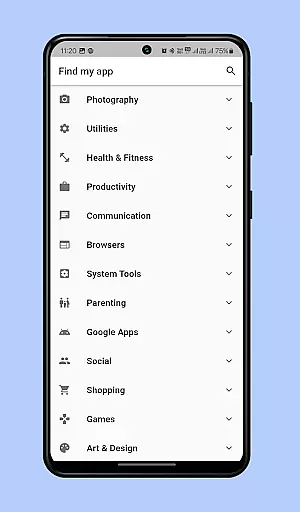
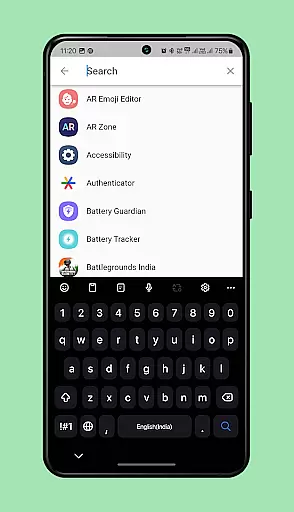
One of its key features is the smart organization system that categorizes apps into an intuitive menu. This allows users to quickly find the specific app they need without endless scrolling. Additionally, the app includes a powerful search function where you can type either the full name or part of the app's name, and Find My App will immediately locate and open it for you.
This functionality is particularly useful for users who struggle with locating apps among numerous pages of icons. With Find My App, everything is instantly accessible, saving valuable time and improving overall device navigation experience.
Find My App offers several innovative features that enhance app management on mobile devices. First, its real-time app detection system automatically scans and identifies all installed applications, creating an organized inventory of your apps.
The app's intelligent categorization feature groups similar apps together, making it easier to locate specific types of applications. For instance, all social media apps might appear in one category while productivity tools are grouped separately. This thoughtful organization saves users from tedious manual searching.
Another standout feature is the instant search capability. Users can simply type a few letters of an app's name, and the system will immediately display matching results. The app also remembers frequently used applications, learning user preferences over time to optimize search results.
Customization options in applications allow users to tailor their experience to suit their preferences and needs. Find my app offers a diverse range of customization features that enhance user interaction significantly. The application categorizes installed apps into efficient menus, streamlining the process of locating specific apps.
By organizing apps into groups based on categories, Find my app ensures that users can swiftly navigate through their collection of applications. This categorization not only simplifies access but also optimizes the phone's interface according to individual usage patterns. Users can customize the grouping criteria, making their app management experience truly personal.
Additionally, the search functionality within Find my app adds another layer of customization. Users can type part of an app's name and instantly retrieve it, eliminating the need to scroll through numerous pages. This feature showcases the appu2019s commitment to providing varied customization options that cater to different user preferences.
Theme compatibility is crucial for users who wish to maintain a consistent visual style across their devices. Find my app excels in this area by ensuring seamless integration with various themes available on your phone. This compatibility enhances the aesthetic appeal and provides a unified look and feel to the deviceu2019s interface.
The application supports multiple themes without compromising performance or usability. Whether you prefer a dark mode for reduced eye strain or vibrant themes for a lively interface, Find my app adapts effortlessly. This flexibility allows users to personalize their phone's appearance while maintaining optimal functionality.
Moreover, Find my appu2019s design considers future updates and theme additions, ensuring long-term compatibility. As new themes become available, users can integrate them without worrying about losing the appu2019s core functionalities. This forward-thinking approach underscores the appu2019s dedication to delivering a visually cohesive yet highly functional user experience.
User-friendly interface
Instant app detection
Smart categorization
Powerful search function
Time-saving solution
Limited customization options
Requires storage space
No cross-device syncing
Premium features locked
Occasional scanning delays

Ultra realistic gold analog watch face with lots of customization options.
 4.50
4.50
Customizable flower power digital watch face for Wear OS watches.
4.00
Ninja Turtles Cowabunga SE watch face for Wear OS
4.50
Prank your friends with realistic broken screen and cracked HD effects!
4.2
Transform your phone with Launcher iOS 26 - Smooth & elegant iOS experience
4.50
Art & Emoji Keyboard with Cool Fonts, Cute Themes and Custom Designs.
4.40
Crystal-clear, square icon provides a sleek and sophisticated visual upgrade
4.00
Create unique, fun emojis with Funny Emoji Maker! Unlimited creativity!
4.00
Transform your phone with stunning video wallpapers and a unique, personal touch
3.80
Enjoy a variety of amazing live wallpapers and colorful EDGE lighting borders!
4.80
350+ widgets with a premium glass-style finish, perfect for home & lock screens.
4.70
Unique Android Launcher
4.60
Want to make your phone more special than ever?
4.60
300+ Beautifully crafted widgets inspired by OneUI.
4.60
Fingerprint Lock Screen & Live Animations with 4K Wallpapers as Live Wallpaper
4.40
Ultimate widget creator. Design custom widgets for a truly unique home screen!
3.90
Design your screen with unique, vibrant clocks
3.80
HappyLighting is a Bluetooth lamp control software.
3.40
Capture moments that pass like a storm, second by second.
4.0


User Reviews