
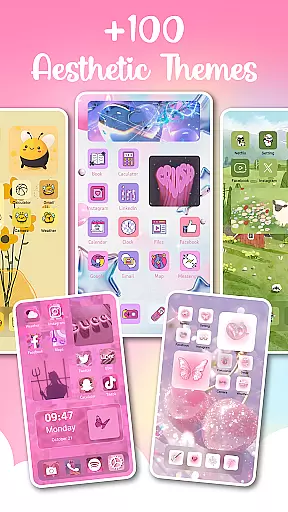
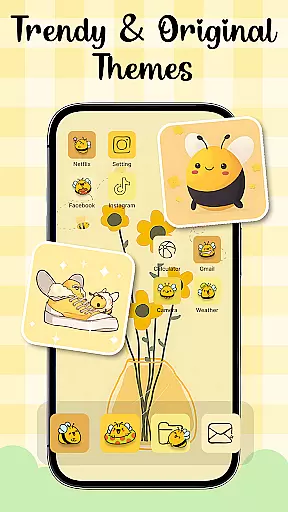
Themes - Widgets, Icon Changer is a powerful personalization app that allows users to fully customize their smartphone's appearance. The app provides an extensive collection of themes, widgets, wallpapers, and icon packs, enabling users to create a unique and personalized phone interface. Whether you're looking for anime themes, K-pop aesthetics, or minimalist designs, this app caters to all preferences.
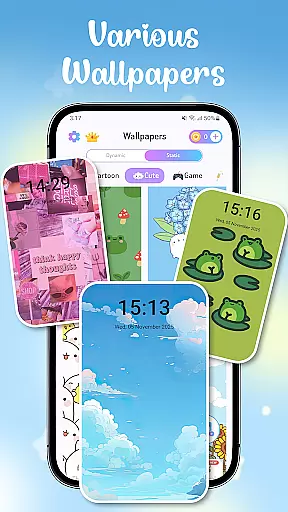
One of the standout features is its ability to transform both the lock screen and home screen with just a few taps. Users can choose from hundreds of stylish widgets and countless wallpapers, including daily refreshed options. The app also offers specialized icon packs for popular social media apps, making it easy to achieve complete design consistency across your device.
This application is particularly valuable for users who want to express their individuality through their phone's appearance. With regular updates and new content additions, Themes - Widgets, Icon Changer ensures your device always has fresh customization options while maintaining optimal performance and user experience.
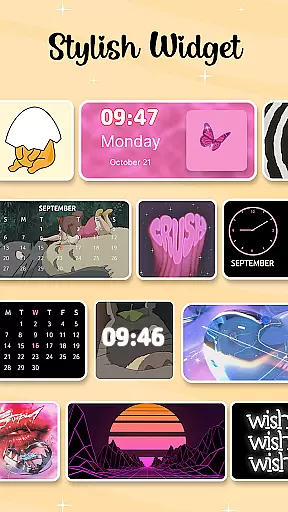
The app boasts an impressive array of features designed to maximize customization possibilities. It includes over 100 customizable widgets that can completely transform your traditional screen appearance. These widgets are not only functional but also serve as decorative elements that showcase your personal style. Users can create unique widget combinations by selecting from various themes and wallpapers.
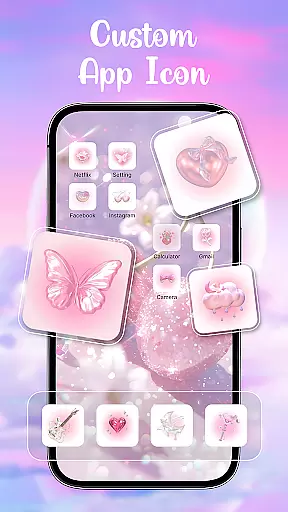
Another remarkable feature is the comprehensive icon changer functionality. The app provides numerous icon packs that work seamlessly with popular applications like Facebook, WhatsApp, and Instagram. This allows users to maintain design consistency across their entire interface. Additionally, the one-click wallpaper replacement system makes it effortless to change your device's appearance daily, with categories ranging from aesthetic wallpapers to holiday-themed options.
The app's strength lies in its thoughtful integration of accessibility features and foreground services. These technical implementations ensure smooth performance while maintaining user privacy. The Control Center overlay, for instance, provides quick access to essential functions without compromising security or collecting personal data, demonstrating the developer's commitment to both functionality and privacy protection.
Customization is at the heart of Themes - Widgets, Icon Changer, allowing users to transform their phone's interface into a personalized space that reflects their unique style. The app offers an extensive array of customization options including trendy themes such as anime, cute, aesthetic, and Kpop themes, which cater to diverse tastes and preferences.
With over 100 widgets available, users can break away from traditional screen appearances and enjoy a fresh look every day. These stylish and custom widgets not only enhance visual appeal but also provide functional benefits by offering quick access to frequently used features. Users have the freedom to select images from their gallery and apply them to widgets, showcasing their creativity in designing a truly individualized home screen.
The app goes beyond just thematic changes; it allows for intricate personalizations like mixing and matching themes with wallpapers and app icons. This level of detail extends to social media icons for platforms like Facebook, Whatsapp, Messenger, Instagram, among others, ensuring that every element on the screen aligns with the user's desired aesthetic.
By providing these varied customization options, Themes - Widgets, Icon Changer empowers users to express themselves through their smartphones while enjoying an intuitive interface that makes personalizing both fun and effortless.
Theme compatibility is crucial when personalizing a device, and Themes - Widgets, Icon Changer excels in this area by ensuring seamless integration across various elements of smartphone aesthetics. The app provides exquisitely designed wallpapers and icon packs that are fully compatible with the themes offered, creating a cohesive look throughout the deviceu2019s interface.
Users will find that all componentsu2014whether it be lock screens, widgets, or wallpapersu2014work together harmoniously without any disruptions in design language or functionality. This compatibility ensures that whether you choose minimalist designs or vibrant art styles, each piece complements the other perfectly.
In addition to visual consistency, the app supports easy updates and replacements so users can refresh their devices daily if they wish. With one-click replacement options, maintaining a current and stylish appearance has never been easier. Whether opting for anime wallpapers, holiday themes, or aesthetic enhancements, everything syncs effortlessly within the app ecosystem.
This dedication to theme compatibility means users enjoy not only visually stunning results but also reliable performance as they personalize their devices according to their ever-changing moods and preferences.
User-friendly interface
Extensive customization options
Regular content updates
Privacy-conscious design
Versatile widget library
Requires multiple permissions
Premium themes cost extra
May affect device performance
Some features are complex
Limited free options

Customizable flower power digital watch face for Wear OS watches.
 4.00
4.00
Interactive Miniature Painting Catalogue
3.30
Ultimate widget creator. Design custom widgets for a truly unique home screen!
3.90
Adorable pets roam and play right on your phone screen!
3.30
300+ Beautifully crafted widgets inspired by OneUI.
4.60
Enjoy a variety of amazing live wallpapers and colorful EDGE lighting borders!
4.80
Emoji Maker app - Design custom emojis and effortlessly blend them with Mixer
3.80
Fast SMS & group chat - use GIFs and emojis from your home screen launcher.
4.50
Transform your phone with stylish zipper lock themes and 4D live wallpaper
4.10
Wallpaper HD 4K Live - Thousands of high-quality Anime backgrounds for you.
4.80
Vertically oriented rectangular icons
4.70
Glass style colourful icons with a One UI look and feel
4.60
A retro cartoon style watch face and a punch right in the face of the copyright
4.60
Stylish Pink Cute Hippo keyboard with 10000+ customized keyboard themes!
4.60
Transform your device in a game console
4.40
App Icon Changer & Shortcut Creator. Customize your icons without any watermarks
4.30
Transfer your live wallpapers from Windows to Android using Wallpaper Engine!
4.00
Transform your phone with stunning video wallpapers and a unique, personal touch
3.80
Turn your lock screen into fun with smile live wallpapers & animated wallpapers!
2.50


User Reviews