
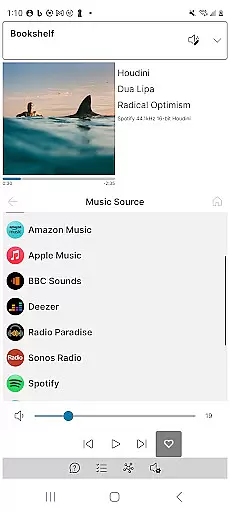
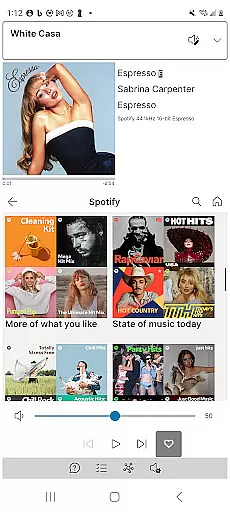
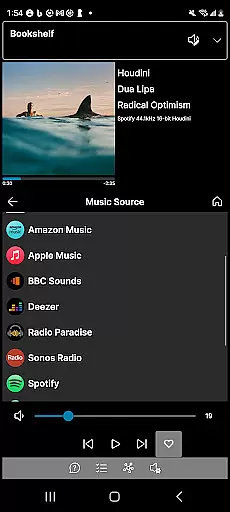
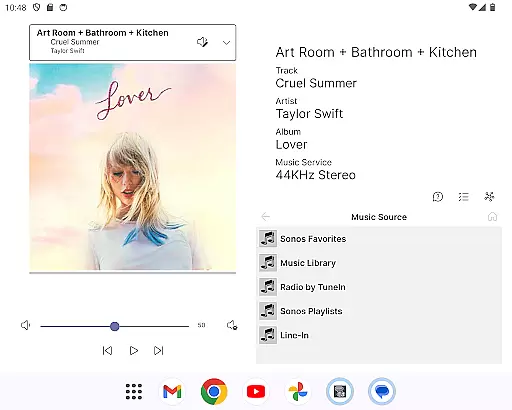
Phonos Ultimate is a powerful and reliable app designed specifically for controlling your whole-home Sonos music system. With a focus on performance and stability, this application offers all the essential features you need to manage your Sonos devices efficiently. It supports over a hundred music services, local libraries, line-in, and custom station URLs, ensuring that you have access to a vast array of audio content.
In addition to standard controls like play, pause, next, previous, shuffle, repeat, like, and unlike, Phonos Ultimate provides advanced functionalities such as unique device views, track streaming data, and EQ settings editing. Whether you're managing individual speakers or groups, adjusting volumes, or organizing playlists, this app delivers an intuitive and seamless experience tailored for both casual listeners and audiophiles alike.
Phonos Ultimate stands out with its comprehensive feature set tailored for Sonos users. The app allows you to see all your devices, rooms, groups, and music sources in one place, making it easy to navigate and control your entire Sonos ecosystem. You can save your music queue as a Sonos playlist, play and shuffle playlists directly, and edit groups effortlessly.
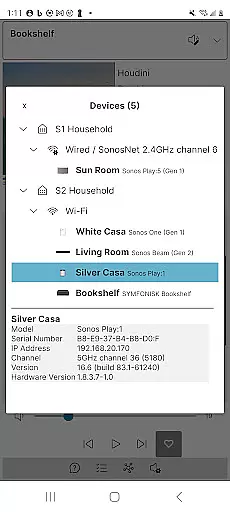
One of the standout features is the Unique Devices View, which shows exactly how your devices are connected, providing insights into your system's architecture. Additionally, the app displays track streaming data including sample rate and bit depth, enhancing your understanding of audio quality. By not using the Sonos cloud API, Phonos Ultimate ensures speed and reliability, supporting S1, S2, and multiple systems simultaneously without interruptions.
Phonos Ultimate offers an extensive music library that supports over a hundred music services, similar to what Sonos provides. This vast selection ensures users have access to a wide range of music genres and artists.
In addition to streaming services, the app allows for the integration of local libraries, line-in connections, and custom station URLs. This feature not only broadens the music sources but also guarantees that all content is legally accessible, respecting copyright laws.
The ability to save queues as Sonos Playlists and manage these playlists directly within the app enhances user experience by providing personalized music curation options.
By supporting various music sources without using the Sonos cloud API, Phonos Ultimate ensures speed and reliability in music playback, offering users uninterrupted access to their favorite tunes.
One of the standout features of Phonos Ultimate is its capability to display track streaming data, including sample rate and bit depth, which requires S2. This transparency allows audiophiles to enjoy high-fidelity sound with detailed audio information.
The app supports every Sonos device except Ace headphones, ensuring that whether you're listening through speakers or other devices, the audio quality remains consistently high.
Users can adjust EQ settings directly within the app, tailoring the sound output to their preferences. This level of customization empowers users to optimize their listening experience according to different music genres or personal taste.
Furthermore, the app's support for direct streaming URLs as custom radio stations adds another layer of audio quality control, enabling users to fine-tune their music sources for optimal performance.
User-friendly interface
Comprehensive feature set
High reliability and performance
Supports multiple Sonos systems
No ads or unwanted updates
Not officially endorsed by Sonos
Limited to existing Sonos setups
Requires official app for initial setup
Some advanced features need S2
No support for Ace headphones

SqueezePlayer turns your Android phone or tablet into a SqueezeBox on its own!
 4.60
4.60
Performance-Synthesizer & Multi-Track-Sequencer, polyphonic + multi timbral!
4.70
Permanently backup Now Playing. Maps, filters & listening stats.
4.00
Bass Booster Pro takes auto-equalizing to the next level!
4.30
AI Music Maker: Generate And Compose AI Tunes & AI Songs & AI Music & AI Melody!
4.60
Music, News & Sports Radio Tuner App. Tune in Live FM & AM Radio Stations.
4.80
Learn and play 2M+ music tabs & chords on guitar, ukulele, bass, and more
4.30
A complete sound package for the sound engineer or enthusiast
4.60
Sing, record, and create music together — enhanced by smart voice tools.
4.00
Full-featured, High-Quality Groovebox Workstation, perfect for Live Performance!
4.80
Gorgeous UI, Powerful music Search and Equalizer, the great choice for you!
4.70
Over 100 million tracks available for high quality streaming and download
4.60
Taal player that lets you sing any Indian & Western song with Tabla & Tanpura
4.60
Help you quickly get started with Shokz headphones
4.40
Your HD audio recorder on the go for music, meetings, ambience, animal sounds…
4.30
The alternative folder based music player.
4.20
The official Sonos app
4.10
USB audio recording and playback finally possible on Android 3.1 or higher!
3.90
The Skullcandy App Experience
3.20


User Reviews