


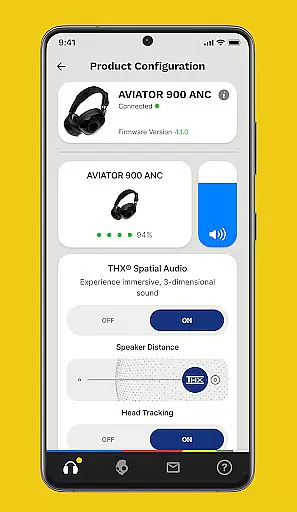


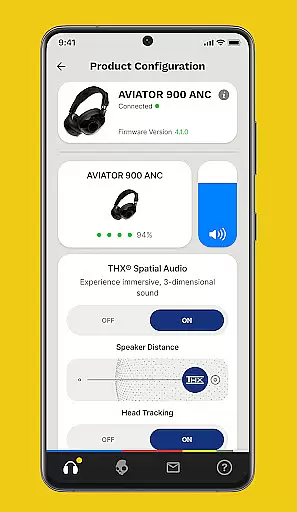


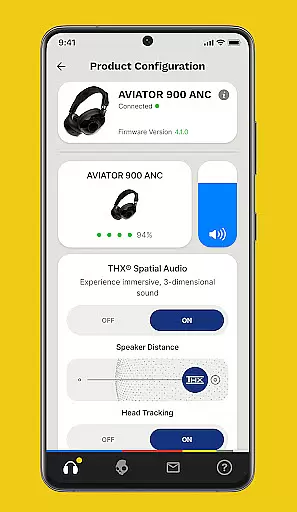
Skullcandy is a feature-rich audio customization app designed to elevate your listening experience. The app allows users to personalize sound profiles based on their unique hearing, providing an unparalleled audio experience. With advanced equalizer settings and hearing modes, Skullcandy ensures optimal performance in any environment.
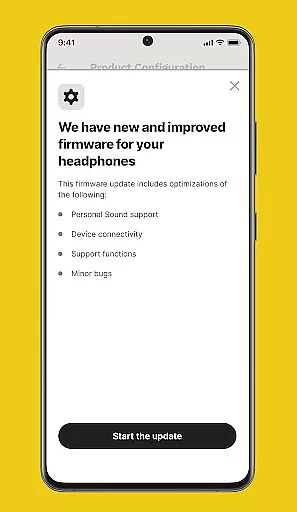
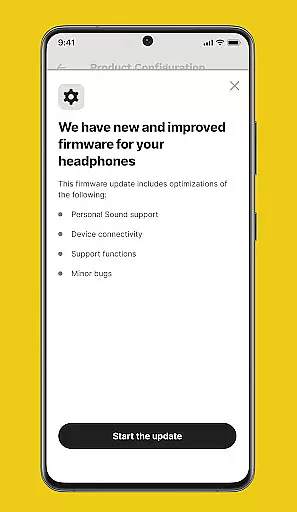
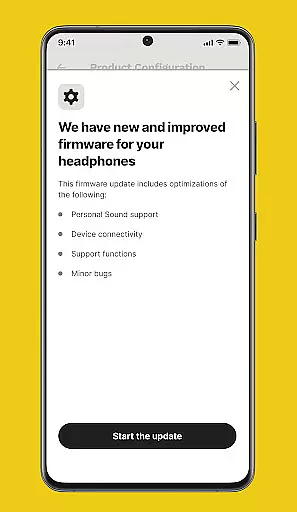
In addition to personalization features, the app offers seamless firmware updates for compatible Skullcandy products. Users can access detailed user guides and receive timely upgrade notifications, ensuring their devices always deliver top-notch audio quality. Whether you're a music enthusiast or a casual listener, Skullcandy provides the tools to make every listening session exceptional.
The Skullcandy app stands out with its comprehensive suite of audio control features. At its core is the Personal Sound feature, which creates a customized sound profile through a simple hearing assessment. This ensures users experience music exactly as it was intended, tailored to their specific hearing capabilities.
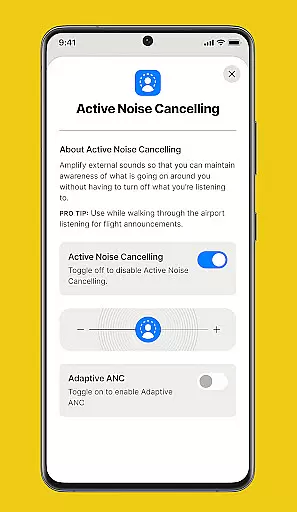
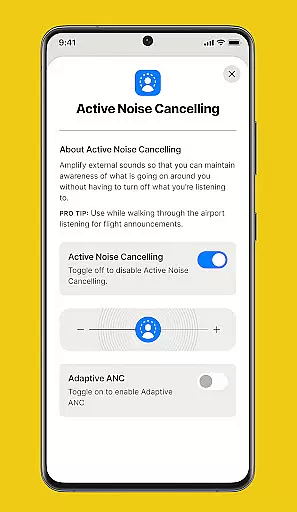
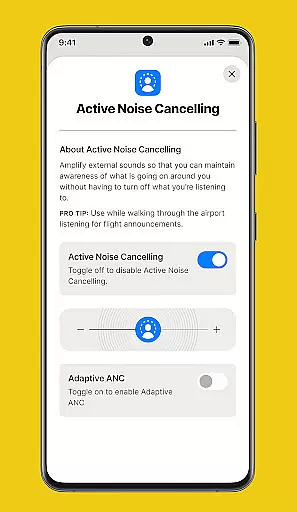
Beyond personalization, the app includes advanced Equalizers & Hearing Modes that adapt to different noise environments and listening preferences. These settings can be easily toggled on or off depending on the situation. Furthermore, Skullcandy provides regular firmware updates directly through the app, keeping devices up-to-date with the latest improvements and features from Skullcandy's engineering team.
Skullcandy app offers a unique audio experience by allowing users to customize their sound settings, but it doesn't manage a traditional music library. Instead, it focuses on personalizing the audio experience through features like Personal Sound, which creates a unique hearing profile for each user.
The app provides various equalizer settings and hearing modes that can be adjusted according to the user's environment and preferences, ensuring an authentic and customized listening session. These features guarantee that the sound output is tailored to individual needs, enhancing the perception of music's richness and depth.
While Skullcandy does not directly deal with music copyright, it ensures that all firmware updates and feature enhancements comply with legal standards, safeguarding users against any potential copyright infringement issues. This commitment to compliance adds another layer of authenticity to the overall user experience.
By focusing on personalized audio profiles and customizable settings, Skullcandy app delivers a high-quality, secure listening experience that respects both user preferences and intellectual property rights, making it a reliable choice for discerning music enthusiasts.
One of the standout features of the Skullcandy app is its ability to enhance audio quality through advanced settings and equalizers. Users can adjust these settings to match their listening environment, whether they're at home, in the office, or on the go, ensuring optimal sound quality at all times.
The app includes different hearing modes designed to adapt to various noise conditions, providing clear and crisp audio regardless of external factors. This flexibility allows users to enjoy high-quality sound without being constrained by their surroundings, making every listening session enjoyable and immersive.
In addition to customizable equalizer settings, Skullcandy app also supports firmware updates for certain products. These updates often include improvements to audio processing algorithms, further enhancing sound clarity and fidelity over time.
Overall, Skullcandy app empowers users with numerous options to fine-tune their audio experience, delivering superior sound quality that meets individual preferences and adapts to diverse listening scenarios, setting a new standard in personal audio customization.
Customizable sound profiles
Regular firmware updates
User-friendly interface
Detailed user guides
Push notification support
Limited device compatibility
Occasional connectivity issues
Firmware update required
No offline functionality
Basic design aesthetics

Formerly known as Spotistats! View your top tracks, artists, albums and more!
 4.40
4.40
Gorgeous UI, Powerful music Search and Equalizer, the great choice for you!
4.70
Walkout Song DJ is the most intuitive app to manage your sports music.
4.70
The ultimate media player for Android devices
3.90
Guzheng Master supports many playing techniques as an acoustic Guzheng
4.50
Voice recorder - Audio recorder. Best recorder for recording
4.90
Smart piano keyboard, Classical to Pop, Real-time multiplayer connection!
4.20
Listen to offline music and sounds from all categories
4.70
Be a true music maker: create beats, mix and make music like a real DJ!
4.30
Brian Eno and Peter Chilvers’ acclaimed music app Bloom, radically reinvented.
4.80
Simple & Intuitive Metronome
4.70
Taal player that lets you sing any Indian & Western song with Tabla & Tanpura
4.60
Offline Music Player&MP3 Player with themes, equalizer, lyrics, music play mode
4.60
DJ Music Mixer - DJ Remix: remix songs, make beat music & record mix of DJ.
4.40
Full featured mp3 and audio player with Chromecast and Android Auto support.
4.40
Permanently backup Now Playing. Maps, filters & listening stats.
4.00
USB audio recording and playback finally possible on Android 3.1 or higher!
3.90
The iconic iOS metronome app is now on Android.
3.70
Remove ads permanently from Music Visualizer
4.3


User Reviews