
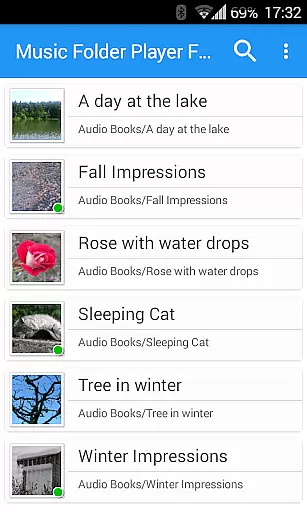
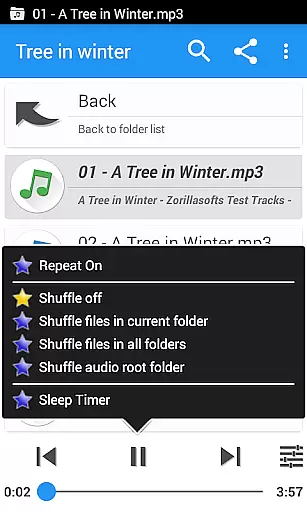
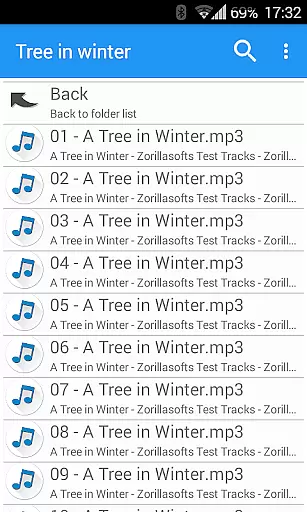
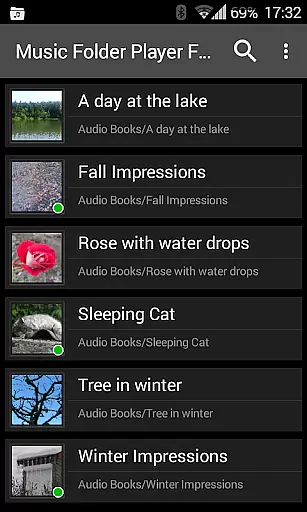
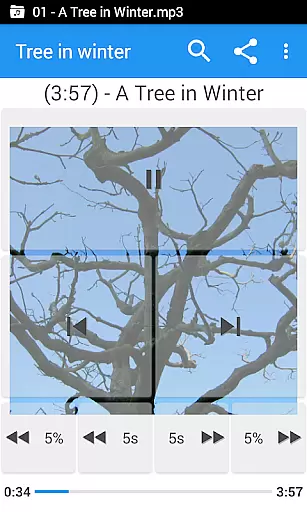
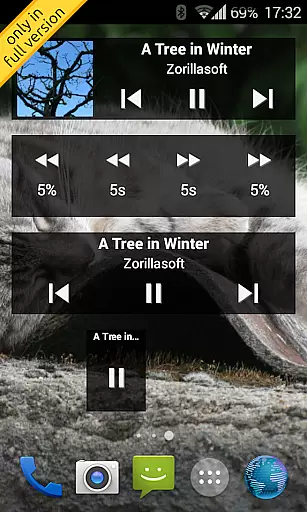
Music Folder Player Full is a specialized audio player designed for users who prefer organizing their music files in folders rather than traditional categories like artist or album. This full version offers an ad-free experience with additional features such as homescreen widgets.
The app provides both simple list view for smaller collections and hierarchical folder view for larger libraries. It supports advanced functionalities including equalizer presets, virtual room effects, speed control with pitch correction, and 432 Hz playback mode. These features make it particularly suitable for audiobooks, podcasts, and customized listening experiences.
With its unique combination of file management capabilities and audio enhancement tools, Music Folder Player Full caters to users seeking both organization and high-quality sound reproduction in their music player.
Music Folder Player Full stands out with its comprehensive feature set tailored for diverse listening needs. The app's Material Design interface includes three customizable homescreen widgets exclusive to the full version, providing quick access to key functions.
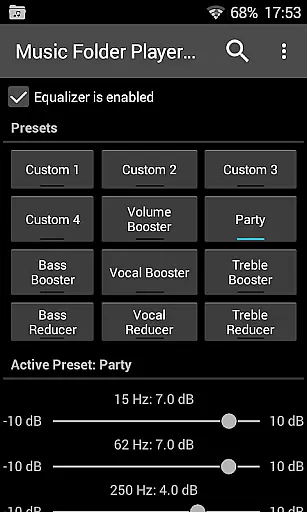
Advanced playback features include four configurable seek buttons ideal for navigating long audio files, multiple equalizer settings with specialized presets, and speed control with pitch correction for optimal podcast and audiobook playback. The app also offers innovative options like 432 Hz playback mode and virtual room/reverb effects.
Additional functionality includes resume capability across folders, two-finger gesture volume control, undo function for accidental actions, and integration with external services like Last.fm scrobbling. These features collectively create a versatile audio playback solution.
Music Folder Player Full offers an extensive music library management system that allows users to organize their audio tracks in folders rather than relying on traditional artist, album, or playlist classifications. This unique approach caters to those who prefer a more personalized and folder-centric organization of their music collection.
The app supports a wide variety of audio formats, ensuring that your entire music library is accessible regardless of the source. With the ability to display folders as a 'flat' list for smaller collections or as a hierarchical file manager structure for larger ones, users can easily navigate through their music archives with ease.
Regarding copyright authenticity, Music Folder Player Full respects the intellectual property rights of artists and creators. It does not provide or distribute music but instead focuses on giving users advanced tools to manage and enjoy their legally acquired audio files. The app ensures that all features, including playback, equalizer settings, and speed control, are designed to enhance the listening experience of your personal and authentic music collection.
One of the standout features of Music Folder Player Full is its robust set of audio quality options. The app includes an advanced equalizer with four customizable settings and eight predefined options such as Bass Booster, Vocal Booster, and Party setting. These allow users to fine-tune their listening experience according to their preferences and audio equipment capabilities.
In addition to the equalizer, the app provides virtual room and reverb effects, which add depth and richness to the sound, making it feel like you're listening in different environments. For audiobooks and podcasts, the speed control feature with pitch correction enables users to increase or decrease playback speed without affecting the audio quality, ensuring clarity and comprehension.
For tracks recorded at low levels, the pre-amplifier function boosts volume while maintaining sound integrity. Furthermore, the 432 Hz playback mode offers an alternative tuning standard believed by some to provide a more natural and harmonic listening experience. All these features combined ensure that users have unparalleled control over their audio quality, allowing them to tailor every aspect of their music enjoyment to their exact specifications.
User-friendly folder organization
Advanced equalizer settings
Speed control with pitch correction
Customizable homescreen widgets
Comprehensive playback options
Lacks basic streaming services
Complex for casual listeners
Requires Android 2.3+
No built-in music store
Separate free version available

DJ Music Mixer - DJ Remix: remix songs, make beat music & record mix of DJ.
 4.40
4.40
JBL PartyBox APP works with 110/310/710/120/320/520/Encore/Encore 2/Encore Ess 2
4.80
Save hundreds of dollars for a physical strobe tuner and instead use this app.
4.50
Simple & Intuitive Metronome
4.70
Network/Cloud Streaming, Visualization, Graphic Equalizer and Sound Effects.
4.20
Record, Mix & Master with all n-Track effects, 64-bit audio and Stem Separation.
4.70
Sheet music reader, piano & music note player. Play music score & learn to read.
3.90
Versatile MP3 recorder with auto-backup to Dropbox and Google Drive
4.10
Ringtone Maker is free app create ringtone from music files or your recording.
4.40
Voice recorder - Audio recorder. Best recorder for recording
4.90
Pay Once, no monthly payment
4.60
AI Music Maker: Generate And Compose AI Tunes & AI Songs & AI Music & AI Melody!
4.60
Enhance the sound quality of your devices, listen to what you want
4.50
Help you quickly get started with Shokz headphones
4.40
Full featured mp3 and audio player with Chromecast and Android Auto support.
4.40
Your HD audio recorder on the go for music, meetings, ambience, animal sounds…
4.30
Smart piano keyboard, Classical to Pop, Real-time multiplayer connection!
4.20
Turn your Android phone into a professional audio analyser with up to 120 bands.
4.00
Offline Tunes, Unlimited Vibes
3.90


User Reviews