
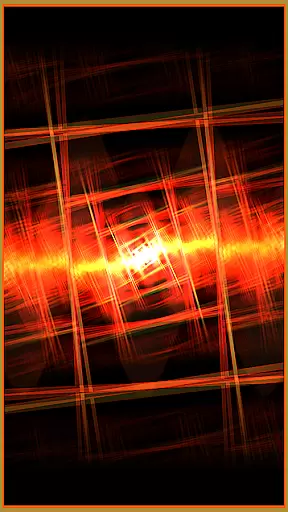



projectM Music Visualizer TV is a cutting-edge music visualization application designed specifically for Android TV. It offers the smoothest graphics and an extensive library of presets, making it highly responsive to music. The app allows users to visualize any sound playing on their Android TV, whether it's from Pandora, Spotify, or other music players. With seamless integration, you can control playback directly within projectM, eliminating the need to switch between apps. This modern take on MilkDrop utilizes advanced technologies while maintaining compatibility with MilkDrop (.milk) presets, providing an unparalleled audio-visual experience.
The visualizer supports over 200 unique effects and delivers stunning 60 FPS Pixel Shaded Rendering. Users can customize their experience by adjusting settings such as texture size and mesh size to optimize performance or enhance quality. Whether you're looking to elevate your listening sessions or create an immersive environment, projectM Music Visualizer TV brings professional-grade visuals to your living room.
projectM Music Visualizer TV stands out with its comprehensive feature set tailored for audiophiles and visual enthusiasts alike. The app boasts over 200 meticulously crafted visual effects that transform your music into mesmerizing art. With support for 60 FPS Pixel Shaded Rendering, every frame is rendered in exquisite detail, ensuring buttery-smooth animations that sync perfectly with your tracks.
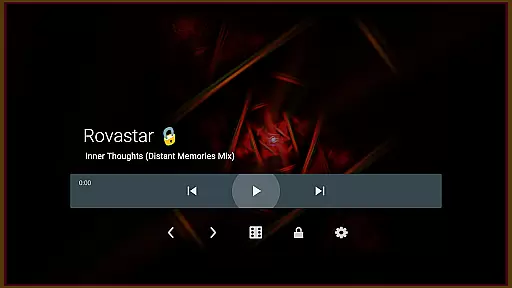
One of the key highlights is its ability to control various music players like Stock Player, Google Music, Spotify, Pandora, and PowerAMP directly from the app interface. This seamless integration enhances user convenience by allowing play/pause and track skipping without leaving the visualizer. Additionally, configurable graphics settings let users fine-tune parameters such as texture size and mesh size, enabling them to balance between visual fidelity and system performance based on their device capabilities.
projectM Music Visualizer TV offers an extensive library of over 200 visual effects, ensuring a rich and diverse audio-visual experience. These presets are not only numerous but also varied, providing users with a wide array of visual styles to choose from.
The application is compatible with MilkDrop (.milk) presets, which speaks to its commitment to authenticity and respect for copyright. This compatibility ensures that the visual content is legitimate and respects the original creators' rights, offering peace of mind to users who value genuine digital content.
By supporting third-party presets, projectM encourages community contributions and creativity, enhancing the overall user experience. This feature allows users to explore new visuals and enjoy a personalized music visualization journey.
One of the standout features of projectM Music Visualizer TV is its ability to render visuals at 60 FPS with pixel-shaded graphics. This high frame rate ensures smooth animations and responsive visualizations that sync perfectly with the music, providing an immersive experience.
Users can adjust the texture size under settings to balance between quality and performance. This flexibility allows individuals to tailor their experience based on their device's capabilities or personal preferences, whether they prioritize graphical fidelity or smoother performance.
In addition to texture adjustments, configuring mesh size can further refine the visual output. These customizable options ensure that every user can achieve optimal audio-visual quality tailored specifically for their Android TV setup.
Smoothest graphics
Extensive preset library
Seamless music control
Highly customizable
Modern technology
Requires powerful hardware
Limited mobile support
Premium pricing
Complex settings
Occasional bugs

Your HD audio recorder on the go for music, meetings, ambience, animal sounds…
 4.30
4.30
Tune in to the greatest hits on UK Radio | The home of Capital, Smooth & Heart.
4.90
Pay Once, no monthly payment
4.60
Control your MIDI USB or Bluetooth devices in app and avoid some trampling
3.30
Record, Mix & Master with all n-Track effects, 64-bit audio and Stem Separation.
4.70
A sleek, no-frills player designed for true music lovers.
4.20
Responsive piano with great sounds, graphics, and songs
4.80
Offline Tunes, Unlimited Vibes
3.90
Get alarms that fit your lifestyle and wake up to the sounds you love.
4.80 4.70
4.70
Performance-Synthesizer & Multi-Track-Sequencer, polyphonic + multi timbral!
4.70
Most Advanced AI Song Generator and Music Creator. Rap, Pop, Rock, Gospel & more
4.70
Reverse your voice & songs instantly! Fun singing challenge with cool effects.
4.60
Guzheng Master supports many playing techniques as an acoustic Guzheng
4.50
Turn your phone into a musical instrument from the future!
3.90
The only true audiophile music player with Hi-Fi audio rendering and DSP engine
3.90
Learn to play the piano using falling notes!
3.80
Slow music down without changing pitch.
3.70
Remove ads permanently from Music Visualizer
4.5


User Reviews