
Vivid Navigation Gestures is a powerful tool that revolutionizes the way you interact with your Android device. This app allows users to control their devices through intuitive gestures instead of traditional button presses, offering a more modern and fluid user experience.
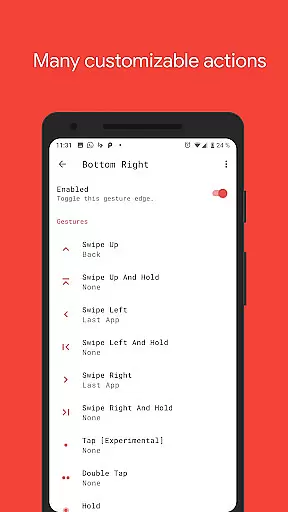
With features like beautiful visual effects during gesture execution and multiple trigger points across the screen, it provides an immersive navigation experience. The app supports various gestures such as swipes, holds, taps, and double taps, each customizable to perform different actions like launching apps, controlling media, or managing system settings.
Ideal for users looking to maximize productivity and streamline their device interaction, Vivid Navigation Gestures offers a glimpse into the future of smartphone navigation without needing to upgrade hardware or wait for system updates.
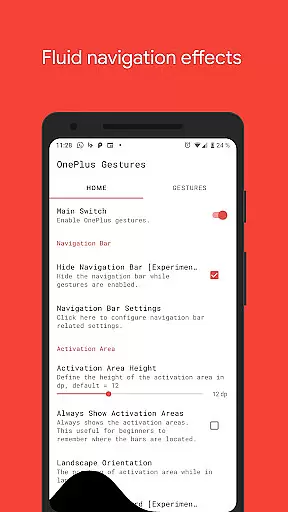
Vivid Navigation Gestures stands out with its comprehensive set of features designed to enhance user interaction. The app includes fluid visual effects that accompany each gesture, making navigation not only functional but also visually appealing.
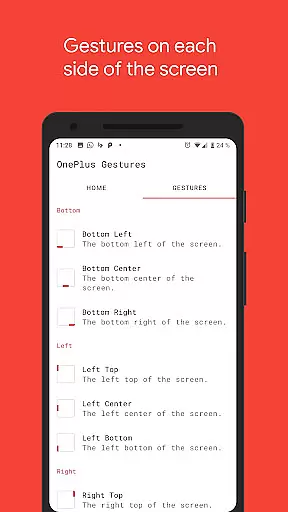
Users can choose from multiple gesture triggers located at different screen positions - bottom, left, right, and corners. Each trigger point can be customized to execute specific actions ranging from basic navigation commands like Back and Home to more advanced functions such as launching apps, toggling settings, or even taking screenshots.
The app leverages accessibility services to programmatically execute actions like Back, Home, or Quick Settings without collecting any personal data. Additionally, for devices with ADB or Root access, users can hide the stock navigation bar entirely, creating a truly immersive full-screen experience.
Gestures are revolutionizing the way we interact with our devices, and Vivid Navigation Gestures brings this innovation to your fingertips. The app's core functionality lies in its ability to replace traditional button presses with intuitive gestures, allowing for seamless device control.
With multiple gesture triggers spread across different screen areas, users can execute a wide range of actions such as launching Google Assistant, navigating back, accessing the home screen, or even taking screenshots. Each gesture is precisely mapped to ensure accurate execution every time, making device interaction faster and more efficient.
The effectiveness of Vivid Navigation Gestures is further enhanced by fluid visual effects that provide real-time feedback during each gesture. This not only makes the experience visually appealing but also helps users confirm their actions without any guesswork.
By combining precision engineering with user-centric design, Vivid Navigation Gestures delivers a reliable tool that transforms how you engage with your Android device, offering an experience that feels both futuristic and natural.
A truly effective tool should not only be powerful but also easy to use, and Vivid Navigation Gestures excels in delivering an intuitive interface. The app simplifies navigation by replacing complex button combinations with straightforward swipe motions and taps, reducing the learning curve significantly.
Users can access a comprehensive list of available gestures and corresponding actions within the appu2019s settings, ensuring clarity at every step. Whether itu2019s swiping up to go home or double-tapping to open notifications, each action is designed to feel instinctive and effortless.
In addition to its simple setup process, Vivid Navigation Gestures offers customization options that let users tailor the system according to their preferences. From assigning specific actions to unique gestures to adjusting sensitivity levels, the app ensures that everyone can create an interaction model that suits them best.
By prioritizing ease of use without compromising on functionality, Vivid Navigation Gestures provides an interface that is both approachable for beginners and robust enough for advanced users seeking greater control over their devices.
Intuitive gesture controls
Customizable trigger points
Extensive action options
Beautiful visual effects
Accessibility service integration
Requires ADB or Root for full functionality
Complex setup process
Limited to Android devices
Potential learning curve
No iOS support

Just one-tap to easy translate in any language after calls within seconds.
 4.20
4.20
App that Recover your pictures, videos or files after you delete them.
4.20
Best leveling tool for your Android device. Hang paintings like a pro.
4.90
View detailed information about your Nissan Leaf the dealer never shows you.
4.10
With videos, electrical calculators, and built-in ebook, Ugly’s has your answer.
4.50
Planner and Tracker for Stardew Valley
4.60
Screen Mirroring with sound for Samsung TV, LG TV, Sony TV, Smart TV and Browser
4.20
NFC Tools can read and write NFC tags.
4.70
Protect your device with antivirus, storage cleanup, and system monitoring
4.70
HD Video player and downloader for all formats, fast & smooth 4K video playback.
4.60
Screen Mirroring for Roku Sticks, Roku TCL TV and Roku Hisense TV
4.50
Use your phone as a webcam on your computer over WiFi or USB.
4.40
Universal TV remote control all TVs, Roku, LG, Samsung, Fire, Vizio, Sony, TCL.
4.40
PC precision for mobile gaming: dominate with keyboard and mouse!
4.30
Signal Strength, Mobile, Wifi, Speed Test, Bad Signals, Cellular, 5G, LTE, 4G
4.20
Introducing Smart Printer, your ultimate destination for printing solutions!
4.00
Create your own live wallpaper or check out thousands already made presets
3.90
Transfer Files, APK from Phone to Watch & Install.
4.3
Unlock your Essential Key. Create custom shortcuts to your favorite apps!
4.3


User Reviews